What Counts as an Approach for IFR Currency?
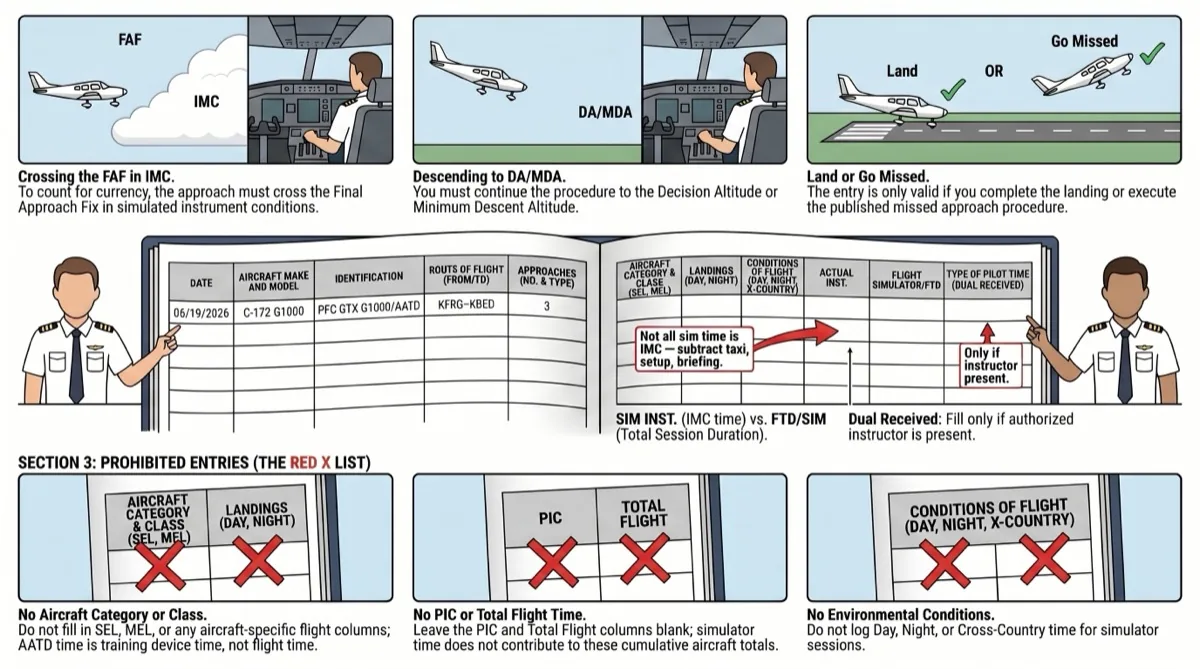
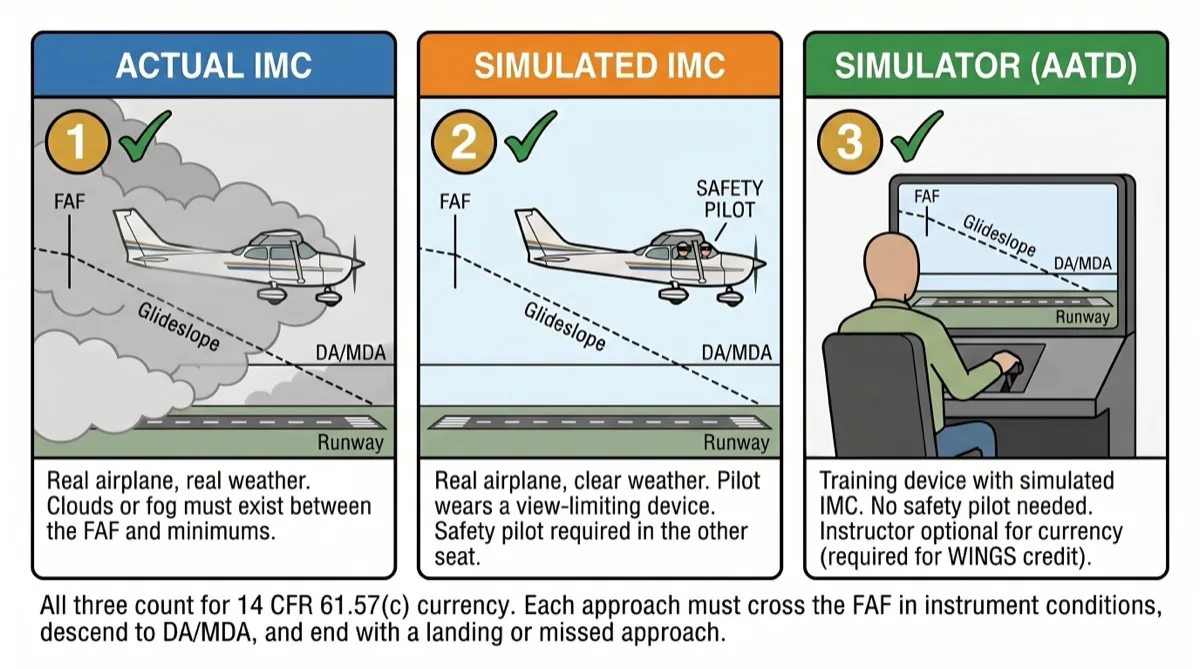
An approach counts toward instrument currency when you cross the Final Approach Fix (FAF) in Instrument Meteorological Conditions (IMC) — real or simulated — and either break out at or above the Decision Altitude (DA) or Minimum Descent Altitude (MDA) and land, or execute the published missed approach procedure. This standard applies identically in a real aircraft and in a simulator. There is no separate "simulator approach" definition. The FAA uses one standard for counting approaches regardless of the platform.
If you break off the approach before reaching DA/MDA — because you made a large error and want to restart, for example — that approach does not count. You must fly the full procedure from FAF through minimums. For a detailed walkthrough of the approach itself, see how to fly an instrument approach.
How Do You Log Approaches in a Paper Logbook?
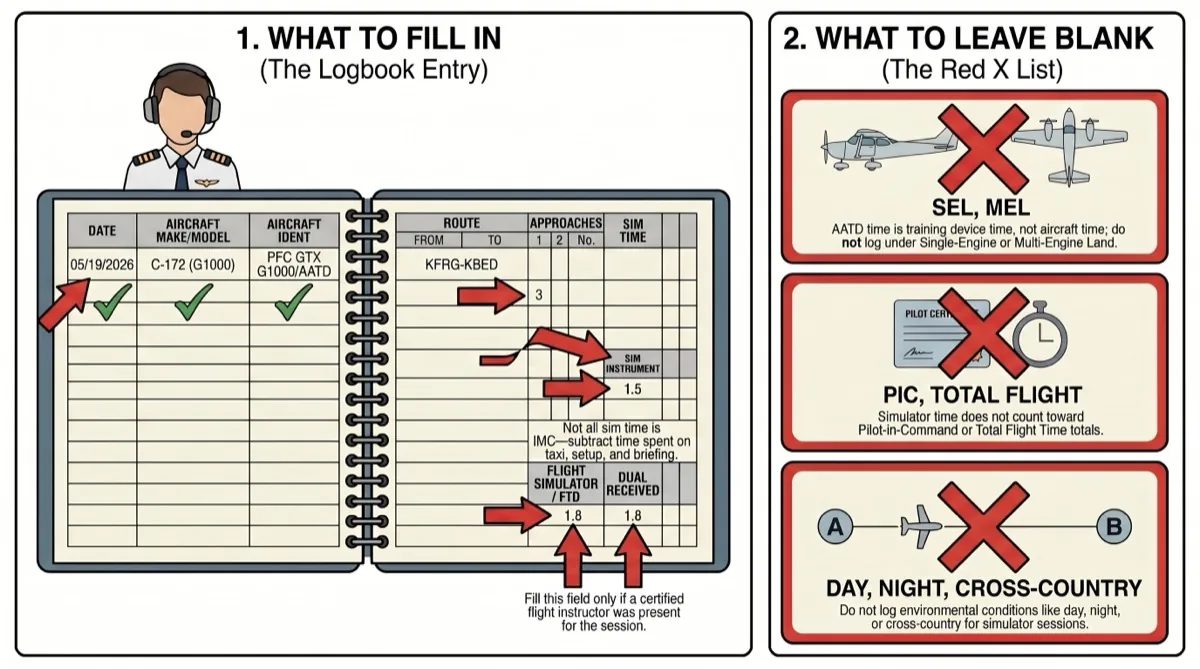
The paper logbook has specific columns designed for different categories of flight time. Simulator sessions use only a subset of those columns. The most common mistake is filling in columns that do not apply to AATD time — like PIC, Total Flight, or the Single-Engine Land (SEL) category. Here is exactly what goes where.
Paper Logbook Entry — Column by Column
Aircraft Make and Model
Enter "AATD". This tells anyone reading the logbook that the time was logged in an Advanced Aviation Training Device, not an actual aircraft.
Aircraft Identification
Enter "PFC GTX G1000". This identifies the specific training device used during the session.
Number of Approaches and Holds
Enter the number of approaches and holds completed. Each approach must meet the full criteria — cross the FAF in simulated IMC, descend to DA/MDA, then land or execute the missed approach.
Dual Received
Enter the full session duration in the Dual Received column when an instructor is present. Solo simulator sessions (for already instrument-rated pilots maintaining currency) leave this blank.
Simulated Instrument
Record the actual duration spent flying in simulated IMC conditions. A typical 1.8-hour AATD session produces roughly 1.5 hours of simulated instrument time — the remaining time covers taxi and setup.
Ground Trainer / Simulator
Enter the total simulator session time. This is the full duration from start to shutdown of the training device.
Remarks
List the type of each approach and the airport. For example: "ILS 6 KISP, RNAV 15 KHWV, VOR 6 KFOX." This detail matters for proving currency and for your DPE during a checkride.
Instructor Signature
Your instructor signs the entry with their CFI certificate number and the expiration month/year of their recurring instructor training (for example, "6/29"). This endorsement validates the training.
Columns to Leave Blank
Leave these blank: SEL, MEL, Day, Night, Cross-Country, PIC, and Total Flight. AATD time is training device time — not aircraft time and not PIC time.
Example Paper Logbook Entry
| Date | Make/Model | Ident | Appr | Holds | Dual | Sim Inst | Gnd Trainer/Sim | Remarks |
|---|---|---|---|---|---|---|---|---|
| 05/19/26 | AATD | PFC GTX G1000 | 3 | 2 | 1.8 | 1.5 | 1.8 | ILS 6 KISP, RNAV 15 KHWV, VOR 6 KFOX |
For guidance on briefing the approach before you fly it, review our approach briefing guide — a solid brief is the foundation of a well-logged approach.
Practice IFR Approaches in the Simulator
Fly approaches in our PFC GTX G1000 AATD with airline pilot instructors. Every approach counts toward your IFR currency.
How Do You Log Approaches in ForeFlight?
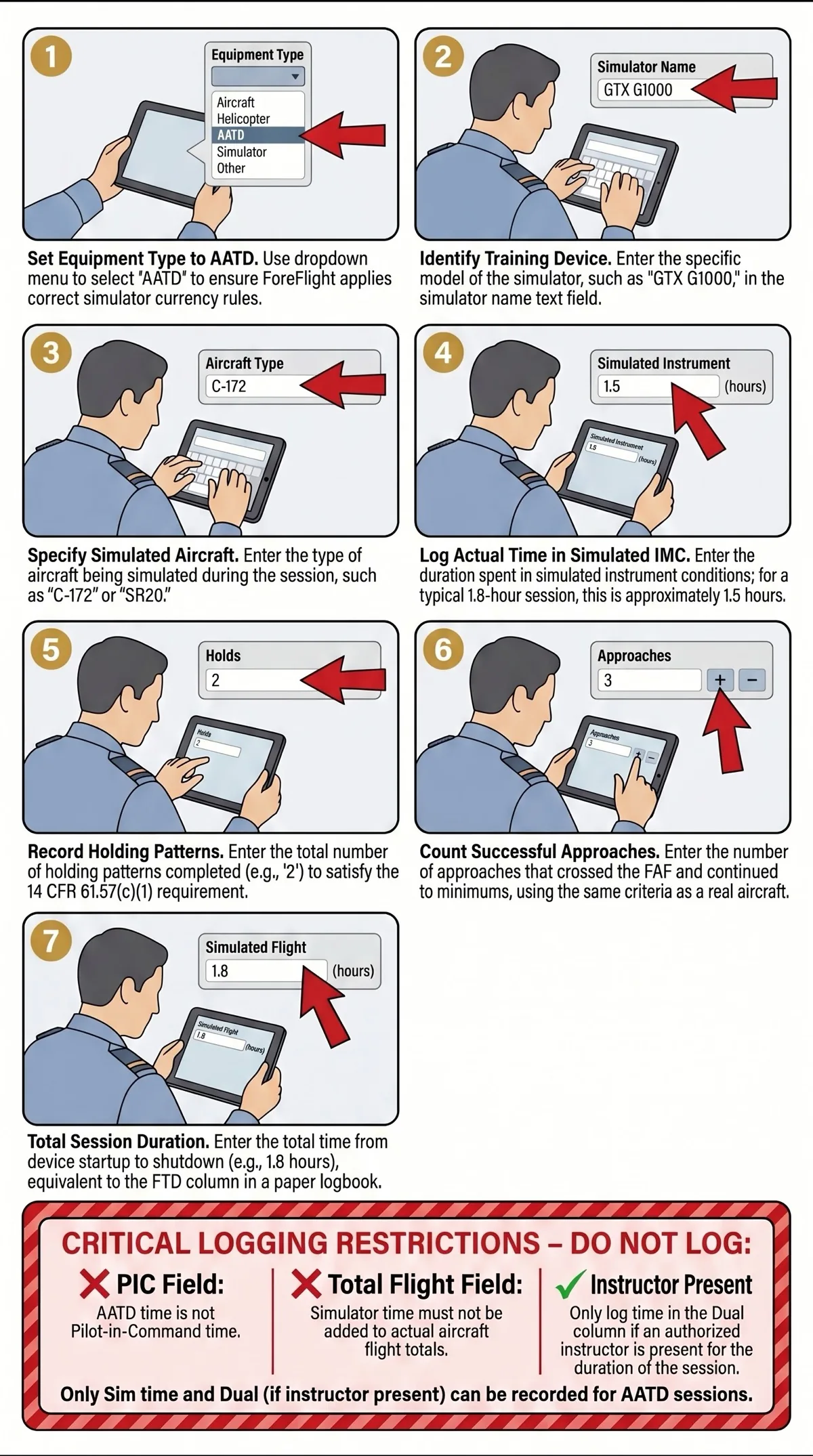
ForeFlight's digital logbook has dedicated fields for simulator entries. The key is setting up the equipment type correctly so ForeFlight categorizes the time properly. Once configured, ForeFlight automatically tracks your IFR currency status based on the approaches, holds, and instrument time you enter. Here is how to fill in each field.
ForeFlight Digital Logbook Setup
Equipment Type
Select AATD from the equipment type dropdown. This tells ForeFlight to categorize the session as simulator time and apply the correct currency rules.
Simulator Name
Enter "GTX G1000" as the simulator name. This identifies the specific training device for your records.
Represented Aircraft Type
Enter the specific aircraft you simulated — for example, "C172S" or "SR20." This matches what you would write in the Make/Model column of a paper logbook.
Simulated Instrument Time
Enter the actual duration spent flying in simulated IMC. This is not the total session time — subtract briefing, taxi, and setup time. For a 1.8-hour session, this is typically around 1.5 hours.
Holds
Enter the number of holding patterns completed during the session. Each hold counts individually toward your currency requirement.
Approaches
Enter the number of approaches completed. Same criteria as the paper logbook — each approach must cross the FAF in simulated IMC and continue to DA/MDA. ForeFlight uses this number to calculate your approach currency expiration date.
Training Section — Simulated Flight
Enter the total duration of the simulator session. This is the overall time from device startup to shutdown — the equivalent of the FTD column in a paper logbook.
SELECT YOUR PATH
NYC / AVIATOR.NYCNEW PILOTS: WHAT'S YOUR GOAL?
LICENSED PILOTS: SELECT TRAINING
FLY AS A HOBBY
Learn safely, step-by-step, and at your own pace.
A private pilot license in NYC typically costs $12,000–$18,000. Most students need 60–80 flight hours to reach checkride proficiency. Simulator training at $190/hr saves over 45% compared to aircraft rental at each stage — and over 60% with a $780 training bundle ($130/hr). Pay-as-you-go pricing with no membership fees or upfront commitment.
See the full private pilot license cost breakdown →Yes. You need at least a Third Class FAA Medical Certificate before you can fly solo. Most healthy adults pass without issues — the exam covers basic vision, hearing, and general health. Schedule your exam with an Aviation Medical Examiner (AME) early in training. Important: if you have ever been prescribed medication for anxiety, depression, or ADHD — even as a child — talk to an AME before investing heavily in training to avoid surprises.
How to get your FAA medical certificate for flight training →Yes. Aviator.NYC's FAA-certified Advanced Aviation Training Device (AATD) with Garmin G1000 NXi avionics logs hours that count directly toward your private pilot certificate. Simulator training at $190/hr saves over 45% compared to aircraft rental — and over 60% with a training bundle — with no weather cancellations or maintenance delays. Train on 20+ aircraft configurations from Cessna 172 to Beechcraft Bonanza, all in Lower Manhattan.
FAA-approved flight simulator training in NYC →Most students earn their private pilot license in 4–12 months depending on training frequency. The FAA requires a minimum of 40 flight hours, but most students need 60–80 hours to reach checkride proficiency. A typical path: Weeks 1–2 in the simulator building foundations, Weeks 3–12 flying dual and solo at a local airport, then Months 3–12 completing cross-country flights and checkride prep. You control the pace — train around your work schedule.
Private pilot training timeline and milestones →Start with a 2-hour discovery session ($380) in Aviator.NYC's Manhattan simulator. No experience needed — your airline pilot instructor walks you through takeoff, flight, and landing. After your first session, you'll know if flight training is right for you. From there, a structured path takes you from simulator foundations to your first solo flight at a local airport.
Book your first flight lesson in Manhattan →Part 61 defines requirements for pilot certification. Part 141 defines requirements for school approval. Both use the same commercially available lesson plans and lead to the same FAA certificate. The key difference: under Part 61, every flight you take counts toward your certificate requirements. Under Part 141, off-syllabus flights don't count toward the 141 program. Part 61 dominates in NYC because the off-syllabus flexibility better serves students who train infrequently and want every flight hour to always count. Aviator.NYC operates under Part 61 — by design.
Part 61 vs Part 141 flight training — which is right for you →The FAA Private Pilot Knowledge Test is a 60-question multiple-choice exam covering aerodynamics, weather, navigation, regulations, and flight planning. You need a score of 70% or higher to pass. Most students use online prep courses like Sheppard Air or Sporty's and pass within 2–4 weeks of focused study. Pass the written test early in your training — it builds confidence and lets you focus on flying skills.
Private pilot training steps and written exam prep →Instructor quality matters more than price. Look for instructors with airline or professional experience who teach part-time because they love it — not because they're building hours. Visit 1–2 schools in person. Ask about cancellation rates, aircraft availability, and whether they use FAA-approved simulators to reduce cost. For NYC-area students, the closest GA airports are Republic Airport (KFRG), Morristown Airport (KMMU), Essex County Airport (KCDW), Westchester Airport (KHPN), and Lincoln Park Airport (N07).
Best flight training airports near New York City →FLY AS A CAREER
From first lesson to professional pilot — one clear path.
The career path follows six stages: Private Pilot License → Instrument Rating → Commercial Certificate → Multi-Engine Rating → CFI Certification → Airline Transport Pilot (ATP). Each rating builds on the previous one. You need 1,500 total flight hours for an ATP certificate, which most pilots build by instructing after earning their CFI. The entire pathway from zero experience to airline-eligible typically takes 4–6 years part-time or 18–24 months full-time.
See the complete career pilot roadmap — PPL through ATP →The complete career pathway costs roughly $80,000–$150,000+ spread across multiple ratings: Private Pilot ($22,250–$32,250), Instrument Rating ($9,250–$21,000), Commercial ($15,000–$50,000), Multi-Engine ($6,000–$8,000), and CFI ($3,000–$5,000). You don't pay this all at once — each rating is a separate phase. Simulator training at $190/hr saves over 45% at every stage compared to aircraft time, and over 60% with training bundles. Once you earn your CFI, you earn $30–$60/hour while building the hours you need for airlines.
Full pilot license cost breakdown by rating →With consistent training, 18–24 months is realistic for the accelerated path. Most part-time students take 4–6 years. The bottleneck is building 1,500 total hours for an ATP certificate. After earning your CFI, instructing is the most common way to build hours while getting paid. Regional airlines are currently hiring pilots at 1,500 hours with competitive first-year pay.
Airline Transport Pilot requirements and timeline →The instrument rating is your next step. It teaches you to fly in clouds and low visibility using only your instruments — a requirement for every professional pilot path. The instrument rating requires 40 hours of instrument training (up to 20 hours can be in an FAA-approved simulator) and 50 hours of cross-country PIC time. Most working professionals complete it in 3–6 months.
Instrument rating — step 2 in the career pilot roadmap →Yes, for most career pilots. The CFI (Certified Flight Instructor) certificate lets you earn $30–$60/hour teaching other pilots while building the 1,500 hours you need for airlines. It also deepens your own flying knowledge — teaching forces mastery. Requirements: Commercial Pilot Certificate, Instrument Rating, 250+ total hours, and passing the CFI practical test. The training typically takes 20–30 additional flight hours.
CFI certification — step 5 in the career pilot roadmap →Airlines require a First Class FAA Medical Certificate. This is a more thorough exam than the Third Class medical used for private flying. It includes detailed vision, hearing, cardiovascular, and neurological screening. Most healthy adults pass. Get your First Class medical early — before investing in career training — to catch any potential issues. The exam is done by an Aviation Medical Examiner (AME) and is valid for 12 months.
FAA medical certificate requirements for career pilots →Yes, extensively. The FAA allows up to 20 hours of simulator time toward your instrument rating, up to 50 hours toward your commercial certificate, and up to 25 hours toward your ATP. Simulator training at $190/hr saves over 45% compared to aircraft at the standard rate — and over 60% with training bundles — across every stage of the career path. Aviator.NYC's AATD features the Garmin G1000 NXi and GFC 700 autopilot used in modern training aircraft, so skills transfer directly to the airplane.
How FAA-approved simulator training reduces career pilot costs →The multi-engine rating is required for most airline jobs. There is no FAA minimum flight time required, but most students need 10–15 hours of training. Cost is typically $6,000–$8,000. Training covers VMC demonstrations, single-engine operations, and asymmetric thrust management. Most pilots complete it in 1–2 weeks of intensive training.
Multi-engine rating — step 4 in the career pilot roadmap →YOUTH PROGRAM (AGES 8-17)
Safe, age-appropriate lessons that grow with your child.
Children can start simulator-based flight training at age 8. There are no medical requirements for simulator lessons. Training is structured by age: ages 8–12 focus on basic stick-and-rudder control, instrument scanning, and simple ATC calls in 1-hour sessions. Ages 13–15 progress to traffic patterns, VOR navigation, and checklist discipline in 2-hour sessions. The simulator is a zero-risk environment supervised by professional instructors.
Youth aviation program milestones by age →Under FAA regulations (FAR 61.87), a student pilot can solo a glider at age 14 and a powered airplane at age 16. At age 17, they are eligible for a full Private Pilot Certificate with 40+ hours of training. Starting simulator training at age 8–12 gives your child years of structured skill building before solo eligibility, creating a significant head start over peers who begin at 16.
FAA solo flight age requirements for young pilots →Youth training uses pay-as-you-go pricing designed for younger attention spans. 1-hour sessions at $190, 2-hour sessions at $380. A 6-hour training bundle ($780) saves over 30% compared to individual sessions. No membership fees or upfront commitment.
Youth flight training pricing and session options →Ages 8–12: Discovery and foundation — basic controls, instrument scanning, simple radio calls. Ages 13–15: Structured skill building — traffic patterns, navigation, checklist discipline. Age 16: Solo flight eligible (FAR 61.87) — pre-solo maneuvers, emergency procedures, student certificate. Age 17: Private Pilot Certificate eligible (FAR 61.103) — checkride, cross-country flights, instrument basics introduction.
Complete youth aviation age milestones and FAA requirements →Not for simulator training. Children ages 8–15 train exclusively in the FAA-approved simulator and do not need a medical certificate. A medical certificate is only required before solo flight in an actual aircraft, which is not permitted until age 16. When the time comes, most healthy teenagers pass the Third Class medical easily.
FAA medical requirements for student pilots under 18 →Yes. Early training creates a massive head start. A student who begins at age 8 has 8 years of structured skill building before solo eligibility at 16. Hours logged in the FAA-approved AATD simulator count toward future certificate requirements. By age 17, a dedicated student can hold a Private Pilot Certificate while peers are just starting. This is a direct path toward airline or professional aviation careers.
Career pilot roadmap starting from youth training →Instructors are active airline pilots or experienced CFIs who specialize in youth aviation training for ages 8–17. They understand age-appropriate pacing, use patient teaching methods, and make sessions engaging without sacrificing real aviation standards. Parents are welcome to observe every lesson from the instructor station.
Meet our airline pilot flight instructors →The FAA-approved AATD simulator is a zero-risk training environment. No aircraft is involved until your child reaches solo eligibility at age 16+. Children practice stalls, engine failures, and emergency procedures safely and repeatedly. The simulator uses the same Garmin G1000 NXi avionics found in real training aircraft, so skills transfer directly when they transition to flying.
FAA-approved flight simulator for youth training →INSTRUMENT RATING
Everything you need to know about earning your instrument rating:
The FAA requires 50 hours of PIC cross-country time, 40 hours of actual or simulated instrument time (up to 20 hours in an FAA-approved AATD like Aviator.NYC's simulator), and passing both a written knowledge test and a practical checkride. You must already hold a Private Pilot Certificate. The 20 simulator hours alone save over $4,400 compared to logging that time in an airplane.
FAA instrument rating requirements explained (14 CFR 61.65) →Total cost typically ranges from $9,250 to $16,800 depending on pace and how much airplane time you add. The simulator-first approach saves over $4,400 compared to airplane-only training. Dual instruction starts at $190/hr in the simulator — over 45% less than aircraft rental. Training bundles save over 60%. Pay-as-you-go with no upfront commitment.
Instrument rating cost breakdown and simulator savings →Your first lesson starts with a 20-minute briefing covering instrument scan fundamentals and the G1000 NXi layout. Then 90 minutes of hands-on simulator time: straight-and-level flight by instruments only, basic attitude control, and an introduction to the instrument scan pattern. Your instructor is an airline pilot who flies IFR professionally — not someone learning alongside you. No experience with instruments required.
What to expect in your first IFR simulator lesson →Most working professionals complete their instrument rating in 3–6 months training 1–2 sessions per week. The 10-lesson simulator curriculum covers fundamentals through mock checkride. After the simulator phase, you transition to the airplane for cross-country time and real-world IFR experience. Consistent weekly sessions are more effective than sporadic blocks — instrument skills decay fast without regular practice.
Instrument rating training timeline and milestones →A structured 10-lesson progression: Lessons 1–2 build instrument scan and basic attitude flying. Lessons 3–5 introduce VOR navigation, holding patterns, and your first approach. Lessons 6–7 cover precision approaches (ILS, GPS). Lessons 8–9 add STARs, complex arrivals, and lost communications. Lesson 10 is a full mock checkride. Each session: 20-min briefing, 90-min simulator, 10-min debrief.
See the full 10-lesson IFR training plan →After building proficiency in the simulator, you take your instrument skills to the airplane at a local airport. The G1000 NXi in the simulator matches the avionics in common training aircraft (Cessna 172S, Cessna 182T), so the cockpit layout transfers directly. Cross-country flights build the PIC time required for your rating while practicing real ATC communications, weather decision-making, and approach procedures in actual conditions.
IFR simulator-to-airplane transition guide →The instrument rating checkride has two parts: an oral exam (~1.5 hours) covering regulations, weather theory, approach procedures, and decision-making scenarios; and a flight test (~2 hours) where you fly approaches, holds, intercepting and tracking courses, and demonstrate partial panel skills. The DPE will test unusual attitudes and recovery, and at least one missed approach. Lesson 10 in the curriculum is a full mock checkride that mirrors the real exam.
Instrument rating checkride preparation →IFR CURRENCY OPTIONS
Choose your IFR currency training option:
The FAA WINGS (Pilot Proficiency Program) lets you earn safety credit while rebuilding IFR proficiency. Aviator.NYC's LOFT scenarios are structured as WINGS activities — you get IFR currency practice and FAA safety credit simultaneously. Each scenario is a realistic cross-country flight with approaches, holds, and decision-making challenges designed by active airline pilots.
IFR currency through FAA WINGS simulator scenarios →Short, focused simulator sessions built around airports you actually fly to. Practice ILS, RNAV, and LOC approaches at local airports like Teterboro Airport (KTEB), Republic Airport (KFRG), Westchester Airport (KHPN), and Morristown Airport (KMMU). Complete your 6 approaches, holding, and tracking requirements in one or two sessions. No travel to an airport, no weather delays, no Hobbs time running while you brief approaches.
IFR currency approaches at NYC-area airports →Custom sessions built around your experience level, aircraft type, and specific currency needs. If you fly a Bonanza, we configure the G1000 NXi to match. If you need RNAV (GPS) approaches specifically, we build a profile focused on those. Your airline pilot instructor tailors the session to what you actually need — not a one-size-fits-all curriculum.
Custom IFR currency training sessions →Guided IFR currency practice with an airline-experienced CFII. Includes structured approach profiles, real-time feedback on instrument scan and procedures, and FAA WINGS credit. Ideal if you've been out of the IFR system for a while and want professional guidance rebuilding precision. If your currency has lapsed beyond 6 months, you'll need an Instrument Proficiency Check (IPC) — available as part of dual sessions. Dual sessions start at $380 for 2 hours.
Dual IFR currency training with instrument proficiency check →Independent simulator access for current IFR pilots at $170 for 2 hours. No checkout required — if you're familiar with G1000 NXi operations and know how to log approaches for currency, you can practice the required 6 approaches, holding, and tracking on your own. Solo practice saves roughly 75% compared to aircraft rental time. Available in bulk bundles for even greater savings.
Solo IFR currency simulator practice →How Much Simulated IMC Time Should You Log?
Not all simulator time is instrument time. A typical 1.8-hour AATD session at Aviator.NYC produces approximately 1.5 hours of simulated Instrument Meteorological Conditions (IMC). The difference accounts for pre-flight briefing, initial setup and configuration of the simulator, taxi procedures, and post-flight debrief. You should only log the time actually spent flying under simulated instrument conditions — from the point you are established on an instrument procedure to when you complete the approach or exercise.
This distinction matters because simulated instrument time is the number that feeds your IFR currency calculation and your instrument time totals. Inflating it by including non-flying time misrepresents your experience. Your instructor will help you determine the precise split if you are unsure.
For strategies on structuring your simulator time to maximize approach count and efficiency, see our guide on optimizing instrument rating training.
Do You Log PIC Time in the Simulator?
No. Simulator time in an AATD is not Pilot-in-Command (PIC) time and is not total flight time. The FAA distinguishes between actual aircraft flight time and training device time. In your logbook — whether paper or digital — the only time columns you fill for an AATD session are FTD/Simulator time, Simulated Instrument time, and Dual Received (when an instructor is present). The PIC column and Total Flight Time column remain blank.
This is different from a full flight simulator (Level C/D) used by airlines, where PIC time can be logged under certain conditions. For AATD sessions, the rule is simple: no PIC, no total time. The approaches and instrument time still count fully toward your IFR currency under 14 CFR 61.57(c).
What About Holds — How Do You Log Those?
Holding patterns are logged by count, not by duration. If you fly three holding patterns during a simulator session, you enter "3" in the Holds column (or field, in ForeFlight). Each hold counts individually toward your currency requirement. The FAA requires you to demonstrate holding proficiency as part of IFR currency — specifically "holding procedures and tasks" under 14 CFR 61.57(c)(1).
In a typical IFR currency session at Aviator.NYC, you will fly 2-3 holds alongside your approaches. Most instructors incorporate holds as part of the approach sequence — for example, holding at an Initial Approach Fix (IAF) before beginning the procedure turn or vectors to final. This keeps the session efficient and realistic.
How Many Approaches Do You Need for IFR Currency?
Under 14 CFR 61.57(c), instrument currency requires six approaches, holding procedures, and intercepting and tracking courses and radials within the preceding six calendar months. If you fall out of currency, you enter a six-month grace period where you can regain currency by completing these tasks with a safety pilot or in a simulator — but you cannot fly IFR as PIC during that grace period. After the grace period expires, an Instrument Proficiency Check (IPC) is required.
Most instrument-rated pilots who fly regularly find that three approaches every three months keeps them comfortably current with a buffer. A single 1.8-hour AATD session can easily cover three approaches plus holds and tracking — which means one simulator visit per quarter keeps you legal. For pilots who want to stay sharp (not just legal), two sessions per quarter is a better target.
Stay IFR Current Year-Round
One simulator session every three months keeps you legal. Our airline pilot instructors make every approach count.
SELECT YOUR PATH
NYC / AVIATOR.NYCNEW PILOTS: WHAT'S YOUR GOAL?
LICENSED PILOTS: SELECT TRAINING
FLY AS A HOBBY
Learn safely, step-by-step, and at your own pace.
A private pilot license in NYC typically costs $12,000–$18,000. Most students need 60–80 flight hours to reach checkride proficiency. Simulator training at $190/hr saves over 45% compared to aircraft rental at each stage — and over 60% with a $780 training bundle ($130/hr). Pay-as-you-go pricing with no membership fees or upfront commitment.
See the full private pilot license cost breakdown →Yes. You need at least a Third Class FAA Medical Certificate before you can fly solo. Most healthy adults pass without issues — the exam covers basic vision, hearing, and general health. Schedule your exam with an Aviation Medical Examiner (AME) early in training. Important: if you have ever been prescribed medication for anxiety, depression, or ADHD — even as a child — talk to an AME before investing heavily in training to avoid surprises.
How to get your FAA medical certificate for flight training →Yes. Aviator.NYC's FAA-certified Advanced Aviation Training Device (AATD) with Garmin G1000 NXi avionics logs hours that count directly toward your private pilot certificate. Simulator training at $190/hr saves over 45% compared to aircraft rental — and over 60% with a training bundle — with no weather cancellations or maintenance delays. Train on 20+ aircraft configurations from Cessna 172 to Beechcraft Bonanza, all in Lower Manhattan.
FAA-approved flight simulator training in NYC →Most students earn their private pilot license in 4–12 months depending on training frequency. The FAA requires a minimum of 40 flight hours, but most students need 60–80 hours to reach checkride proficiency. A typical path: Weeks 1–2 in the simulator building foundations, Weeks 3–12 flying dual and solo at a local airport, then Months 3–12 completing cross-country flights and checkride prep. You control the pace — train around your work schedule.
Private pilot training timeline and milestones →Start with a 2-hour discovery session ($380) in Aviator.NYC's Manhattan simulator. No experience needed — your airline pilot instructor walks you through takeoff, flight, and landing. After your first session, you'll know if flight training is right for you. From there, a structured path takes you from simulator foundations to your first solo flight at a local airport.
Book your first flight lesson in Manhattan →Part 61 defines requirements for pilot certification. Part 141 defines requirements for school approval. Both use the same commercially available lesson plans and lead to the same FAA certificate. The key difference: under Part 61, every flight you take counts toward your certificate requirements. Under Part 141, off-syllabus flights don't count toward the 141 program. Part 61 dominates in NYC because the off-syllabus flexibility better serves students who train infrequently and want every flight hour to always count. Aviator.NYC operates under Part 61 — by design.
Part 61 vs Part 141 flight training — which is right for you →The FAA Private Pilot Knowledge Test is a 60-question multiple-choice exam covering aerodynamics, weather, navigation, regulations, and flight planning. You need a score of 70% or higher to pass. Most students use online prep courses like Sheppard Air or Sporty's and pass within 2–4 weeks of focused study. Pass the written test early in your training — it builds confidence and lets you focus on flying skills.
Private pilot training steps and written exam prep →Instructor quality matters more than price. Look for instructors with airline or professional experience who teach part-time because they love it — not because they're building hours. Visit 1–2 schools in person. Ask about cancellation rates, aircraft availability, and whether they use FAA-approved simulators to reduce cost. For NYC-area students, the closest GA airports are Republic Airport (KFRG), Morristown Airport (KMMU), Essex County Airport (KCDW), Westchester Airport (KHPN), and Lincoln Park Airport (N07).
Best flight training airports near New York City →FLY AS A CAREER
From first lesson to professional pilot — one clear path.
The career path follows six stages: Private Pilot License → Instrument Rating → Commercial Certificate → Multi-Engine Rating → CFI Certification → Airline Transport Pilot (ATP). Each rating builds on the previous one. You need 1,500 total flight hours for an ATP certificate, which most pilots build by instructing after earning their CFI. The entire pathway from zero experience to airline-eligible typically takes 4–6 years part-time or 18–24 months full-time.
See the complete career pilot roadmap — PPL through ATP →The complete career pathway costs roughly $80,000–$150,000+ spread across multiple ratings: Private Pilot ($22,250–$32,250), Instrument Rating ($9,250–$21,000), Commercial ($15,000–$50,000), Multi-Engine ($6,000–$8,000), and CFI ($3,000–$5,000). You don't pay this all at once — each rating is a separate phase. Simulator training at $190/hr saves over 45% at every stage compared to aircraft time, and over 60% with training bundles. Once you earn your CFI, you earn $30–$60/hour while building the hours you need for airlines.
Full pilot license cost breakdown by rating →With consistent training, 18–24 months is realistic for the accelerated path. Most part-time students take 4–6 years. The bottleneck is building 1,500 total hours for an ATP certificate. After earning your CFI, instructing is the most common way to build hours while getting paid. Regional airlines are currently hiring pilots at 1,500 hours with competitive first-year pay.
Airline Transport Pilot requirements and timeline →The instrument rating is your next step. It teaches you to fly in clouds and low visibility using only your instruments — a requirement for every professional pilot path. The instrument rating requires 40 hours of instrument training (up to 20 hours can be in an FAA-approved simulator) and 50 hours of cross-country PIC time. Most working professionals complete it in 3–6 months.
Instrument rating — step 2 in the career pilot roadmap →Yes, for most career pilots. The CFI (Certified Flight Instructor) certificate lets you earn $30–$60/hour teaching other pilots while building the 1,500 hours you need for airlines. It also deepens your own flying knowledge — teaching forces mastery. Requirements: Commercial Pilot Certificate, Instrument Rating, 250+ total hours, and passing the CFI practical test. The training typically takes 20–30 additional flight hours.
CFI certification — step 5 in the career pilot roadmap →Airlines require a First Class FAA Medical Certificate. This is a more thorough exam than the Third Class medical used for private flying. It includes detailed vision, hearing, cardiovascular, and neurological screening. Most healthy adults pass. Get your First Class medical early — before investing in career training — to catch any potential issues. The exam is done by an Aviation Medical Examiner (AME) and is valid for 12 months.
FAA medical certificate requirements for career pilots →Yes, extensively. The FAA allows up to 20 hours of simulator time toward your instrument rating, up to 50 hours toward your commercial certificate, and up to 25 hours toward your ATP. Simulator training at $190/hr saves over 45% compared to aircraft at the standard rate — and over 60% with training bundles — across every stage of the career path. Aviator.NYC's AATD features the Garmin G1000 NXi and GFC 700 autopilot used in modern training aircraft, so skills transfer directly to the airplane.
How FAA-approved simulator training reduces career pilot costs →The multi-engine rating is required for most airline jobs. There is no FAA minimum flight time required, but most students need 10–15 hours of training. Cost is typically $6,000–$8,000. Training covers VMC demonstrations, single-engine operations, and asymmetric thrust management. Most pilots complete it in 1–2 weeks of intensive training.
Multi-engine rating — step 4 in the career pilot roadmap →YOUTH PROGRAM (AGES 8-17)
Safe, age-appropriate lessons that grow with your child.
Children can start simulator-based flight training at age 8. There are no medical requirements for simulator lessons. Training is structured by age: ages 8–12 focus on basic stick-and-rudder control, instrument scanning, and simple ATC calls in 1-hour sessions. Ages 13–15 progress to traffic patterns, VOR navigation, and checklist discipline in 2-hour sessions. The simulator is a zero-risk environment supervised by professional instructors.
Youth aviation program milestones by age →Under FAA regulations (FAR 61.87), a student pilot can solo a glider at age 14 and a powered airplane at age 16. At age 17, they are eligible for a full Private Pilot Certificate with 40+ hours of training. Starting simulator training at age 8–12 gives your child years of structured skill building before solo eligibility, creating a significant head start over peers who begin at 16.
FAA solo flight age requirements for young pilots →Youth training uses pay-as-you-go pricing designed for younger attention spans. 1-hour sessions at $190, 2-hour sessions at $380. A 6-hour training bundle ($780) saves over 30% compared to individual sessions. No membership fees or upfront commitment.
Youth flight training pricing and session options →Ages 8–12: Discovery and foundation — basic controls, instrument scanning, simple radio calls. Ages 13–15: Structured skill building — traffic patterns, navigation, checklist discipline. Age 16: Solo flight eligible (FAR 61.87) — pre-solo maneuvers, emergency procedures, student certificate. Age 17: Private Pilot Certificate eligible (FAR 61.103) — checkride, cross-country flights, instrument basics introduction.
Complete youth aviation age milestones and FAA requirements →Not for simulator training. Children ages 8–15 train exclusively in the FAA-approved simulator and do not need a medical certificate. A medical certificate is only required before solo flight in an actual aircraft, which is not permitted until age 16. When the time comes, most healthy teenagers pass the Third Class medical easily.
FAA medical requirements for student pilots under 18 →Yes. Early training creates a massive head start. A student who begins at age 8 has 8 years of structured skill building before solo eligibility at 16. Hours logged in the FAA-approved AATD simulator count toward future certificate requirements. By age 17, a dedicated student can hold a Private Pilot Certificate while peers are just starting. This is a direct path toward airline or professional aviation careers.
Career pilot roadmap starting from youth training →Instructors are active airline pilots or experienced CFIs who specialize in youth aviation training for ages 8–17. They understand age-appropriate pacing, use patient teaching methods, and make sessions engaging without sacrificing real aviation standards. Parents are welcome to observe every lesson from the instructor station.
Meet our airline pilot flight instructors →The FAA-approved AATD simulator is a zero-risk training environment. No aircraft is involved until your child reaches solo eligibility at age 16+. Children practice stalls, engine failures, and emergency procedures safely and repeatedly. The simulator uses the same Garmin G1000 NXi avionics found in real training aircraft, so skills transfer directly when they transition to flying.
FAA-approved flight simulator for youth training →INSTRUMENT RATING
Everything you need to know about earning your instrument rating:
The FAA requires 50 hours of PIC cross-country time, 40 hours of actual or simulated instrument time (up to 20 hours in an FAA-approved AATD like Aviator.NYC's simulator), and passing both a written knowledge test and a practical checkride. You must already hold a Private Pilot Certificate. The 20 simulator hours alone save over $4,400 compared to logging that time in an airplane.
FAA instrument rating requirements explained (14 CFR 61.65) →Total cost typically ranges from $9,250 to $16,800 depending on pace and how much airplane time you add. The simulator-first approach saves over $4,400 compared to airplane-only training. Dual instruction starts at $190/hr in the simulator — over 45% less than aircraft rental. Training bundles save over 60%. Pay-as-you-go with no upfront commitment.
Instrument rating cost breakdown and simulator savings →Your first lesson starts with a 20-minute briefing covering instrument scan fundamentals and the G1000 NXi layout. Then 90 minutes of hands-on simulator time: straight-and-level flight by instruments only, basic attitude control, and an introduction to the instrument scan pattern. Your instructor is an airline pilot who flies IFR professionally — not someone learning alongside you. No experience with instruments required.
What to expect in your first IFR simulator lesson →Most working professionals complete their instrument rating in 3–6 months training 1–2 sessions per week. The 10-lesson simulator curriculum covers fundamentals through mock checkride. After the simulator phase, you transition to the airplane for cross-country time and real-world IFR experience. Consistent weekly sessions are more effective than sporadic blocks — instrument skills decay fast without regular practice.
Instrument rating training timeline and milestones →A structured 10-lesson progression: Lessons 1–2 build instrument scan and basic attitude flying. Lessons 3–5 introduce VOR navigation, holding patterns, and your first approach. Lessons 6–7 cover precision approaches (ILS, GPS). Lessons 8–9 add STARs, complex arrivals, and lost communications. Lesson 10 is a full mock checkride. Each session: 20-min briefing, 90-min simulator, 10-min debrief.
See the full 10-lesson IFR training plan →After building proficiency in the simulator, you take your instrument skills to the airplane at a local airport. The G1000 NXi in the simulator matches the avionics in common training aircraft (Cessna 172S, Cessna 182T), so the cockpit layout transfers directly. Cross-country flights build the PIC time required for your rating while practicing real ATC communications, weather decision-making, and approach procedures in actual conditions.
IFR simulator-to-airplane transition guide →The instrument rating checkride has two parts: an oral exam (~1.5 hours) covering regulations, weather theory, approach procedures, and decision-making scenarios; and a flight test (~2 hours) where you fly approaches, holds, intercepting and tracking courses, and demonstrate partial panel skills. The DPE will test unusual attitudes and recovery, and at least one missed approach. Lesson 10 in the curriculum is a full mock checkride that mirrors the real exam.
Instrument rating checkride preparation →IFR CURRENCY OPTIONS
Choose your IFR currency training option:
The FAA WINGS (Pilot Proficiency Program) lets you earn safety credit while rebuilding IFR proficiency. Aviator.NYC's LOFT scenarios are structured as WINGS activities — you get IFR currency practice and FAA safety credit simultaneously. Each scenario is a realistic cross-country flight with approaches, holds, and decision-making challenges designed by active airline pilots.
IFR currency through FAA WINGS simulator scenarios →Short, focused simulator sessions built around airports you actually fly to. Practice ILS, RNAV, and LOC approaches at local airports like Teterboro Airport (KTEB), Republic Airport (KFRG), Westchester Airport (KHPN), and Morristown Airport (KMMU). Complete your 6 approaches, holding, and tracking requirements in one or two sessions. No travel to an airport, no weather delays, no Hobbs time running while you brief approaches.
IFR currency approaches at NYC-area airports →Custom sessions built around your experience level, aircraft type, and specific currency needs. If you fly a Bonanza, we configure the G1000 NXi to match. If you need RNAV (GPS) approaches specifically, we build a profile focused on those. Your airline pilot instructor tailors the session to what you actually need — not a one-size-fits-all curriculum.
Custom IFR currency training sessions →Guided IFR currency practice with an airline-experienced CFII. Includes structured approach profiles, real-time feedback on instrument scan and procedures, and FAA WINGS credit. Ideal if you've been out of the IFR system for a while and want professional guidance rebuilding precision. If your currency has lapsed beyond 6 months, you'll need an Instrument Proficiency Check (IPC) — available as part of dual sessions. Dual sessions start at $380 for 2 hours.
Dual IFR currency training with instrument proficiency check →Independent simulator access for current IFR pilots at $170 for 2 hours. No checkout required — if you're familiar with G1000 NXi operations and know how to log approaches for currency, you can practice the required 6 approaches, holding, and tracking on your own. Solo practice saves roughly 75% compared to aircraft rental time. Available in bulk bundles for even greater savings.
Solo IFR currency simulator practice →Frequently Asked Questions
Do simulator approaches count for IFR currency?
Yes. Approaches flown in an FAA-approved AATD, BATD, FTD, or full flight simulator count identically to approaches flown in an actual aircraft for IFR currency under 14 CFR 61.57(c). The criteria are the same — cross the FAF in simulated IMC, descend to DA/MDA, and either land or execute the missed approach.
How many approaches do I need for instrument currency?
Six approaches within the preceding six calendar months, plus holding procedures and intercepting/tracking courses and radials. Most pilots find that doing three approaches every three months keeps them comfortably current. A single 2-hour AATD session can cover three or more approaches plus holds.
Do I log PIC time in a simulator?
No. AATD and BATD time is not PIC time and is not total flight time. You log only FTD/Simulator time, simulated instrument time, and dual received (if an instructor is present). The PIC and Total Flight Time columns remain blank for all training device sessions.
What is the difference between AATD and BATD logging?
The logging format is identical — the same columns, the same approach criteria, the same currency credit. The difference is in what each device can represent. An Advanced Aviation Training Device (AATD) like the PFC GTX G1000 replicates a specific aircraft panel and flight model, while a Basic Aviation Training Device (BATD) provides generic instrument procedures training. Both count for IFR currency under 61.57(c). The Aviator.NYC simulator is an AATD.
Can I log approaches in an AATD without an instructor?
Yes — if you are already instrument rated and maintaining currency, you can fly solo in an AATD and log the approaches toward 61.57(c) currency. You would leave the Dual Received column blank since no instructor is present. However, if you are an instrument student working toward your initial rating, an instructor must be present for the time to count toward training requirements. At Aviator.NYC, both dual sessions with an instructor and solo currency sessions are available.