
See It. Learn It. Practice It. Then Fly It.
Our proven methodology: simulator-first training that builds real IFR competence
See It in the Simulator
We can fly from New Jersey to Nantucket to show you how a specific approach works. Then compare it to another approach at a different airport to highlight the differences. Can't do that in the airplane—weather, time, and cost make it impossible. In the simulator? We can show you 5 different approaches in one session.
- ✓Practice procedures designed by airline pilots with a CFI-I
- ✓No weather delays, no airport drives
- ✓Real nav data—same charts you'll use in flight
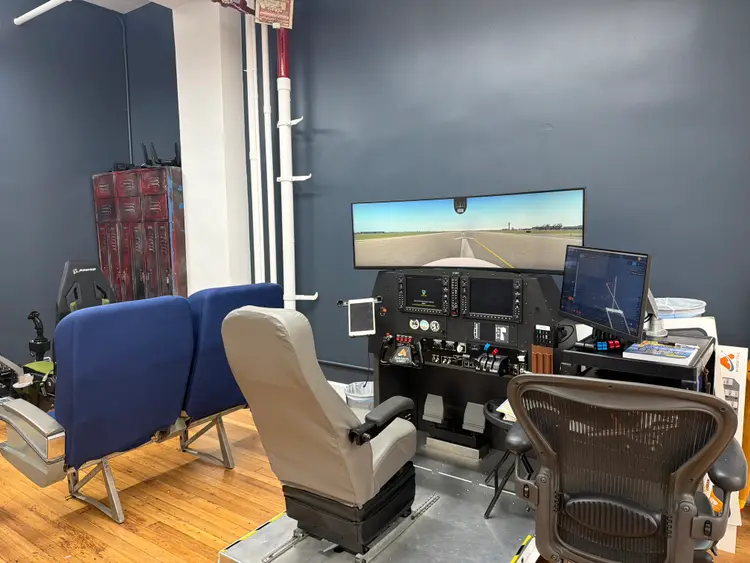
Build Instrument Proficiency on a Cirrus G3000 Simulator
Train for your instrument rating on the Garmin G3000 Perspective Touch+ interface used in current Cirrus SR20, SR22, and Vision Jet aircraft. Build real IFR workflow with airline pilot-led instruction in Manhattan.


Train with Real
Navigation Data
Our G1000 NXi runs the same worldwide navigation database used in active aircraft. Current AIRAC cycle. Real procedures. The same SIDs, STARs, and approaches you'll fly on your checkride.

IFR Currency Session Pricing
Choose hourly for occasional practice. Choose bundles to save when you need more reps.
With Instructor
A CFII guides you through approaches, holds, and procedures
Hourly = pilots who fly IFR regularly and need occasional practice.
Bundle = pilots rebuilding proficiency or prepping for an IPC.
Your first lesson
What Happens in Your First IFR Lesson?
Structured instrument training, designed by airline pilots, with a CFI-I in the FAA-approved simulator.
2-Hour IFR Introduction · Licensed Pilots (PPL+) · $430
2 Hours Total
Pre-flight briefing 20 minutes, Simulator session 90 minutes, Post-flight debrief 10 minutesPre-flight briefing 20 min
- Meet your instructor and the simulator
- Plan the flight: Republic Airport (KFRG) to Bedford (KBED)
- Weather and ForeFlight charts
- Clearance structure and readback
- G1000 route, NAV radios, flight director
Simulator session 90 min
- Partial panel on the attitude indicator
- Add the altimeter, then heading
- Full panel: Pattern A, Vertical S
- Trim and the basic scan
Post-flight debrief 10 min
- Your scan and G1000 use
- Trim and control in maneuvers
What does instrument training look like?
Ten two-hour lessons, twenty hours of loggable AATD time in the G1000 NXi, from $430 a lesson.
- Briefing
- Simulator
- Debrief
Lesson 01: Introduction to Instrument Flight Rules
Build your instrument scan from partial to full panel
- Instrument scan
- IFR clearance readback
- Trim technique
Full lesson 1 planBriefing 20 min
- IFR flight planning: Republic Airport (KFRG) to Bedford (KBED)
- Weather briefing and ForeFlight chart organization
- IFR clearance structure and readback practice
- G1000 setup: input route, NAV radios, flight director
Simulator 90 min
- Partial panel attitude flying (attitude indicator only)
- Progressive instrument introduction: altimeter, then heading
- Full panel transition: Pattern A, Vertical S maneuvers
- Trim management and basic instrument scan
Debrief 10 min
- Scan technique and G1000 effectiveness review
- Trim and control management in maneuvers
Lesson 02: VOR Navigation & IFR Cross-Country
Navigate by VOR and fly your first holds
- VOR navigation
- Holding entries
- Autopilot modes
Full lesson 2 planBriefing 20 min
- VOR navigation: radials vs bearings, TO/FROM, CDI vs bearing pointers
- IFR flight plan: Morristown Airport (KMMU) to Allentown (KABE)
- Holding pattern components and entry types
- Approach briefing introduction: VOR 24 at Nantucket (KACK)
Simulator 90 min
- Pattern A, Vertical S1, Teardrop maneuvers
- Holding entries: 80/260, teardrop, direct
- Flight Director and autopilot modes: HDG, NAV, FLCH, VS
- Dual VOR navigation with radial intercepts
Debrief 10 min
- Common radial/course errors and TO/FROM logic
- Hold entry timing and G1000 bearing pointer use
Lesson 03: Holds & First VOR Approaches
Fly your first instrument approach to minimums
- VOR approaches
- Approach briefings
- Holds on approach
First Instrument Approach
Full lesson 3 planBriefing 20 min
- VOR approach plate interpretation and briefing format
- IAF vs vectors: definitions and G1000 loading techniques
- Approach configuration: flaps, power, autopilot setup
- Missed approach flow review
Simulator 90 min
- VOR 24 at Nantucket (KACK): full procedure, no vectors
- Three execution modes: autopilot NAV, HDG/VS, and manual raw data
- Holding pattern entries integrated into approach segments
- VOR 6 at Martha's Vineyard (KMVY) with radar vectors (time permitting)
Debrief 10 min
- Hold entry selection and approach tracking review
- Configuration and missed approach execution
Lesson 04: Non-Precision Approaches & Holds
Fly non-precision approaches and the missed
- Non-precision approaches
- Missed approaches
- Wind correction in holds
Full lesson 4 planBriefing 20 min
- MDA vs DH: non-precision vs precision approach concepts
- Step-down fixes, MAP identification, and descent profiles
- G1000 approach configuration and stabilized approach criteria
- Missed approach brief: full flow from go-around to ATC call
Simulator 90 min
- VOR 24 KACK: autopilot, HDG/VS, and manual modes
- VOR 6 KMVY: radar vectors to final, no procedure turn
- Hold execution with wind correction and timing
- LOC 11 KSBP introduction: localizer tracking to MDA
Debrief 10 min
- Configuration management and descent timing
- Missed approach decision-making review
Lesson 05: Precision Approaches, SIDs & GPS
Fly the ILS, a SID and a GPS approach
- ILS approaches
- SID departures
- GPS approach types
First Precision Approach
Full lesson 5 planBriefing 20 min
- Precision vs non-precision: ILS components, DH vs MDA
- GPS approach types: LNAV, LNAV/VNAV, LPV minimums
- SID procedures: plate interpretation, threat identification
- Missed approach automation: TO/GA, SUSP, configuration flow
Simulator 90 min
- SID departures from Teterboro (KTEB): every runway to top altitude
- LOC 11 at KSBP: full procedure with briefing and configuration
- ILS 11 at KSBP: glideslope tracking and precision to DH
- Full missed approach execution with automation
Debrief 10 min
- Glideslope tracking technique and ILS vs LOC differences
- GPS vs conventional navigation comparison
Lesson 06: LOC & VOR Approach Proficiency
Fly LOC and VOR approaches without vectors
- Full procedure approaches
- Navigation cross-checks
- Procedure turns
Full lesson 6 planBriefing 20 min
- Full procedure routing: KSWF departure to IGN to VOR 24 KPOU
- ILS 11 KSBP review: intercept and glideslope management
- Procedural routing vs ATC vectors comparison
- NAV source switching: GPS vs LOC1/LOC2 in G1000
Simulator 90 min
- VOR 24 KPOU: full routing from KSWF via IGN, no vectors
- Manual CDI settings, procedure turn, outbound timing
- ILS 11 KSBP: autopilot and manual LOC + glideslope intercept
- Cross-check navigation sources: NAV1, NAV2, bearing pointers
Debrief 10 min
- Station passage identification and outbound intercept timing
- G1000 annunciation awareness and staying ahead of the airplane
Lesson 07: STARs, VNAV & Descent Management
Fly a STAR with VNAV descents
- STARs and restrictions
- VNAV descents
- GPS approaches
First Full Arrival-to-Approach
Full lesson 7 planBriefing 20 min
- STAR chart interpretation: RNAV vs non-RNAV arrivals
- VNAV programming: crossing altitudes, target fixes, profile view
- Loading STAR and approach transition in G1000
- ATC-style changes: altitude, speed, and routing amendments
Simulator 90 min
- LVZ STAR to KMMU: meet MUGZY crossing restriction via VNAV
- Monitor altitude, speed, and lateral deviation throughout
- Fly LPV, LNAV/VNAV, and LNAV-only RNAV approaches
- Handle simulated ATC speed and descent changes enroute
Debrief 10 min
- Vertical navigation planning and constraint compliance
- Reprogramming G1000 fixes and altitudes in-flight
Lesson 08: IFR Diversions & Lost Communications
Divert and handle lost communications
- Lost communications
- G1000 reroutes
- EFC timing in holds
Full lesson 8 planBriefing 20 min
- Lost comm procedures: FAR 91.185, AVEF route, MEA altitude
- Squawk 7600, visual ID, tower coordination for re-entry
- Diversions in G1000: Direct-To, OBS mode, flight plan editing
- EFC logic and "hold for release" instructions
Simulator 90 min
- IFR flight KMMU to KSYR with mid-flight ATC reroute
- Simulate reroute: Direct SAX to V252 to GDM
- Hold at SAX with EFC time and 15 kt crosswind
- Lost comm scenario: follow FAR 91.185 decision tree
Debrief 10 min
- Decision-making under lost comm scenarios
- Direct-To vs full reroute via edited flight plans
Lesson 09: IFR Emergencies & System Failures
Fly partial panel through system failures
- Partial panel
- System failures
- Aviate, navigate, communicate
Full lesson 9 planBriefing 20 min
- G1000 reversionary mode and MFD takeover
- Electrical failure hierarchy: essential bus, load shedding, alternator
- GPS failure vs RNAV database expiry implications
- Backup instruments: standby attitude, magnetic compass
Simulator 90 min
- PFD failure: fly using MFD reversionary mode
- ADC failure: navigate with compass and backup attitude indicator
- Non-GPS approach scenario (LOC or VOR without moving map)
- Progressive system failures with approach execution
Debrief 10 min
- Emergency priorities: aviate, navigate, communicate
- Failure recognition speed and partial panel proficiency
Lesson 10: Comprehensive Review & Checkride Prep
Fly a mock instrument checkride
- Full IFR flight profile
- ACS approaches
- Oral exam preparation
Mock Checkride
Full lesson 10 planBriefing 20 min
- Checkride format: oral exam areas and flight test ACS standards
- Common DPE questions and decision-making scenarios
- Crosswind operation techniques and personal minimums
- Weather-below-minimums scenario planning
Simulator 90 min
- Complete IFR cross-country: file, depart (SID), enroute, hold
- Multiple approach types to minimums (VOR, LOC, ILS, RNAV)
- Missed approach execution and diversion to alternate
- System failure scenarios and backup procedure demonstration
Debrief 10 min
- Checkride readiness assessment and weak area identification
- Oral exam preparation strategy and recommended study
How It Works
Start in the Simulator
Book your first 2-hour lesson with a CFI-I.
- No airplane rental costs
- No weather cancellations
- Pause, rewind, and repeat any procedure
Log 20 FAA-Approved Hours
Complete our structured 10-lesson curriculum.
- Approaches, holds, emergencies, and a mock checkride
- Every hour counts toward your instrument rating
- Save $3,400+ vs. airplane-only training
Transition to the Airplane Ready
Hit the aircraft with real IFR skills already built.
- Progress faster in the airplane
- Spend less on aircraft rental hours
- Pass your checkride with confidence


PRACTICE SOLO. NO CHECKOUT.
Practice IFR procedures on your own time. Drill approaches, holds, and flows between lessons so you get more from every hour with your instructor.
- +Same G1000 NXi you train on
- +Reinforce what you learned in dual
- +Book any available time slot
FAA Instrument Rating Requirements
Here's what the FAA requires for your instrument rating. Up to 20 hours can be logged in an FAA-approved AATD simulator like ours.
Accelerate Your In-Airplane IFR Training
Whether you train with us or elsewhere, these strategies will help you get the most value from your in-airplane IFR instruction. Click any tip for detailed guidance, or watch our airline pilots share proven techniques.
In-Airplane IFR Training Tips
Location
TRAIN TO FLY IN MANHATTAN
Midtown Manhattan

Loading reviews...
Tap any station for live arrival times
Why IFR Students
Train Here
We're not a traditional flight school. We're a simulator training center built for serious IFR students.
Airline Pilot-Led Instruction
Our instructors include active airline pilots and airline pilot-mentored CFIs.
Manhattan Location
Train in Midtown Manhattan, a 2-minute walk from 34 St–Herald Sq.
FAA-Certified Simulator
Realistic training that counts toward your certificate.
Flexible Scheduling
Book sessions when it works for you. Evenings and weekends available.
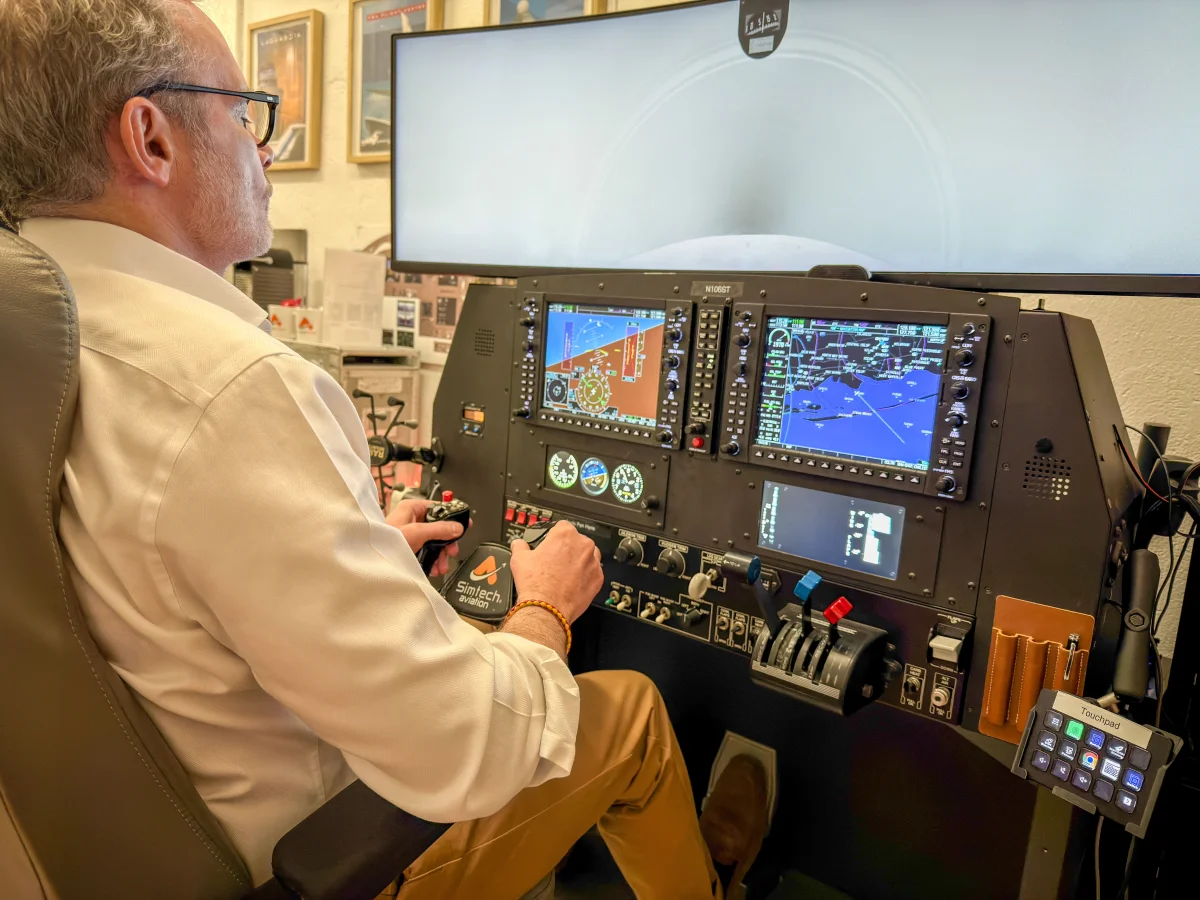
FAA-Certified IFR Simulator
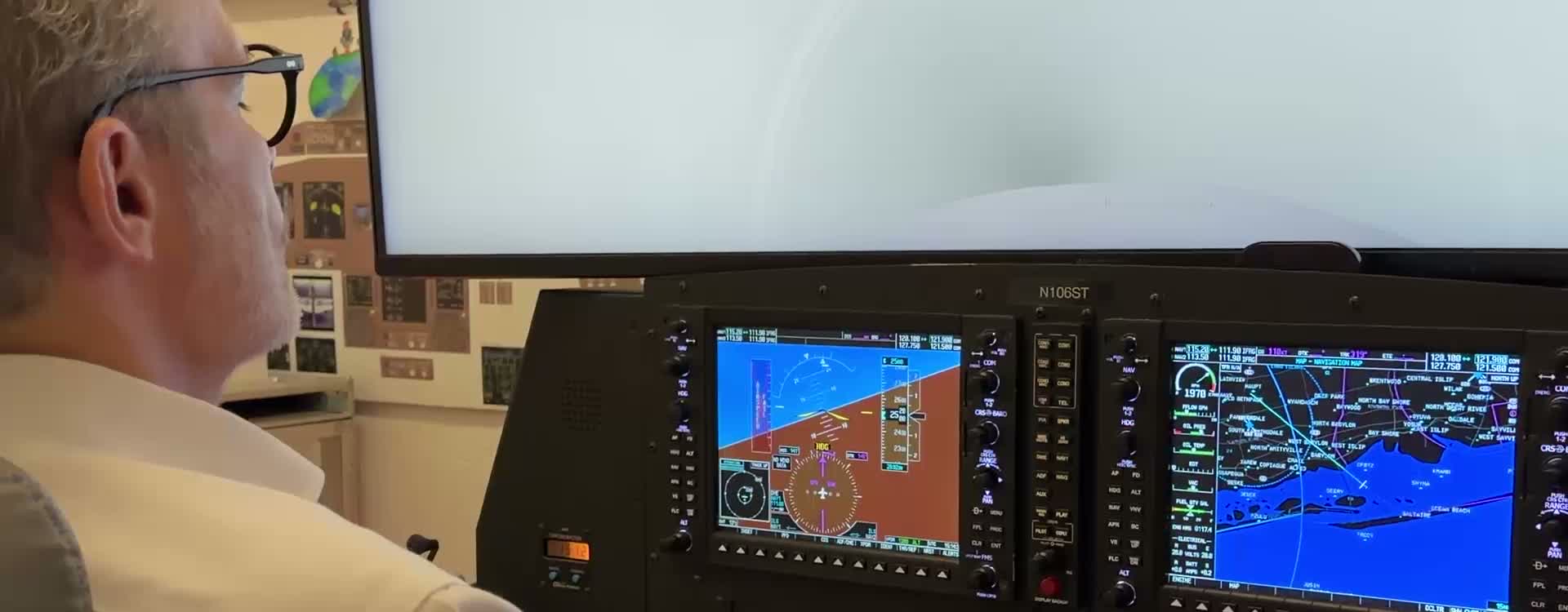
Log up to 20 hours toward your instrument rating in our G1000 NXi AATD.
Instrument Rating & IFR Currency
IFR procedures are complex—from holding patterns to RNAV approaches with VNAV guidance. Our FAA-certified G1000 NXi simulator reproduces every mode and alert you'll encounter in real aircraft, so you learn correct habits from day one. Practice approaches that are too expensive or impossible in an airplane, including NDB procedures, international airports, and mountain terrain, with a flight instructor.
Book Your IFR Training
Start your instrument rating journey today.
Trusted by instrument students across NYC
Non-U.S. Citizen?
TSA approval is required before your second lesson. We do NOT sponsor visas.
We do NOT sponsor visas.
Learn about TSA requirements →Which simulator should you use for instrument training?
Midtown studio: Open at 35 West 31st Street, Suite 901.
You are training for an instrument rating, where most of the work happens inside the avionics rather than out the window.
At this level the panel is no longer background. Choosing the wrong one means learning a menu structure you will never use.
This is the point where the answer flips. Through primary training the panel barely mattered; at the instrument level you will spend most of your time operating one specific system, so train on the one you fly.
How to choose
- Fly a Cessna, Piper, Diamond, or Beechcraft? Take the G1000. It runs the manufacturer trainer software, so procedure loading and approach logic behave exactly as they do in flight.
- Fly a Cirrus? Take the Cirrus G3000 when it opens. The touchscreen controller workflow is different enough that practising it on the wrong panel costs you.
- Either way, log it. Both are FAA-approved training devices, so instructor-supervised time counts toward the rating and toward currency.
| G1000 Suggested for you | Cirrus SR Delayed to 2027 | |
|---|---|---|
| Aircraft | Cessna 172R / 172S, Cessna 182T / T182T, Piper Archer, and Diamond DA40 | Cirrus SR20 and Cirrus SR22 |
| Avionics | Garmin G1000 NXi | Garmin Perspective Touch+ (G3000 displays, GTC 580 controllers) |
| Panel type | Knobs and soft keys | Touchscreen controllers |
| Autopilot | GFC 700 | GFC 700 |
| Software | Garmin G1000 PC Trainer (manufacturer software) | Cirrus Perspective Touch+ profile on X-Plane 12 |
| FAA status | FAA-approved AATD, loggable with an instructor | FAA-approved AATD, loggable with an instructor |
| Available | Now, in Midtown Manhattan | Delayed to 2027. It will run at the new Midtown studio. |
What you get
Approaches, holds, and failures rehearsed on the exact panel you will fly them on, until the workflow is automatic.
What it costs to guess
Hunting for a page you have never seen while single-pilot in instrument conditions is the scenario this training exists to prevent.
These are not video games
The G1000 simulator is an FAA-approved Advanced Aviation Training Device (AATD). Flown with an instructor, the time counts toward the instrument rating, instrument currency, the private pilot certificate, and the commercial certificate.
The Cirrus SR simulator will be an FAA-approved Advanced Aviation Training Device (AATD). Flown with an instructor, the time will count toward the instrument rating and instrument currency.
The Vision Jet simulator will be an FAA-approved Advanced Aviation Training Device (AATD). Flown with an instructor, the time will count toward the instrument rating, instrument currency, and type rating preparation.
The VR simulators are recreational and not FAA approved. Time in them does not currently count toward a certificate, rating, or currency, even with an instructor, and would need a certification process before it could.
Which Simulator for Instrument Training?
Midtown studio: Open at 35 West 31st Street, Suite 901.
Either platform logs the same instrument time, so the question is which panel you fly. The G1000 matches the Cessna, Piper, and Beechcraft fleet. The Cirrus machines match Perspective Touch+ aircraft, where the touchscreen workflow is most of the learning curve. Train on the one that matches your airplane.
G1000 Flight Simulator
Suggested for youFlight training airplanes, a Cessna 172 and similar. This is the certified equipment people train in toward a license.Unless you fly a Cirrus, the G1000 is the panel your IFR training airplane has.Cirrus SR Series Simulator
Delayed to 2027The Cirrus SR20 and SR22, the airplanes famous for the whole-airframe parachute.Delayed to 2027. It will run at the new Midtown studio.SF50 Vision Jet Simulator
Delayed to 2027The Cirrus SF50 Vision Jet, the only civilian jet built with a whole-airframe parachute.Delayed to 2027. It will run at the new Midtown studio.
VR Flight Simulators
General aviation airplanes in X-Plane 12 (a Cessna 172, a Cirrus SR22 and a Piper PA-18 Super Cub) open the recreational launch lineup, alongside the F/A-18 Hornet, F-16 Fighting Falcon, and A-10 Thunderbolt II. Not FAA approved, and time in it never counts toward a certificate, rating, or currency, even with an instructor.
More about the VR simulatorsInstrument Rating FAQs
How to start, simulator hours, approach practice, and checkride prep.
Instrument Rating Essentials
How to start, simulator hours, approach practice, and checkride prep.
Aviator NYC's instrument rating program begins in the simulator — build scan discipline, approach procedures, and radio skills before spending $200+/hour in the aircraft.
- PPL required before starting instrument training (or train concurrently)
- 40 hours of actual or simulated instrument time required (FAR 61.65)
- Up to 20 hours in Aviator NYC's AATD count toward the requirement
- Structured curriculum: basic instruments → holds → approaches → cross-country → checkride prep
Aviator NYC's FAA-approved AATD logs up to 20 hours toward the 40-hour instrument time requirement under FAR 61.65.
- 20 hours AATD: the maximum FAA allows for instrument rating
- All approach, hold, and tracking time is loggable with an instructor
- Practice approaches at Republic Airport (KFRG), Morristown Airport (KMMU), and other local airports
- Smart use of simulator time can save $3,000–$8,000 in aircraft rental costs
Aviator NYC's checkride prep covers every approach type in the ACS: precision (ILS), non-precision (VOR, RNAV), and partial panel.
- ILS: the gold standard precision approach — required for checkride proficiency
- RNAV (GPS): the most common approach in modern GA flying
- VOR: increasingly rare but still on the practical test standards
- Partial panel: demonstrate instrument flying with failed instruments
Aviator NYC offers full instrument rating training on the G3000 Perspective Touch+ — ideal for pilots who fly or plan to fly Cirrus aircraft.
- Same 20-hour AATD maximum applies — G1000 and G3000 hours both count
- G3000 touchscreen approach loading and autopilot coupling for Cirrus workflows
- Train on the avionics you'll actually fly in the aircraft
- G1000 also available for general IFR discipline on Cessna/Piper platforms
Aviator NYC's flight instructors teach approach briefing the way it's done in airline operations: systematic, complete, and fast.
- Identify approach type, minimums, missed approach procedure, and frequencies
- Brief before descending — never while configuring the aircraft
- Aviator NYC uses the MARTHA briefing format: Minimums, Approach type, Radios, Timing, Heading, Altitude
Aviator NYC's instructors see the same approach errors repeatedly — most stem from incomplete briefings and late configuration.
- Descending below MDA/DA without the runway environment in sight
- Failing to identify the final approach fix or missed approach point
- Not briefing the missed approach procedure before starting the approach
IFR Training Resources & Guides
Build instrument proficiency with these guides — from clearances to checkride techniques
Instrument Rating Training Experience
Personal story of earning an instrument rating in NYC — what to expect on your journey.
Instrument Rating Training Tips
Proven strategies to train efficiently — simulator vs aircraft, lesson planning, and checkride prep.
IFR Clearance Proficiency
Master IFR clearances beyond CRAFT — foundational communication skills for IFR flying.
Jeppesen Approach Plate Briefing
Step-by-step Jeppesen chart briefing format used by airline pilots — core technique to master.
Holding Pattern Entry Procedures
Master holding pattern entries with interactive calculators — essential checkride skill.
IFR Departure Climb Gradients
Calculate and fly required climb gradients on departure procedures — obstacle clearance techniques.
FAA/NACO Approach Chart Briefing Guide
FAA approach plate briefing technique — what to brief, when to brief it.
Flying Instrument Approaches
Practical technique for flying precision and non-precision approaches.
G1000 VNAV Navigation
Master vertical navigation on the G1000 — setup, descent planning, and common pitfalls.
G1000 Approach Activation Tips
Navigate approach activation on the G1000 — vectors-to-final, HILPT, and transition selection.
RNAV Equipment Requirements
Understand RNAV equipment requirements — what you need to file /G and fly RNAV approaches.
What Is the FAA WINGS Program?
WINGS is the FAA's voluntary Pilot Proficiency Program. Complete activities at your level to earn credits toward a WINGS phase — which can replace your flight review. Our simulator sessions are FAA-accepted WINGS activities at three proficiency levels.
master Level
ATP/CFI ACS
3 credits per session
Airport operations + flight operations + knowledge
Each session earns 3 of 4 credits needed. One Risk Management credit completes the phase.
advanced Level
Commercial ACS
2 credits per session
Flight operations + knowledge
Each session earns 2 of 4 credits needed. Two sessions plus knowledge activities complete the phase.
basic Level
Private Pilot / Instrument ACS
2 credits per session
Flight operations + knowledge
Each session earns 2 of 6 credits needed. Three sessions plus knowledge activities complete the phase.
Which Scenarios Can You Fly?
Every session is different. Pick any scenario below — each one earns FAA WINGS credit and challenges a different instrument skill. No required order.
Structured IFR currency session to regain or maintain instrument currency under 14 CFR §61.57(c). Six approaches, holding, and intercepting/tracking.
Mountain IFR flying through Colorado with convective weather and terrain challenges.
Desert-to-urban IFR with high density altitude, terrain, and busy Class B airspace.
Mountain crossing IFR through the Cascades with icing and low visibility.
Get-home-itis scenario with deteriorating weather and decision-making pressure.
Coastal IFR with marine layer, fog, and fatigue/business pressure decision-making.
Short-hop IFR through NYC Class B with complex arrival procedures and unfamiliar aircraft.
Corporate flight into major Class B airport with sequencing, speed restrictions, and personal urgency.
Medical delivery mission under time pressure with low IFR conditions.
Transport-category profile with full SID/STAR sequencing. Airline interview prep and single-pilot jet IFR training.
Northeast corridor IFR with Class B departures, busy ATC, and complex arrival procedures.
Mountain IFR into challenging terrain with special approach procedures and weather considerations.
Mountain resort destination with terrain challenges, special procedures, and weather decision-making.
Hawaiian inter-island IFR with oceanic procedures, volcanic terrain, and tropical weather.
South American high-altitude IFR with challenging terrain, international procedures, and mountain weather.
Hub-to-hub STAR flow with "descend via" clearance, NorCal flow control, and marine layer ILS.
Mid-Atlantic coastal IFR through military airspace with Chesapeake Bay moisture and low-IFR arrival.
Business jet northeast corridor with Class B departure, reroute amendments, and BOS STAR compression.
Caribbean overwater IFR with tropical convection, limited diversion options, and island terrain approach.
High-altitude hub with terrain-ringed basin, rigid STAR step-downs, and 7,316-foot elevation approach.
Complex Heathrow SID with multiple constraints, European procedures, and Alpine terrain approach.
Short-haul Alpine IFR with FOEHN winds, terrain-constrained MEAs, and compressed task timeline.
View all 22 WINGS scenarios and earn FAA proficiency credits →
Plan your instrument training
Questions About Instrument Training?
Get personalized guidance on your path to an instrument rating.