Flight Training Lesson Plans
Structured curriculum for every stage of your aviation journey - from young aviators to professional IFR training
Best viewed on desktop or tablet. On mobile, rotate to landscape for the full experience.
Professional Curriculum by Training Category
Private Pilot Lessons
14 lessons across 3 stages — from basic flight controls through traffic pattern operations. Includes background briefings, step-by-step exercises, and radio communication practice.
Overview
The purpose of this exercise is to learn the effects of the controls when operated independently in flight. This exercise is the foundation of learning to control the aircraft. Lessons you learn here will prove invaluable at later stages of your training.
In the background briefing you will find reference to aerodynamic principles such as lift, drag, thrust, etc. These terms and principles are described only in basic detail in this exercise, but are expanded upon in the following exercises as your knowledge develops.
The exercise may be split into more than one flight, and elements of it will recur and may be revised in later flight exercises. As at all other times, tell your instructor right away if you do not understand a certain point, or would like to see another demonstration.
Simulator Practice
At Aviator.NYC, you'll practice these control effects on our FAA-approved AATD simulator with Garmin G1000 NXi avionics. The simulator provides a safe, controlled environment to feel the control responses before flying in an actual aircraft.
Background Briefing Topics
- Flying Lesson Format
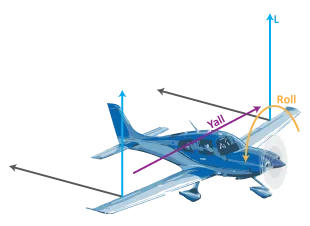
- The Planes and Axes of Movement
- The Function and Initial Effect of the Three Primary Flying Controls
- The Further Effects of the Three Primary Flying Controls
- The Effect of Differing Airspeeds
- The Effect of Propeller Slipstream
- The Effect of Differing Power Settings
- The Trimming Controls
- The Flaps
- Carburetor Heat
- Mixture
- Cockpit Heating and Ventilation
- Other Controls
Flight Exercise Topics
- Purpose
- Airmanship
- The initial effect of elevator
- The initial effect of aileron
- The initial effect of rudder
- The further effect of aileron
- The further effect of rudder
- The effect of differing airspeed
- The effect of propeller slipstream
- The effect of differing power settings
- The effect of flaps
- The effect of elevator trim
Background Briefing
Flying Lesson Format
Typically a lesson covers one or more flight exercises and follows this format:
- Background Briefing
- Self-study from a textbook or course notes before the flight. Some flight schools may also give group briefings and lectures.
- Pre-Flight Briefing
- At the flight school immediately before the flight, your instructor will brief you on the air exercise and answer any questions.
- In Flight
- Your instructor will fly each maneuver as described in the pre-flight briefing. Then you fly the maneuver under the guidance of your instructor.
- After Flight Debrief
- A short discussion where your instructor reviews the flight, the progress you have made, and any particular points to concentrate on. The instructor will tell you the next exercise to be flown so you can cover the background briefing in advance.
Study Tip
Before moving to the next exercise, re-read the material for the exercise you have just flown. You'll find it much simpler after flying it, and you'll retain the important points if you refresh your memory within 24 hours.
The Planes and Axes of Movement
| Plane of Movement | Control Surface | Control Movement |
|---|---|---|
| Pitch | Elevator / Stabilator | Control column forward and back |
| Roll | Ailerons | Control column left and right |
| Yaw | Rudder | Rudder pedals left and right |
An aircraft operates in three dimensions, and each of the three primary flight controls moves the aircraft in one of these planes. The axes are fixed relative to the aircraft, not the horizon — for example, regardless of the aircraft's attitude, the elevator controls pitch as the pilot perceives it.
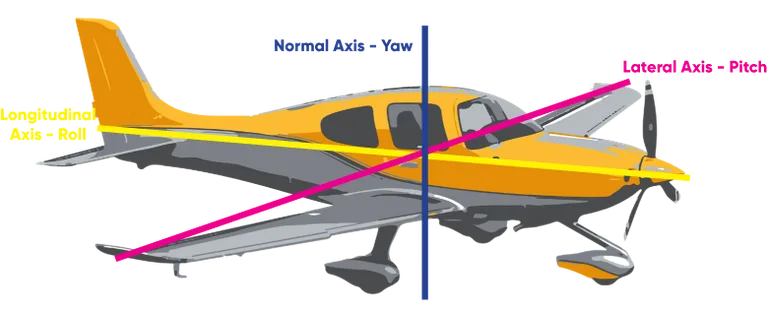
Key Concept
The axes are fixed to the aircraft. Even if the aircraft is in a steep climb, the elevator still controls pitch as the pilot sees it — not relative to the ground.
The Function and Initial Effect of the Three Primary Flight Controls
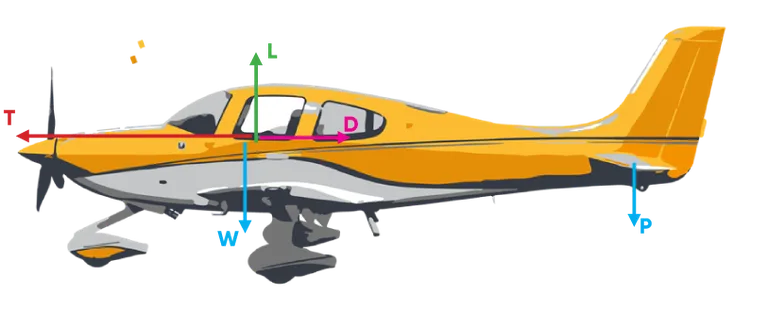
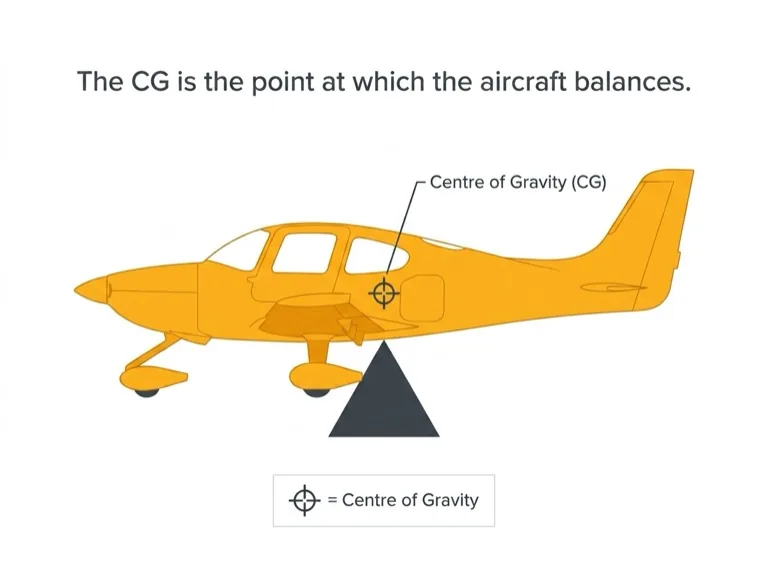
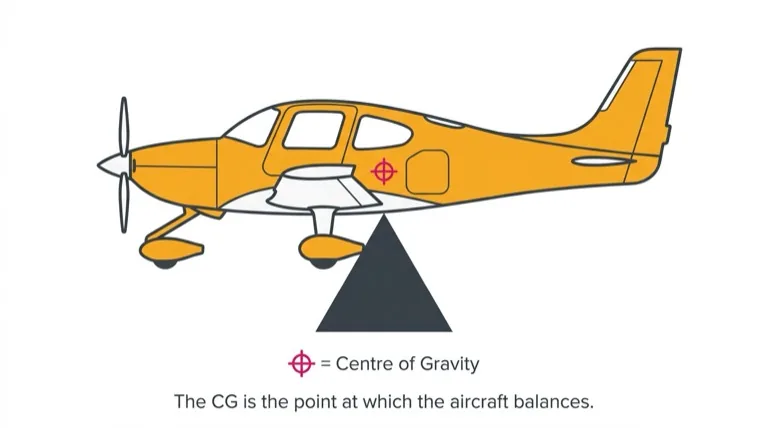
Each control surface works by altering the airflow around it. The movement of the aircraft around an axis is governed by how quickly and how far the control is moved. Each control surface is located some distance from the center of gravity (CG) — for practical purposes, assume the CG is about where the pilot is sitting. The distance between the control surface and the CG provides leverage and enhances its effect.
Elevator — Pitch Control
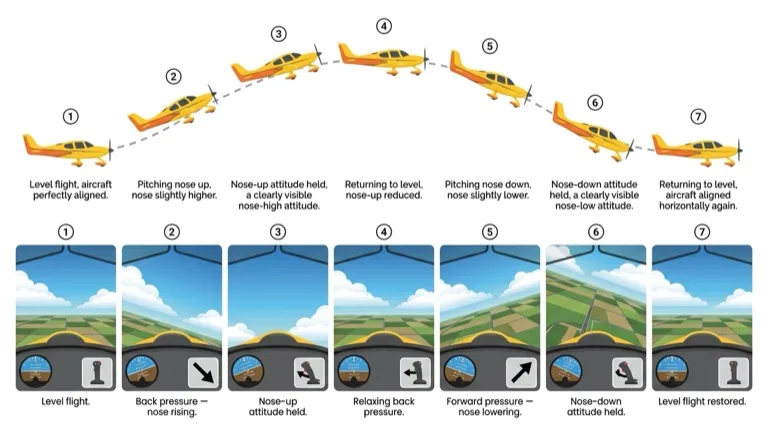
The elevator (or stabilator) controls the aircraft in pitch. When the control column is moved back, the elevator moves up, creating a downward force at the tail. The aircraft pivots around the CG and pitches nose-up. The aircraft continues to pitch nose-up until the control column returns to the neutral position.
When the control column is moved forward, the elevator moves down, creating an upward force at the tail. The aircraft pivots around the CG and pitches nose-down, continuing until the control column is neutralized.
Ailerons — Roll Control
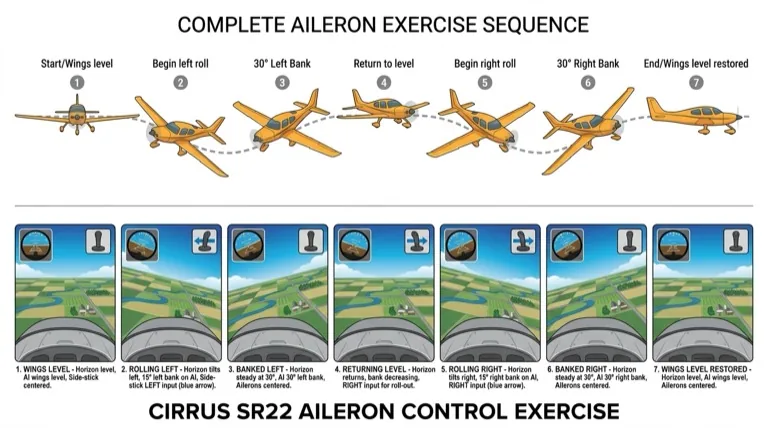
The ailerons control the aircraft in roll. When the control column is moved to the left, the left aileron moves up and the right aileron moves down. These deflections alter the lift produced by each wing — the left wing now produces less lift than the right wing. This imbalance causes the aircraft to roll to the left. The aircraft continues to roll until the control column is centralized.
When the control column is moved to the right, the aileron movements reverse, the lift imbalance reverses, and the aircraft rolls to the right.
Rudder — Yaw Control
The rudder controls the aircraft in yaw. When the left rudder pedal is pressed, the rudder deflects to the left, creating a lift force at the fin acting to the right. The aircraft pivots around the CG and yaws to the left. When the rudder pedals are centralized, the yaw stops.
When the right rudder pedal is pressed, the rudder moves to the right, creating a lift force acting to the left, and the aircraft yaws to the right as long as the rudder is held.
Even a light aircraft has some inertia, so movement about an axis is not instant when a control is moved. In larger, heavier aircraft, the effect of inertia can be quite pronounced and the pilot must allow time for a control movement to take effect.
The Further Effects of the Three Primary Flight Controls
In the flight exercise, only the further effects of the aileron and rudder are demonstrated. The elevator's further effect — that pitching nose-up decreases airspeed and pitching nose-down increases airspeed — is debatable as a "further effect."
Further Effect of Aileron → Yaw
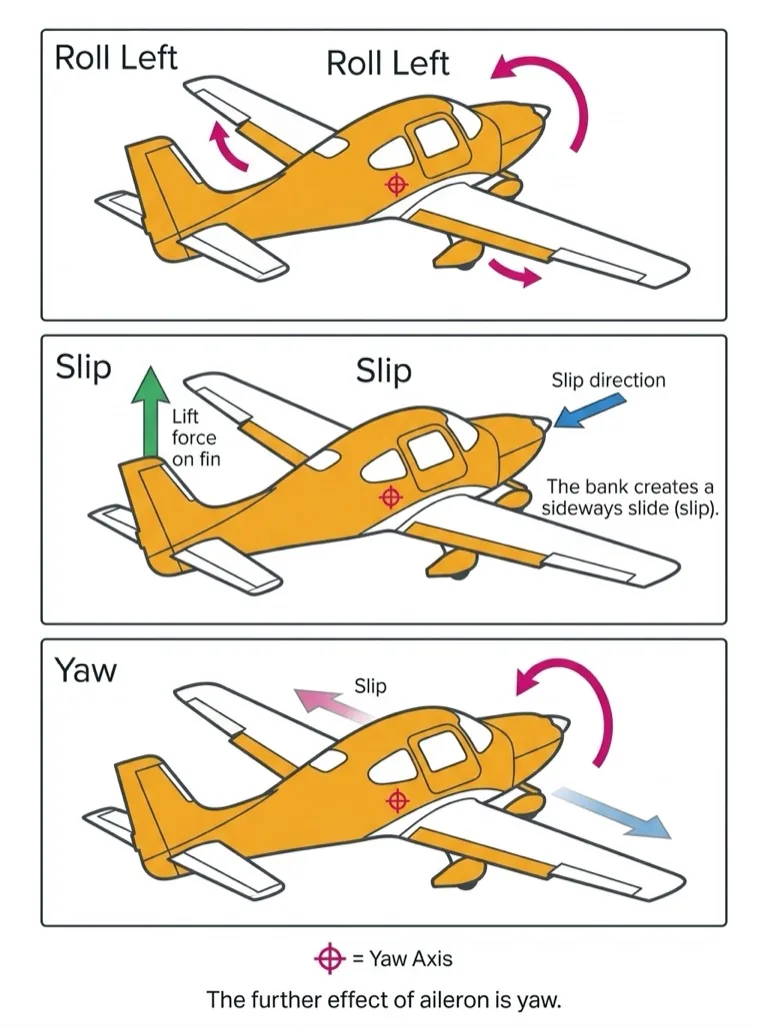
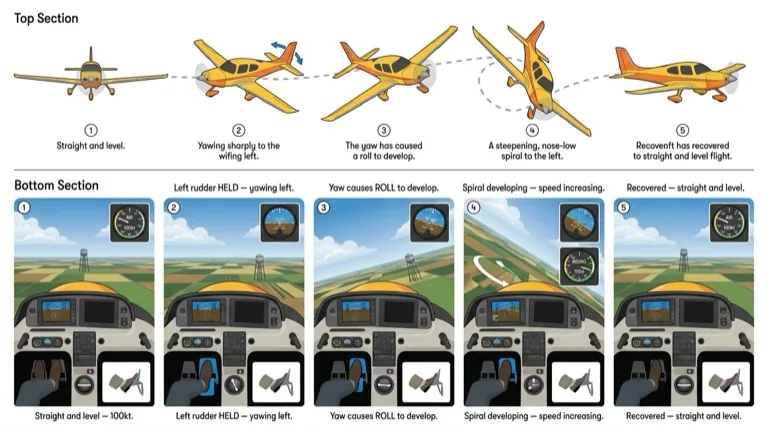
When the aircraft is rolled to a banked attitude using the ailerons and the ailerons are then centralized, the aircraft tends to slip "downhill" toward the lower wing. As the aircraft slips, the airflow strikes the fin from one side, creating a lift force. The aircraft pivots around its CG and yaws toward the lower wing — even though no rudder has been applied.
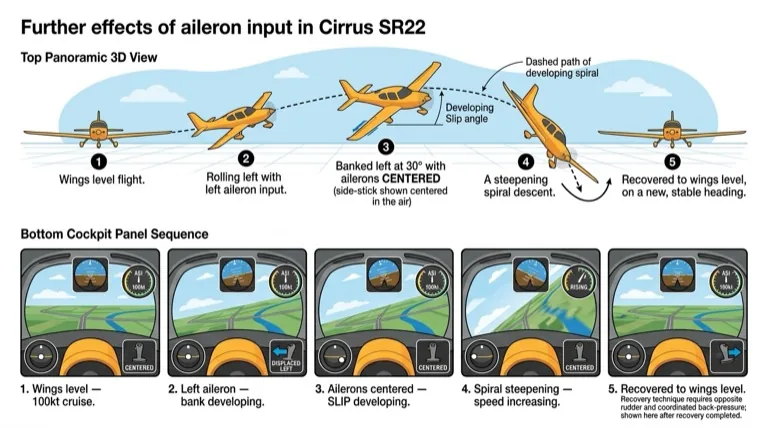
So: the initial effect of aileron is roll; the further effect is yaw.
If the roll and yaw are left unchecked, the aircraft will begin a gradually steepening spiral descent — with increasing roll, increasing airspeed, and loss of altitude. However, this spiral descent is easy to correct, as you will discover during the flight exercise.
Note
There is another yawing effect present while the aircraft is actually rolling, known as adverse yaw. This effect is covered in the turning and slow flight exercises.
Further Effect of Rudder → Roll
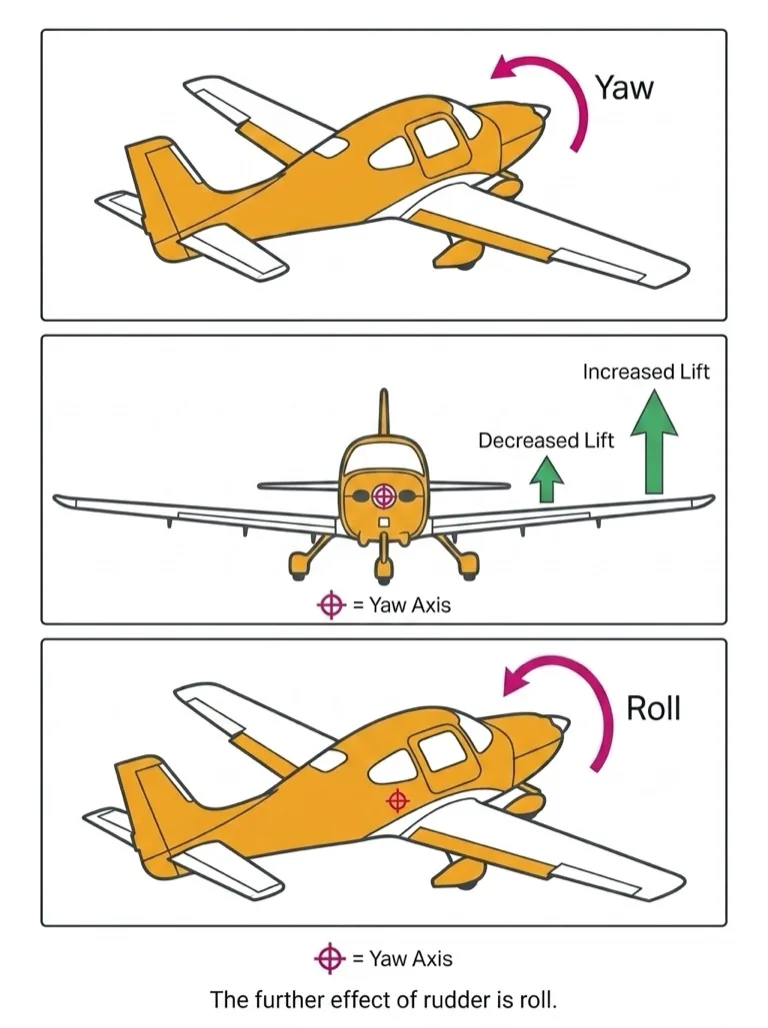
While the aircraft yaws, it is effectively skidding through the air. The wing on the outside of the skid has a faster airflow, producing more lift. The inner wing has slower airflow, producing less lift. This lift imbalance causes the aircraft to roll in the same direction as it is yawing — even though no aileron has been applied.
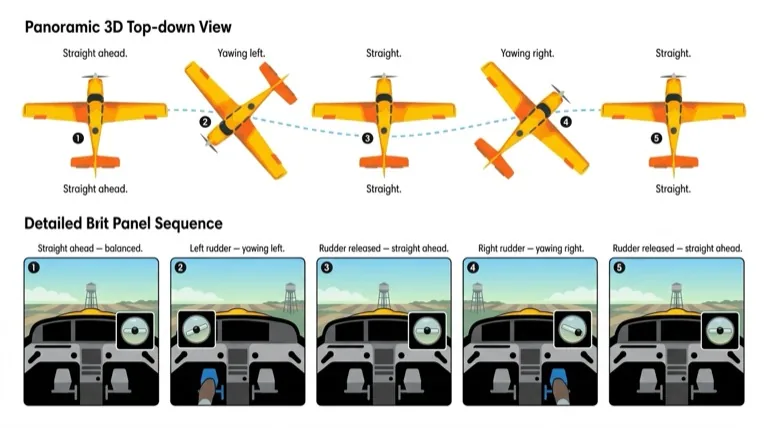
So: the initial effect of rudder is yaw; the further effect is roll.
Key Concept
Stability in yaw and stability in roll are interrelated. A movement in yaw will affect roll, and vice versa. This coupling is fundamental to understanding coordinated flight.
The Effect of Differing Airspeeds
The flying controls function by altering the airflow at their location. At different airflow speeds, the effectiveness and feel of the controls changes:
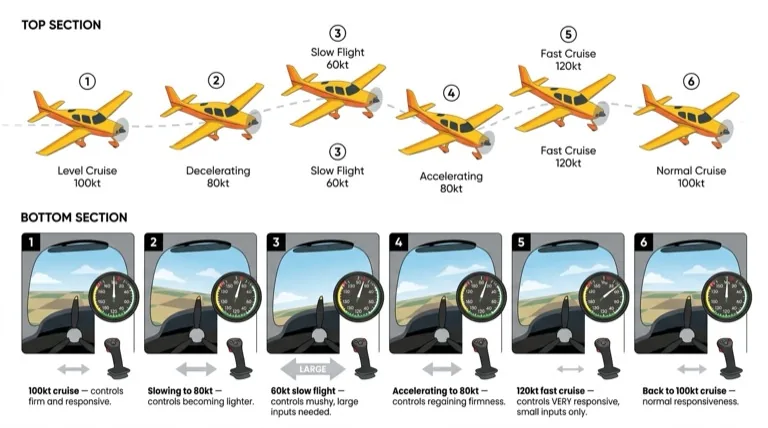
- Fast airspeed: Controls are very effective — only small movements are needed.
- Slow airspeed: Controls are much less effective — larger movements are needed.
The "feel" of the flying controls becomes an important cue to the pilot. Once familiar with control feel at normal cruising airspeed, you should be able to sense from the controls if the aircraft is flying significantly faster or slower.
The Effect of Propeller Slipstream
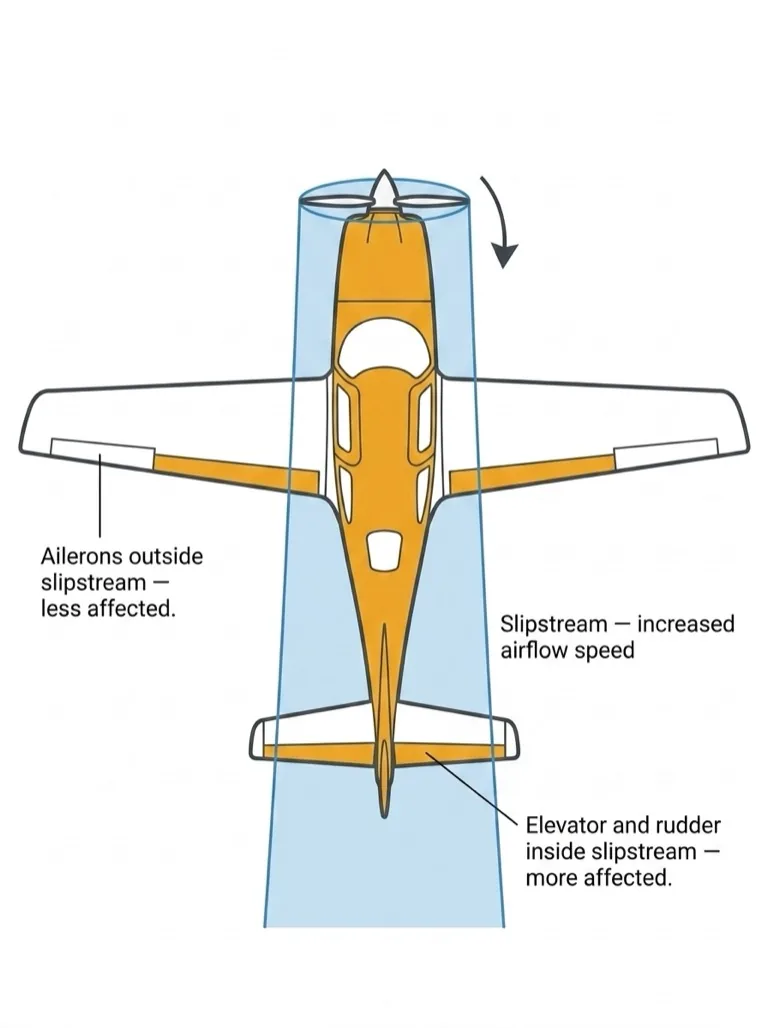
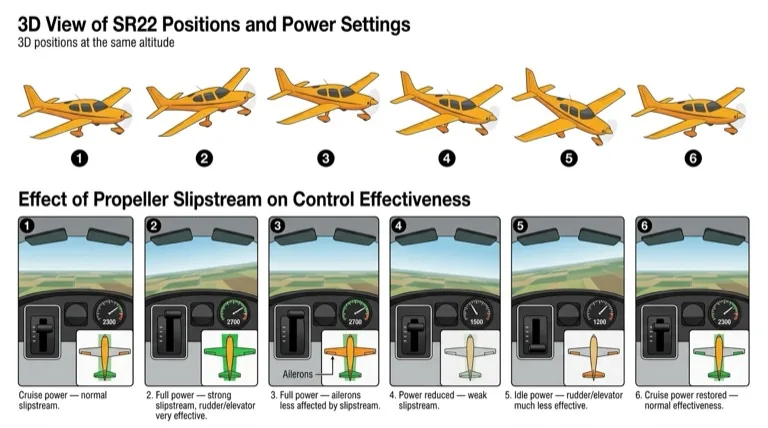
The propeller generates a slipstream — a tube of faster-moving air surrounding the fuselage behind the propeller. Most training aircraft have a fixed-pitch propeller rotating at the same speed as the engine:
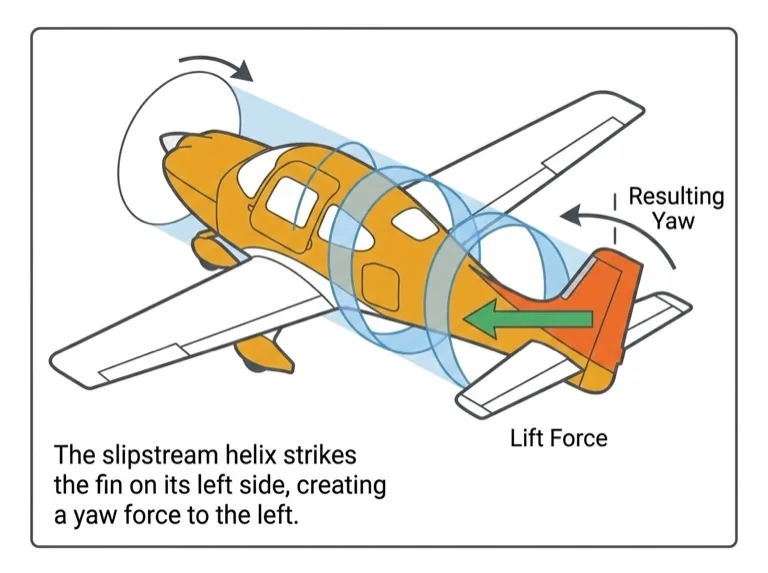
- High power settings: Increased slipstream and airflow speed behind the propeller.
- Low power settings: Decreased slipstream and airflow speed.
Any flight controls inside the slipstream are affected by these varying speeds, just as they are affected by differing airspeeds. Usually the elevator/stabilator and rudder are affected. The ailerons, out at the wingtips, are outside the slipstream.
Important
In a high-power/slow-airspeed situation, the rudder and elevator of a low-tailplane aircraft will still feel effective due to the slipstream effect, despite the slow airspeed. Aircraft with T-tails may have the elevator outside the slipstream.
The Effect of Differing Power Settings
The aircraft is designed to be stable at its normal cruise airspeed and power setting. At any other power setting, there are associated pitch and yaw forces.
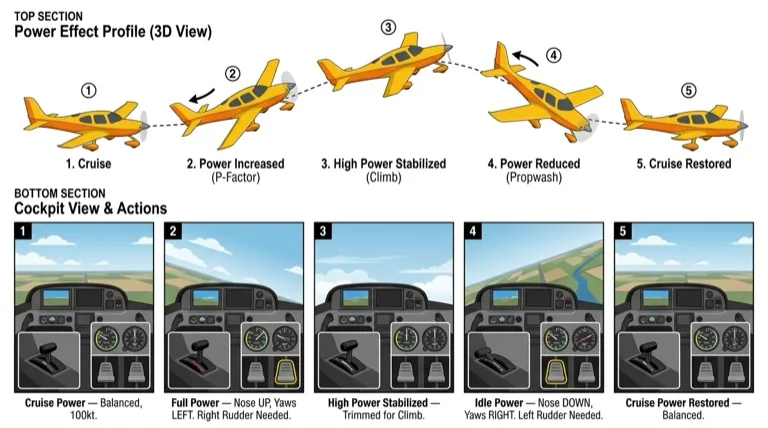
Pitch Effect
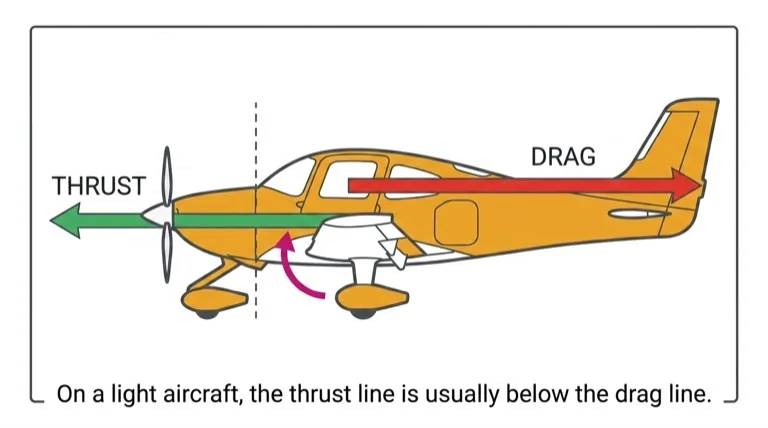
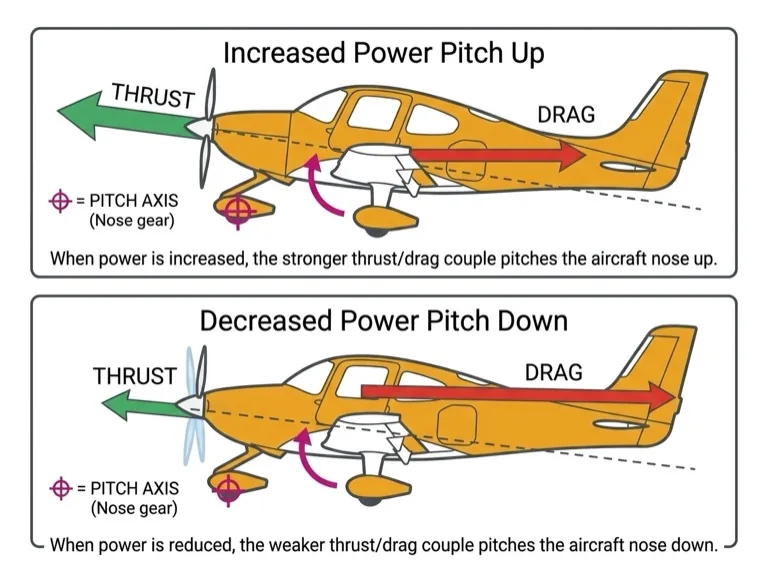
On most light aircraft, the thrust line is lower than the drag line. When power is increased, the stronger thrust/drag couple pitches the aircraft nose-up. When power is reduced, the aircraft pitches nose-down. The pitching movement is aided by the change in airflow over the tailplane.
Yaw Effect
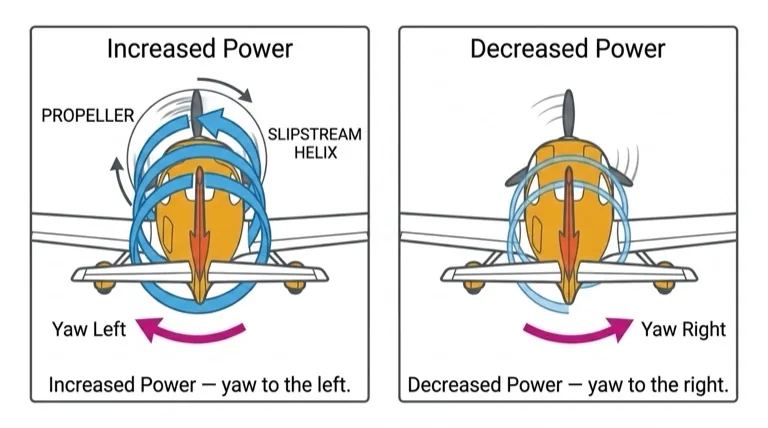
On most modern light aircraft, the propeller rotates clockwise as seen from the cockpit. The helix of the propeller slipstream curves around the fuselage and strikes the fin on its left side, creating a yaw tendency to the left.
Some aircraft compensate with an offset fin or engine. This counterforce is calibrated for cruise power:
- Power increased above cruise: The counterforce is overcome → aircraft yaws left.
- Power reduced below cruise: The counterforce overcompensates → aircraft yaws right.
Note
Aircraft with counter-clockwise rotating propellers have reversed yaw tendencies — increased power causes a yaw to the right.
The Trimming Controls
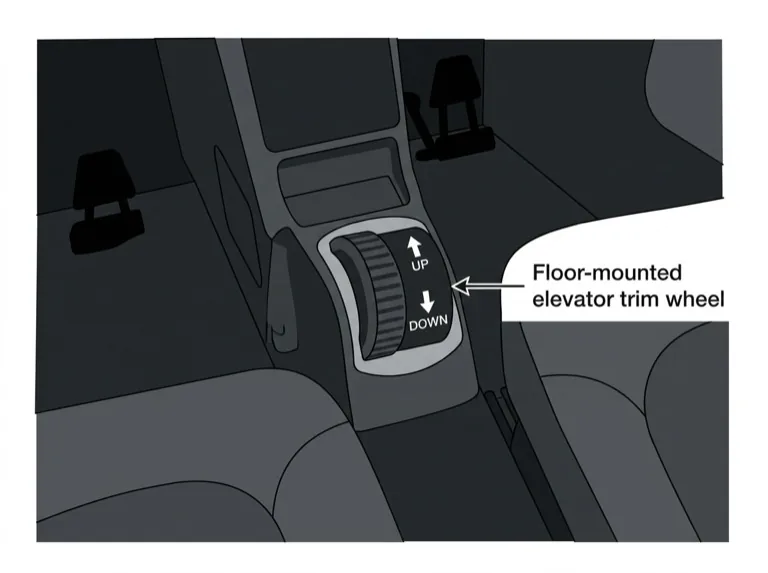
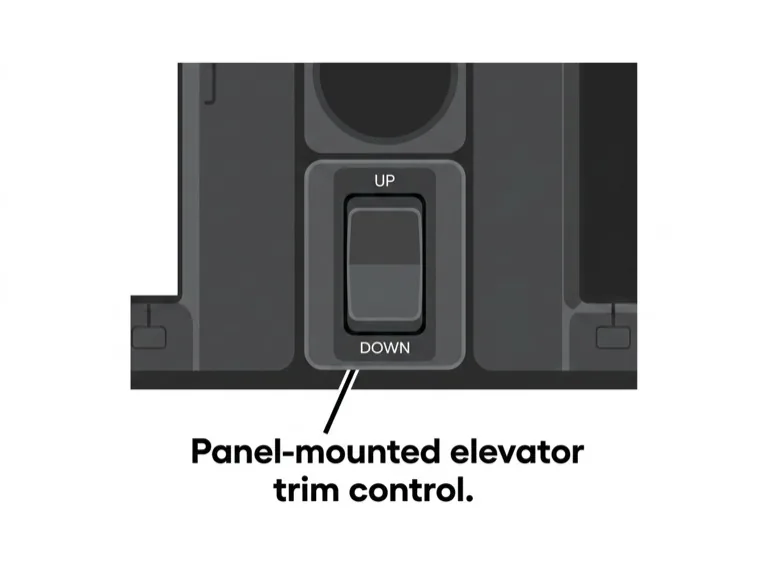
In different flight conditions, there are varying loads on the flight controls, particularly the elevator/stabilator and rudder. To relieve the physical workload, the elevator is fitted with a trimmer. Some aircraft also have a rudder trimmer.
The elevator trimmer usually takes the form of a small trim tab on the trailing edge of the elevator. When a constant pull or push force is needed to hold the elevator in position, the cockpit trim control adjusts the tab to maintain the elevator position aerodynamically — so no pressure is required from the pilot. Some aircraft use a spring in the elevator control cable pattern instead of a trim tab, but the effect is the same.
Remember
The trimmer is used to relieve control loads, not to control the airplane. Always select the desired attitude and performance first, then trim to maintain it.
The Flaps
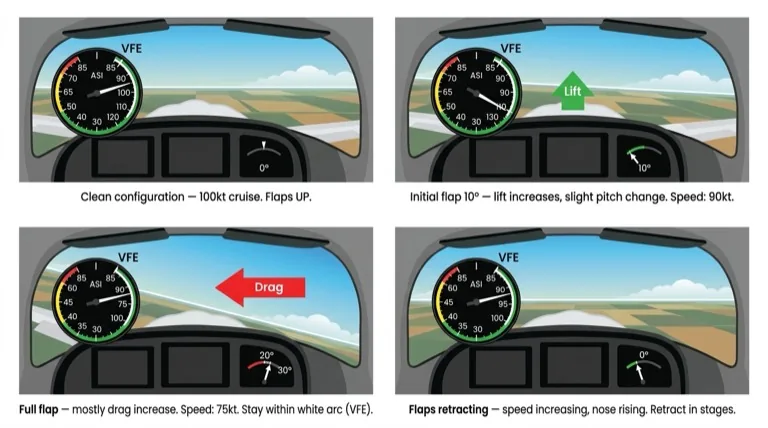
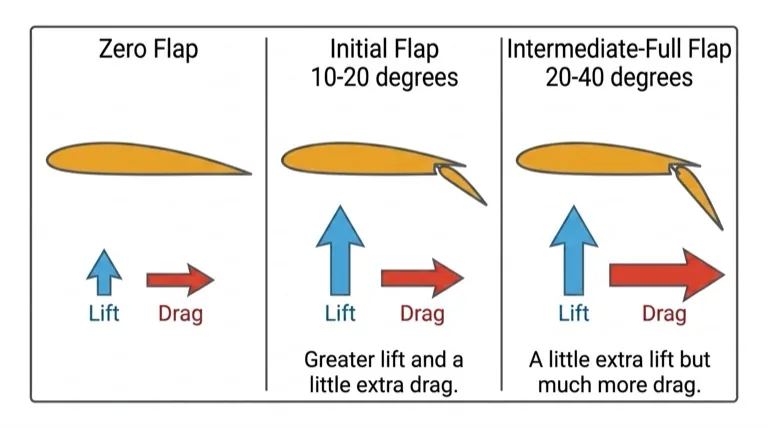
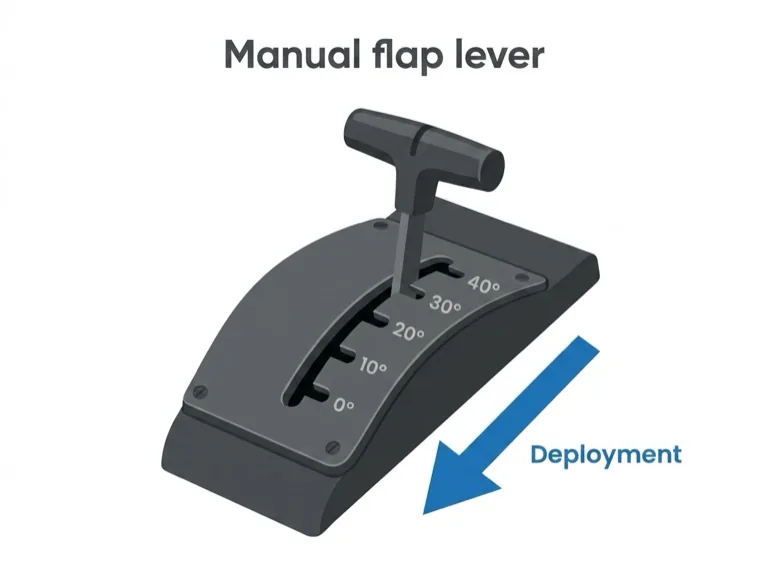
Flaps are fitted to the trailing edge of the wings and operated manually or electrically from a switch or lever in the cockpit. When lowered, they change the wing's shape and the airflow around it:
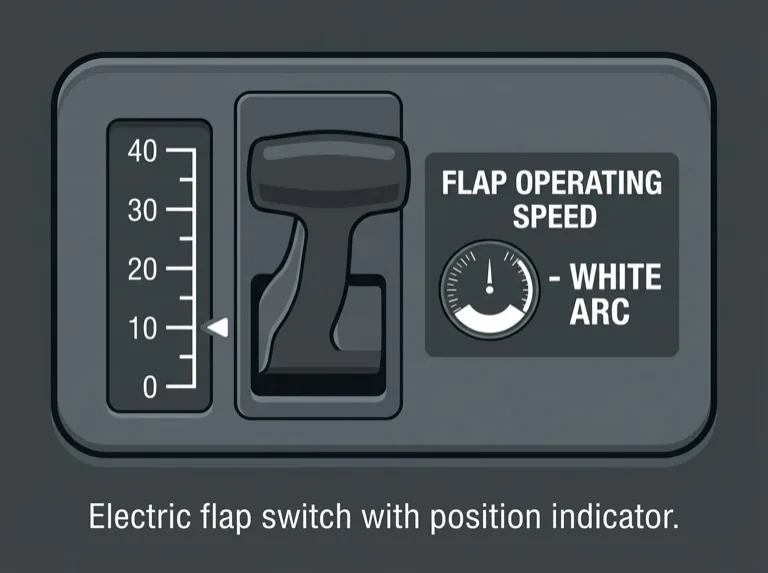
| Flap Setting | Lift Effect | Drag Effect |
|---|---|---|
| Initial flap (10°–20°) | Large increase | Small increase |
| Intermediate to full (20°–40°) | Small further increase | Much larger increase |
When flaps are lowered, the aircraft will pitch nose-up or nose-down depending on the aircraft type. In either case, airspeed reduces due to increased drag.
Speed Limitation
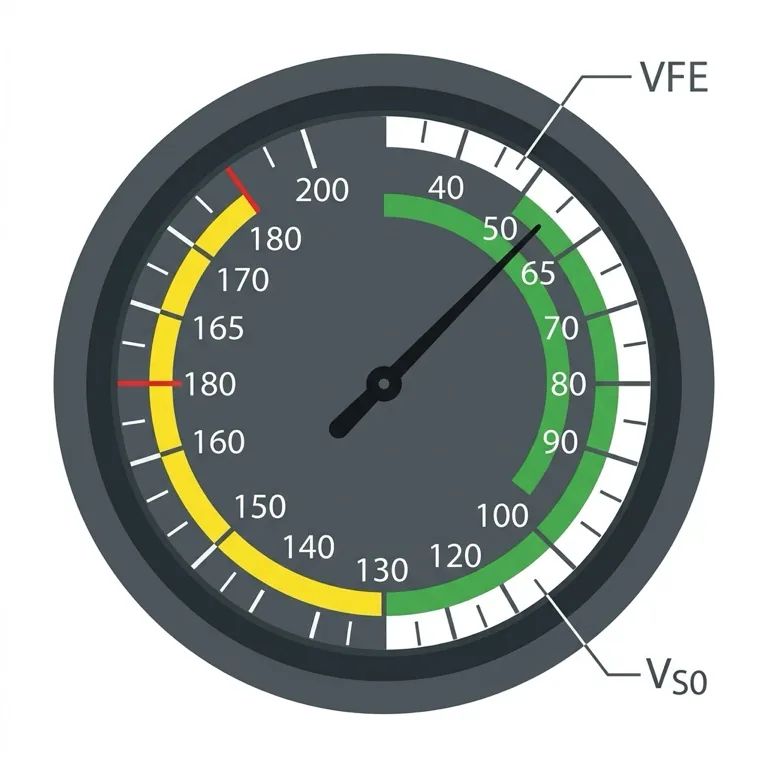
Flaps must only be operated at or below VFE (flap extension speed) — the top of the white arc on the airspeed indicator. Always verify the airspeed is within the white arc before operating flaps, to prevent structural damage.
Carburetor Heat
Most training aircraft engines use a carburetor to supply the fuel/air mixture. If ice forms inside the carburetor — which can happen over a very wide range of temperatures and conditions — engine power will be reduced.
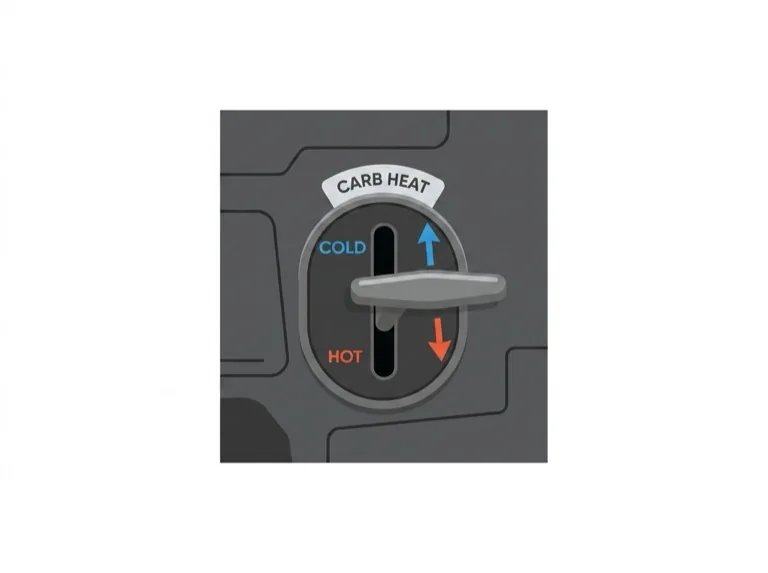
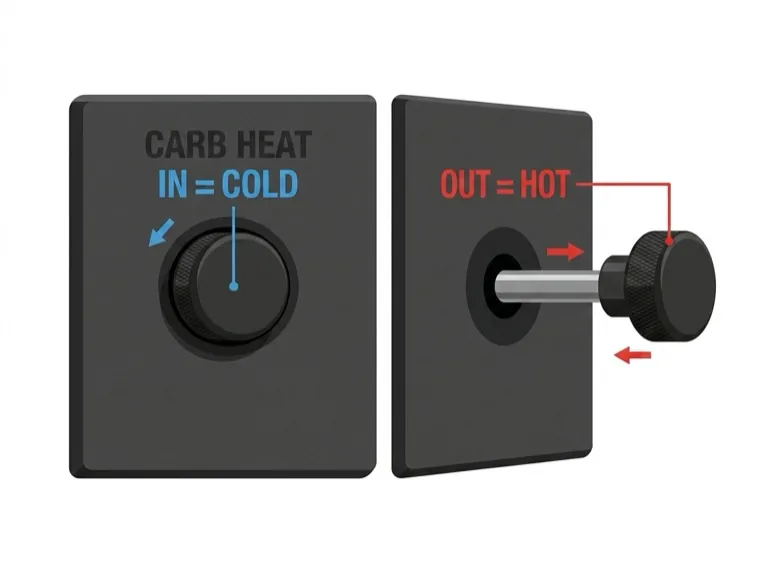
The carburetor heat control routes hot air through the carburetor, melting any ice present. When operated, expect a small reduction in power and possibly slight engine roughness if ice has melted.
Usage Procedure
- The carburetor heat control is normally left in the fully cold position.
- Apply carburetor heat approximately every 10 minutes by moving the control to fully hot.
- Hold for at least 5–10 seconds, then return to cold.
- If RPM returns higher than before, carburetor ice was present — recheck more frequently.
Note
Carburetor icing is covered in much greater detail in later lessons. It is one of the most important topics for pilots to understand thoroughly.
Mixture
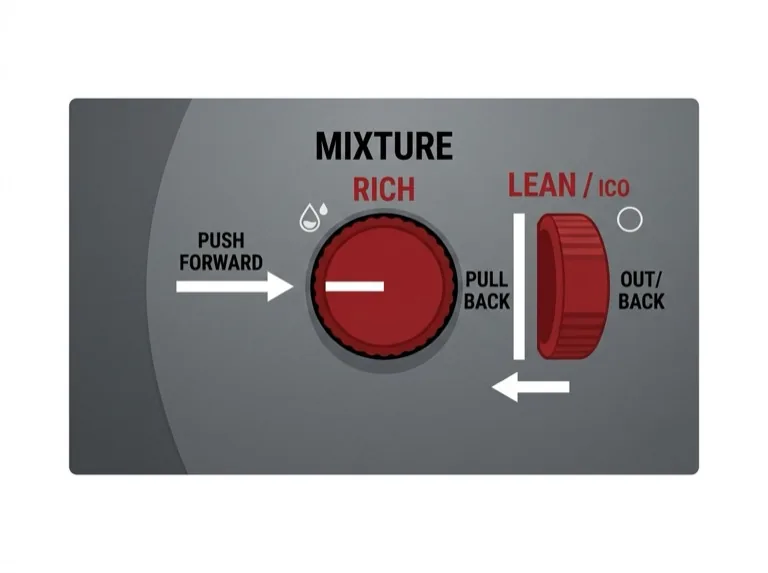
In many training aircraft, the fuel-air mixture is controlled by a red lever or knob next to the throttle — the mixture control.
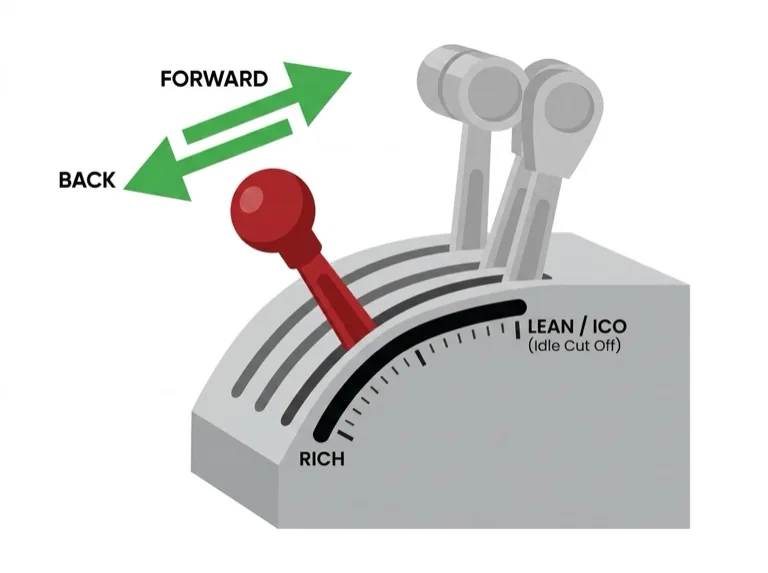
- Low altitudes: Operate with mixture fully rich (control fully forward or fully in).
- High altitudes: Reduced air density means less fuel is needed — the mixture needs to be leaned by moving the control back or out.
Leaning Procedure (Fixed-Pitch Propeller)
- Slowly move the mixture control back (lean).
- Watch for an initial RPM increase.
- RPM will peak, then decrease as you lean further.
- Enrich (move forward) slightly until RPM is on the rich side of peak.
- Reset mixture for any change in power or altitude.
Important
Different engines have different leaning techniques and limitations. Always refer to the aircraft's POH/AFM for specific guidance. The engine is normally stopped by moving the mixture to idle cutoff (ICO), which completely shuts off the fuel supply.
Cockpit Heating and Ventilation
Your instructor will show you the location and use of heating and ventilation controls. Keep the cockpit at a comfortable temperature — if you're not comfortable, your concentration suffers and flying becomes harder than it needs to be.
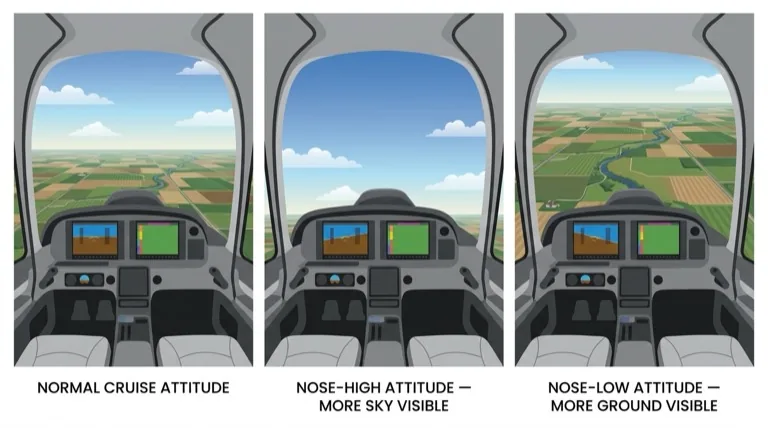
Carbon Monoxide Warning
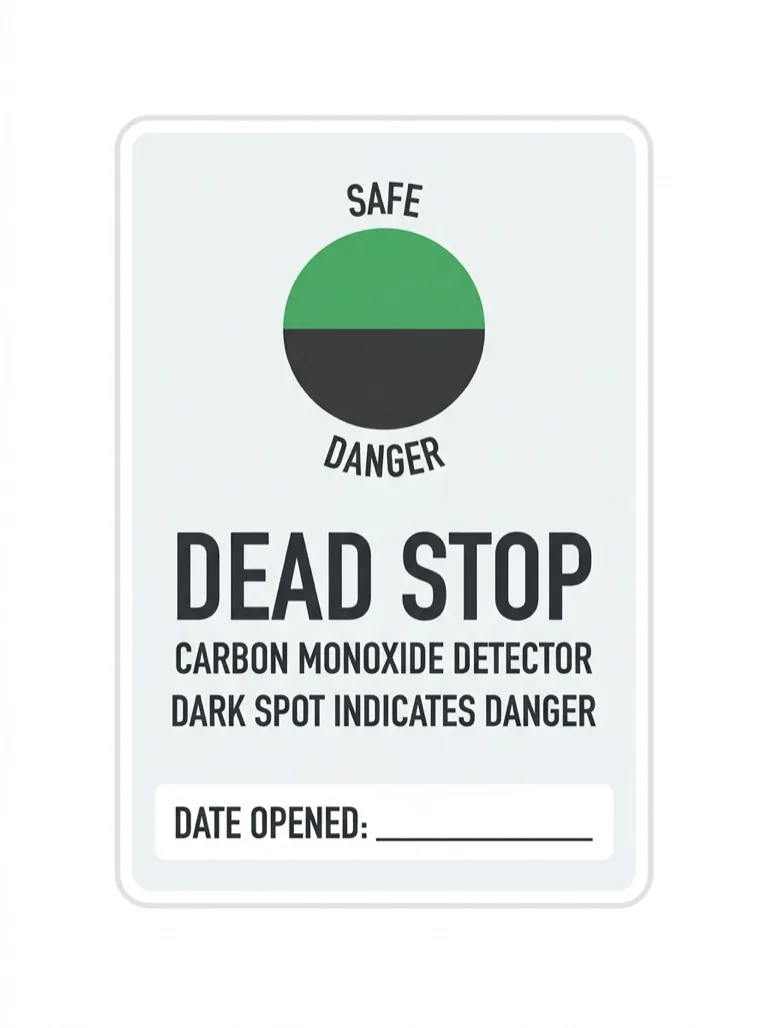
The heating system typically draws hot air from a shroud around the engine exhaust. If there is a crack in the exhaust system, carbon monoxide — a colorless, odorless, potentially lethal gas — may enter the cockpit. Always use fresh air ventilation when using cabin heat. If you suspect exhaust fumes, immediately shut off heating and open all ventilation and windows.
Flight Exercise
Purpose
To learn the effects of the controls when operated independently in flight.
Airmanship
What is airmanship? Airmanship is the common-sense element of flying, but also the quality that differentiates a pilot from an airplane driver. More than anything else, airmanship is about awareness — being aware of what is happening inside and outside the aircraft. Airmanship is best learned by example. Watch your instructor and you will learn more about airmanship than any textbook can teach.
Handing Over / Taking Over Control
During your early flying lessons, control of the aircraft will be transferred between yourself and the instructor many times. It is essential to avoid confusion over who is actually flying the aircraft. Follow this set routine:
Control Transfer Procedure
When the instructor wants you to fly:
- Instructor says: "You have control"
- Student takes the control column in one hand, other hand on the throttle, feet on rudder pedals.
- Student says: "I have control"
When the instructor wants to take control back:
- Instructor says: "I have control"
- Student removes hands and feet from controls.
- Student says: "You have control"
This routine is used at all levels of aviation — from training flights to the cockpit of the largest airliners.
Following Through
When your instructor is demonstrating an exercise, they may ask you to "follow through." This means you should place your hands and feet lightly on the controls so you can feel the control movements your instructor makes — without moving the controls yourself.
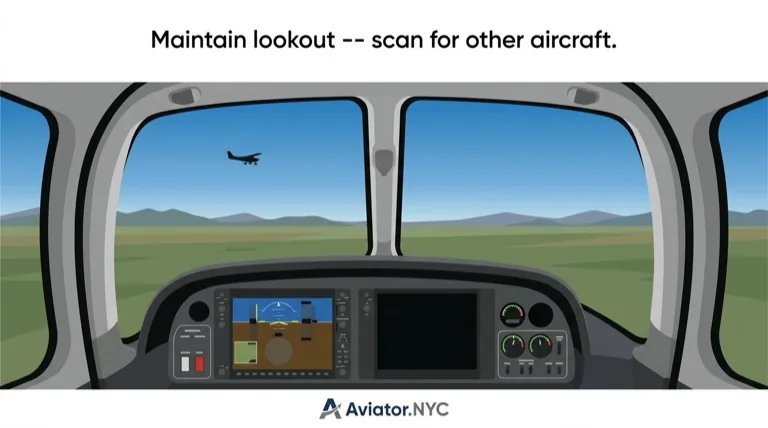
Lookout
Develop the habit now of looking outside the aircraft as much as possible at all times. This will help you:
- Look out for other aircraft
- Maintain awareness of your location
- Monitor changing weather
- Make your flying smoother and easier
If you see another aircraft, point it out to your instructor immediately.
Simulator Practice
In the Aviator.NYC AATD simulator, you can safely practice all these control effects with zero risk. The simulator's G1000 NXi display provides the same instrument feedback you'll see in an actual aircraft. Focus on developing the feel for control inputs and their effects before transitioning to an airplane.
Flight Exercise Sequence
During the flight, your instructor will demonstrate each of the following. You will then practice each one yourself:
Initial Effects
- Elevator: Move the control column forward and back. Observe pitch changes.
- Aileron: Move the control column left and right. Observe roll.
- Rudder: Press left and right rudder pedals. Observe yaw.
Further Effects
- Further effect of aileron: Roll to a banked attitude, centralize ailerons, and observe the aircraft yaw toward the lower wing.
- Further effect of rudder: Apply sustained rudder and observe the resulting roll.
Other Effects
- Differing airspeed: Feel control effectiveness at different speeds.
- Propeller slipstream: Observe control feel changes with power changes.
- Differing power settings: Note pitch and yaw changes when power is added or reduced.
- Flaps: Observe pitch and airspeed changes when flaps are extended and retracted.
- Elevator trim: Practice trimming to relieve control pressure.
Radio Practice
Traffic Pattern Announcement — KFDK
Airport: Frederick Municipal (KFDK)
Position: Crosswind leg, RWY 30
Frequency: CTAF 122.725
Airport Type: Uncontrolled
You are in N106ST and have taken off from Frederick Municipal's Runway 30 to practice touch-and-goes. You enter the crosswind leg and need to announce your position. Runway 30 has a left-hand traffic pattern. Tune the CTAF and make the announcement.
Practice the full scenario with your instructor during your lesson.
Simulator Session at Aviator.NYC
- Ramp Start: Begin cold and dark at KFRG, KMMU, or KHPN. Use checklist to start engine and avionics.
- Systems Demo: Learn the basics of power, radios, engine management, and flap settings.
- Taxi Practice: Taxi using rudder pedals and brakes. Practice stopping and holding short of runway.
- Takeoff and Climb: Use smooth power application, maintain heading with rudder, climb to 4,000 feet.
- Flight Controls: Gentle turns, level flight, use of trim and flap basics.
- Descent and Approach: Practice a glide descent to a target point (visual only, no instruments).
Homework and Study Resources
Before your lesson, review the following:
- Private Pilot License Overview
- Flight Training Costs and Budget Tips
- Best Flight Schools Near NYC
- Pre-Flight Briefing PDF
- Cessna 172 G1000 Cockpit Poster
- Flying Training - Private Pilot (EU Book) - Suggested reading: Exercises 1, 5, 3, and partial 4 and 6
Have extra study time? Read Chapter 1 of the FAA Pilot's Handbook of Aeronautical Knowledge (PHAK):
- PHAK Chapter 1 - Introduction to Flying
- Focus on: Pilot Certifications, Selecting a Flight School, The Student Pilot Process, FAA Written and Checkride Process
Deep-Dive Study Material
For detailed aerodynamic theory behind today's flight controls practice:
- Effects of Controls — Background Briefing (axes of movement, elevator, aileron, rudder, trim, flaps)
- Effects of Controls — Flight Exercise (step-by-step practice sequence)
Debrief
Key Takeaways
Primary Controls — Initial Effects
| Control | Input | Initial Effect |
|---|---|---|
| Elevator | Control column forward/back | Pitch (nose down/up) |
| Ailerons | Control column left/right | Roll (bank left/right) |
| Rudder | Rudder pedals left/right | Yaw (nose left/right) |
Further Effects
| Control | Initial Effect | Further Effect |
|---|---|---|
| Ailerons | Roll | Yaw (toward lower wing) |
| Rudder | Yaw | Roll (in same direction as yaw) |
Power Effects
| Power Change | Pitch Effect | Yaw Effect (clockwise prop) |
|---|---|---|
| Increase | Nose up | Yaw left |
| Decrease | Nose down | Yaw right |
Critical Points to Remember
- Yaw and roll are interrelated — a change in one will produce a change in the other.
- Control effectiveness varies with airspeed — fast = more effective, slow = less effective.
- Trim relieves control pressure — set the attitude first, then trim. Never use trim to fly the airplane.
- Flaps operate within the white arc only — never exceed VFE with flaps extended.
- Check carburetor heat regularly — approximately every 10 minutes during flight.
- Lookout is continuous — always scan outside the aircraft.
What's Next
In the next lesson — Taxiing — you will learn how to maneuver the aircraft safely on the ground, including pre-taxi checks, control of direction, and ATC ground procedures.
Before that lesson, review this material once more within 24 hours of your flight to reinforce the key concepts.
Simulator Tip
Schedule a follow-up AATD session at Aviator.NYC to reinforce these control effects. Repetition in the simulator builds muscle memory and deepens your understanding of each control input and its effect.
Resources
- → Read the full Background Briefing →
- → Read the full Flight Exercise →
- → Private Pilot License Overview
- → Flight Training Costs and Budget Tips
- → Best Flight Schools Near NYC
- → Pre-Flight Briefing PDF
- → Cessna 172 G1000 Cockpit Poster
- → Flying Training - Private Pilot (EU Book)
- → PHAK Chapter 1 - Introduction to Flying
- → Effects of Controls — Background Briefing
- → Effects of Controls — Flight Exercise
Overview
In this exercise you will learn how to maneuver the aircraft safely on the ground. You will also learn the checks and procedures carried out while taxiing, along with the basic rights of way, Air Traffic Control (ATC) procedures, and signals.
You should also understand the emergency procedures used in the event of steering or brake failure. This exercise is taught in conjunction with flight exercises at the beginning and end of each flight.
Simulator Practice
At Aviator.NYC, our AATD simulator allows you to practice taxi procedures and nosewheel steering in a safe environment before your first time in an actual aircraft.
Background Briefing Topics
- Pre-Taxi Checks
- Effects of Inertia
- Engine Handling
- Control of Direction
- Parking Area Procedures and Taxiing in Confined Spaces
- Effect of Wind and Use of the Flight Controls
- Effects of Ground Surface
- Apron and Maneuvering Area Markings
- Marshaling Signals
- ATC Light Signals
- Rights of Way on the Ground
- Rudder Check
- Instrument Checks
Flight Exercise Topics
- Purpose
- Airmanship
- Moving Off
- Control of Direction on the Ground
- Use of Differential Braking
- Stopping
Background Briefing
Pre-Taxi Checks
The pre-taxi checks are normally completed using the aircraft's checklist. Depending on airport procedures, it may be necessary to obtain ATC clearance by radio before starting to taxi.
Before Taxiing
Take a thorough look around before starting to taxi, in case your path has become obstructed since your pre-flight check. If in any doubt, shut down the engine and check for yourself.
Effects of Inertia
You will notice that increased power is needed to get the aircraft moving, particularly on a grass surface. Much less power is needed once the aircraft is rolling.
When taxiing, be aware that changes in speed or direction must be anticipated — the aircraft's inertia makes it want to continue in the original direction at the original speed.
Engine Handling
The throttle is the primary means of controlling speed while taxiing. Key points:
- Set the throttle friction loose when taxiing for smooth adjustments.
- When slowing or stopping, close the throttle first, then apply brakes.
- Keep carburetor heat at cold when taxiing — the hot air inlet is unfiltered and can ingest debris, grass, and dust.
- Monitor engine temperatures carefully, especially in hot weather. Most light aircraft engines are air-cooled and rely on airflow to stay at the correct operating temperature.
- Do not idle on a fully closed throttle — this causes spark plug fouling. Use the RPM setting specified in the checklist.
Control of Direction
Most light aircraft have a nosewheel linked to the rudder pedals (directly or via springs). A nosewheel aircraft has its center of gravity ahead of the main wheels, making it directionally stable while taxiing.
To turn, apply and maintain rudder pedal pressure in the direction of the turn. When pressure is released, the aircraft straightens out.
Differential Braking
Where fitted (most aircraft), differential braking can assist turns by applying the brake on one side only. This gives a tighter turning radius than nosewheel steering alone.
Toe Brakes
On aircraft with toe brakes, the lower half of the rudder pedals controls steering (and nosewheel on most types). The upper half (toe portion) controls braking.
Some nosewheel aircraft have a free-castering nosewheel with no linkage to the rudder pedals. These aircraft rely on rudder effect and much more differential braking for directional control, especially in crosswinds.
Parking Area Procedures and Taxiing in Confined Spaces
Take great care when taxiing near other aircraft with engines running:
- Even a light aircraft's propeller slipstream can damage the controls of another aircraft behind it.
- Jet blast from an airliner can reach 80 mph up to 120 feet behind it.
- Consider your wingspan and tail length — a small direction change can cause large wing-tip and tail movements.
Taxi Safety Rules
- Taxi slowly; avoid riding the brakes continuously (causes overheating and fade).
- Never use power against the brakes while taxiing.
- Never turn around a locked wheel — this causes serious tire damage.
- If in doubt about clearance, ask for assistance or shut down and check.
Effect of Wind and Use of the Flight Controls
Light winds have little effect on taxiing. In stronger winds, directional control becomes more challenging:
- A crosswind causes the aircraft to weathercock — the wind striking the fin pivots the aircraft into the wind.
- Use rudder pedals and differential braking to counter the weathercock tendency.
Control Column Positions in Wind
Correct positioning of the flight controls relative to wind direction prevents the wind from lifting the upwind wing. This is especially important with a quartering tailwind.
Wind Rules for Taxiing
- Headwind or quartering headwind: Stick back and into the wind (ailerons into wind, elevator up).
- Tailwind or quartering tailwind: Stick forward and away from the wind (ailerons away from wind, elevator down).
- In strong winds, reduce taxi speed and turn slowly.
- Exercise extreme caution if wind speed exceeds half the aircraft's stalling speed.
Practice using the recommended control positions even in light winds — it builds good habits and helps you appreciate wind direction, which is important during takeoff.
Effects of Ground Surface
Slope and surface type significantly affect taxiing:
- Downslope: Less power needed; anticipate increased speed.
- Upslope: More power required.
- Hard surfaces: Less power needed than grass.
- Grass: Avoid long grass (may hide obstructions). Avoid gravel or loose stones — they can damage the propeller and airframe.
Surface Transitions
When crossing from one surface type to another (e.g., concrete to grass), cross at approximately a 45-degree angle, as slowly as possible, using minimum power. This minimizes stress on the landing gear and prevents the nose from pitching with a risk of propeller ground strike.
Apron and Maneuvering Area Markings
Common airport ground markings you should recognize:
| Marking | Meaning |
|---|---|
| Orange/white marker boards or flags | Boundary of an area unsafe for taxiing |
| Two or more white crosses | Disused taxiway or runway |
| Holding point marker board (e.g., "A 05/23") | Hold position for the designated runway |
| Single or double yellow lines across taxiway | Runway holding position markings |
Marshaling Signals
You may receive marshaling signals, usually when parking at the end of a flight. Common signals include:
| Signal | Meaning |
|---|---|
| Arms raised, palms forward | This bay / Come ahead |
| Right arm sweeping forward | Turn left |
| Left arm sweeping forward | Turn right |
| Arms crossed overhead | Stop |
| Right hand drawn across throat | Stop engine(s) |
| Arms down, palms forward | Marshaling finished |
Pilot Responsibility
Marshaling signals are for guidance only. The pilot in command is responsible for the safety of the aircraft and must decide whether it is safe to comply with the marshaller's directions.
ATC Light Signals
Light signals are used primarily during radio failure. The principal signals to an aircraft on the ground:
| Light Signal | Meaning (Aircraft on Ground) |
|---|---|
| Steady Red | Stop |
| Green Flashes | Authorized to taxi at pilot's discretion |
| White Flashes | Return to starting point on the airport |
Rights of Way on the Ground
Regardless of these rules and any ATC instructions, it is ultimately the pilot's responsibility to avoid collisions.
Priority Order
- Aircraft landing and taking off
- Aircraft being towed
- Aircraft taxiing
- Vehicles and pedestrians
Converging Traffic Rules
| Situation | Action |
|---|---|
| Head-on approach | Each aircraft alters course to the right |
| Converging at an angle | Aircraft on the right has right of way ("on the right, in the right") |
| Overtaking | Overtaking aircraft alters course to the left |
Rudder Check
On aircraft where the rudder pedals are directly linked to the nosewheel, a rudder check cannot be done while stationary. Instead, perform it while taxiing:
- Ensure the area is clear of other aircraft and obstructions.
- Tax slowly.
- Apply full rudder deflection in each direction.
- Do not use differential braking during the rudder check.
Instrument Checks
During taxi turns, four flight instruments can be checked. Your instructor will demonstrate how to verify:
- Turn indicator (or turn coordinator), including the balance ball
- Attitude indicator (artificial horizon)
- Heading indicator (directional gyro)
- Magnetic compass
These checks are normally done during routine taxi turns — each instrument is verified in both a left-hand and right-hand turn.
Simulator Practice
On the Aviator.NYC G1000 NXi simulator, you can practice reading these instruments during simulated taxi turns. The G1000's integrated HSI and PFD make instrument cross-checks intuitive once you understand what to look for.
Taxiing Emergencies
Although rare, there are three types of emergencies to be prepared for:
Steering Failure
In the event of a steering failure, you should still have some directional control through the rudder and differential braking (where available). Stop the aircraft and request assistance.
Brake Failure
If brakes fail — there will usually have been warning signs beforehand — take these steps:
- Steer clear of obstructions.
- Close the throttle immediately.
- Look for an open area where the aircraft can come to a halt.
- If a collision cannot be avoided, shut down fuel, engine, and electrical systems. Steer to lessen impact force — avoid a head-on collision with a solid obstruction.
Emergency Stop
Close the throttle and apply brakes evenly — hard enough to stop without locking the main wheels. Factors that increase braking distance:
- High taxi speed
- Strong tailwind
- Slippery surfaces (wet grass, slush, ice)
- Downhill slope
- Standing water
Flight Exercise
Purpose
Learn to maneuver the aircraft safely on the ground.
Airmanship
Lookout
Before moving off, always check that the aircraft can maneuver safely. Maintain a good lookout while taxiing — especially near runways, active or not. Always visually check before crossing or entering a runway, even after receiving ATC clearance. Always look before changing direction.
ATC Liaison
At an airport with an Air Traffic Service Unit (ATSU), obtain taxi instructions before beginning to taxi. Have an airport diagram available for reference and do not hesitate to ask for help if you are unsure of an instruction or clearance.
Brake Check
Check the brakes within the first few feet of taxiing. The brakes should also be checked before entering a parking area or confined space.
Moving Off
- Lookout — scan the area before moving.
- Close the throttle and release the parking brake.
- Increase power gradually until the aircraft moves forward.
- Close the throttle and test the brakes within 5–10 meters of moving off.
- Use power to regulate taxi speed — much less power is needed once rolling.
Control of Direction on the Ground
- Lookout before every turn.
- Apply left rudder — the aircraft turns to the left.
- Apply right rudder — the aircraft turns to the right.
- Centralize the rudder pedals — the aircraft straightens out and stops turning.
Remember
The aircraft responds to how far and how fast you move the controls. On aircraft with a free-castering nosewheel, opposite rudder and opposite differential braking may be needed to straighten the nosewheel and stop the turn.
Use of Differential Braking
- Lookout before turning.
- Begin a turn using rudder (e.g., left rudder for a left turn).
- Apply the inside brake (e.g., left brake) to tighten the turn and reduce the turning circle.
- Centralize the rudder pedals and release the brake to stop the turn.
- Use opposite rudder and brake if needed to return to the original heading.
Stopping
- Maintain a good lookout and anticipate the braking distance required.
- Close the throttle first.
- Then apply the brakes evenly.
- Always stop with the nosewheel straight.
- Once at rest, set the parking brake and adjust throttle to the recommended RPM.
Simulator Practice
The Aviator.NYC AATD simulator lets you develop nosewheel steering coordination and brake feel in a controlled environment. Practice taxi patterns to build confidence before your first time on the ramp.
Radio Practice
Copy ATIS & Contact Tower — KMFD
Airport: Mansfield Lahm Municipal (KMFD)
Position: 15 miles south, 3,000 ft
Frequency: ATIS 124.15 → Tower 118.9
Airport Type: Class D (Towered)
You are in N106ST, inbound to Mansfield Lahm Municipal Airport. You need the current ATIS before contacting the tower. Tune in the ATIS frequency, listen, then contact the tower.
Practice the full scenario with your instructor during your lesson.
Simulator Session at Aviator.NYC
- Start-Up: Cold and dark start at KMMU or KFRG. Complete Before Start and Taxi checklists.
- Weather-Informed Briefing: Review ATIS or METAR and select appropriate runway.
- Taxi Practice: Use wind awareness to plan control deflection and correct turns.
- Takeoff and Climb: Perform normal takeoff, apply wind correction, and climb at Vy to 4,000 ft.
- Maneuver Practice: Straight and level, shallow turns, and coordinated climbs/descents.
- Glide Exercise: Practice power-off descent to an aiming point using pitch and flap control.
Homework and Study Resources
Before your lesson, review the following:
- PHAK - Chapter 12: Weather Reports and Forecasts
- Sporty's Course - Weather Reports, ATC Ground/Tower (watch only if enrolled)
- LiveATC.net - Tune into KFRG or KMMU. Listen for ATIS, ground, or tower communications.
- Pre-Flight Briefing PDF - Review checklist flow
- Flying Training - Private Pilot (EU) - Review Exercises 3, 4 (partial), and 6
If using ForeFlight or FltPlan Go:
- Learn to locate METAR/TAF on airport pages
- Practice loading KFRG or KMMU diagram and setting ownship location
Deep-Dive Study Material
Theory behind today's taxi, takeoff, and maneuver practice:
- Taxiing — Background Briefing (ground handling, wind effects, marshaling signals, ATC light signals)
- Effects of Controls — Theory (trim, flaps, carburetor heat, propeller slipstream)
Debrief
Learning Objectives
By the end of this exercise — which will take several flights to complete — you should:
- Be able to maneuver the aircraft safely on a variety of surfaces and in a variety of wind conditions.
- Appreciate the essential precautions and checks required when taxiing.
- Understand basic signals and right-of-way rules.
Key Points to Remember
| Topic | Key Rule |
|---|---|
| Speed control | Throttle first, brakes second — never power against brakes |
| Steering | Rudder pedals for direction; differential braking for tight turns |
| Wind | Position controls correctly relative to wind; reduce speed in strong winds |
| Surface changes | Cross at 45 degrees, slowly, minimum power |
| Right of way | Landing/takeoff traffic first; "on the right, in the right" |
| Lookout | Always look before moving, turning, or crossing a runway |
Emergency Preparedness
You will practice emergencies throughout your flight training. Always remain alert to the possibility of a problem while taxiing — whether it's steering failure, brake issues, or the need for an emergency stop.
What's Next
In the next lesson — Climbing — you will learn the techniques for climbing the aircraft safely and efficiently, including the different types of climbs and the power/attitude settings required.
Simulator Tip
Book a dedicated taxi practice session at Aviator.NYC to build proficiency with nosewheel steering and brake management before your next lesson.
Overview
In this lesson you will learn how to transition from level flight into a climb, maintain the climb at a specified airspeed, and level off smoothly at your target altitude. You will also explore the factors that affect climb performance — including weight, altitude, wind, and flap configuration — and learn when to select the appropriate climb technique for the situation.
Simulator Practice
At Aviator.NYC, our FAA-approved AATD simulator with G1000 NXi allows you to practice climb entries, trim technique, and level-off procedures repeatedly until the Power-Attitude-Trim sequence becomes second nature.
Background Briefing
Forces in the Climb
In a steady climb, the four forces acting on the airplane are no longer in simple horizontal and vertical equilibrium as they are in level flight. When the flight path is inclined upward, a component of the airplane's weight acts rearward along the flight path — effectively adding to drag.
This means that in a climb, thrust must overcome both drag and the rearward component of weight acting along the climb path. The steeper the climb angle, the larger this weight component becomes, and the more thrust (and therefore power) is required to maintain airspeed.
Key Principle
Climb performance is ultimately dictated by the amount of excess power available — the difference between the power the engine can produce and the power required to maintain level flight at that airspeed.
Best Rate of Climb Airspeed (Vy)
Vy is the airspeed that delivers the maximum excess power — the greatest difference between power available and power required. Flying at Vy gives you the maximum height gain in a given amount of time.
Vy is used for normal climb operations when there are no obstacles to clear and you want to reach your cruising altitude efficiently. It provides a good balance between climb rate and forward visibility over the nose.
Important
Vy is published in your aircraft's Pilot Operating Handbook (POH) and decreases slightly with altitude. Always reference the POH for your specific aircraft type.
Best Angle of Climb Airspeed (Vx)
Vx is the airspeed that provides the maximum excess thrust over drag — or equivalently, the steepest climb angle and the greatest height gain per unit of horizontal distance traveled.
Vx is slower than Vy. You use it when you need to clear an obstacle after takeoff — for example, trees, buildings, or rising terrain close to the departure end of the runway. Because the airspeed is lower, the nose attitude is higher, and forward visibility is reduced.
Safety Note
Flying at Vx for extended periods is not recommended. The lower airspeed means reduced engine cooling airflow and a smaller margin above stall speed. Transition to Vy or cruise climb once obstacles are cleared.
Cruise Climb
A cruise climb is performed at an airspeed higher than Vy. While the rate of climb is reduced compared to a Vy climb, the cruise climb offers several practical advantages:
- Better forward visibility over the nose
- Improved engine cooling from greater airflow
- More comfortable for passengers
- Greater ground speed, covering more distance during the climb
Cruise climb is commonly used for cross-country flight when terrain and traffic permit a more relaxed climb profile.
Effect of Flap
Extending flaps increases both lift and drag. In a climb, the extra drag is the dominant effect — it reduces the excess power available, which in turn reduces the rate of climb.
However, a small amount of initial flap (typically the first notch) can actually improve the climb gradient at low speeds. This is because flap increases the wing's coefficient of lift, allowing the airplane to fly at a slower speed while maintaining a steeper flight path angle. This is useful for short-field takeoffs where obstacle clearance is the priority.
Note
Always observe the maximum flap extended speed (VFE) and retract flaps according to the POH-recommended procedure as airspeed increases during the climb.
Effect of Altitude
As altitude increases, air density decreases. A normally aspirated (non-turbocharged) engine produces less power in thinner air because each intake stroke draws in fewer air molecules for combustion.
At the same time, the airplane requires a higher true airspeed to generate the same lift, which increases drag. The net result is a progressive reduction in excess power — and therefore climb performance — as you ascend.
- Service Ceiling
- The altitude at which the maximum rate of climb drops to 100 feet per minute. Above this altitude, climbing becomes impractical for normal operations.
- Absolute Ceiling
- The altitude at which the rate of climb drops to zero. The airplane can neither climb nor maintain altitude above this point.
Effect of Weight
Increased weight degrades climb performance in two ways:
- The rearward component of weight along the flight path is larger, requiring more thrust to overcome.
- The airplane must fly at a higher airspeed to generate sufficient lift, which increases the power required for level flight and reduces excess power.
A heavier airplane will have a lower rate of climb, a shallower climb angle, and will require a slightly faster Vy and Vx airspeed. This is particularly important for takeoff performance calculations on hot days at high-altitude airports.
Effect of Wind
Wind affects the airplane's climb gradient over the ground but does not change the rate of climb (vertical speed).
- Headwind: Improves the climb gradient over the ground — you gain more altitude per unit of ground distance traveled. This is beneficial for obstacle clearance.
- Tailwind: Worsens the climb gradient over the ground — you cover more ground distance for the same altitude gain. This makes obstacle clearance more difficult.
Remember: the rate of climb shown on the vertical speed indicator is the same regardless of wind, because the airplane climbs through the air mass. Wind only changes your track over the ground.
Engine Considerations
During a climb, the engine is working harder than in cruise flight — typically at or near full power. At the same time, the lower airspeed means reduced cooling airflow over the engine. This combination demands careful monitoring:
- Oil temperature and pressure: Monitor for normal ranges. High oil temps can indicate inadequate cooling.
- Cylinder head temperature (CHT): Keep within limits. If CHT climbs too high, increase airspeed or reduce power.
- Mixture: At higher altitudes, the mixture may need to be leaned for best power and to prevent spark plug fouling.
- Carburetor heat: Typically not used during full-power climb as it reduces power output and the high engine heat naturally prevents carburetor icing.
Simulator Practice
The G1000 NXi in our AATD simulator displays engine parameters (CHT, EGT, oil temp/pressure) on the MFD engine page. Practice monitoring these instruments during extended climbs to build your scan pattern.
Flight Exercise
Purpose
To climb at a specified airspeed, in various configurations, and to level off at a specified altitude.
Airmanship
Good airmanship during the climb requires constant vigilance and awareness of several factors:
- Lookout: The nose-high attitude in a climb restricts forward visibility. Weave the nose gently left and right every 500 feet of altitude gain, or dip the nose periodically, to check for traffic ahead and above.
- Engine monitoring: Keep a regular scan of engine temperatures and pressures. The combination of high power and reduced cooling airflow makes the climb a demanding phase for the engine.
- VFE awareness: If any flap is extended, be aware of the maximum flap extended speed and ensure you do not exceed it during the climb or subsequent acceleration.
- Altimeter awareness: Monitor your altitude continuously so you can begin the level-off procedure at the correct anticipation point.
Safety Note
Never become so focused on instruments that you neglect your lookout. In the busy airspace around New York, traffic awareness is critical at all altitudes during the climb.
Entering the Climb
The transition from level flight to a climb follows the Power-Attitude-Trim sequence:
- POWER: Smoothly apply full power (or the recommended climb power setting). Check the engine instruments respond normally.
- ATTITUDE: Simultaneously raise the nose to the climb attitude. Use the horizon as your primary pitch reference — the attitude that gives you the target climb airspeed (Vy for a normal climb).
- TRIM: Once the airspeed has stabilized at the target value, trim away the control pressure. This reduces your workload and allows you to hold the climb attitude with minimal effort.
As power is applied, the airplane will yaw to the left due to engine torque effects. Apply right rudder pressure to maintain coordinated flight — check the ball remains centered.
Simulator Practice
Use the AATD to practice the Power-Attitude-Trim sequence repeatedly. The G1000 NXi's trend vectors on the airspeed tape help you anticipate where your airspeed is settling as you adjust pitch attitude.
Maintaining the Climb
Once established in the climb, your priorities are:
- Airspeed control via attitude: If the airspeed is too high, raise the nose slightly. If too low, lower it. Small corrections are key.
- Wings level: Use the attitude indicator and external references to keep wings level. Any bank reduces the vertical component of lift and degrades climb performance.
- Balanced flight: Keep the ball centered with rudder pressure. Uncoordinated flight creates additional drag and reduces climb efficiency.
- Engine monitoring: Regularly scan CHT, oil temperature, and oil pressure. If temperatures approach limits, consider transitioning to a cruise climb for better cooling.
- Altimeter scan: Include the altimeter in your scan to know when to begin the level-off.
Leveling Off
The transition from a climb to level flight follows the Attitude-Power-Trim sequence. Begin the level-off by anticipating your target altitude:
Anticipation Rule
Begin lowering the nose approximately 50 feet before your target altitude at normal climb rates (500 fpm), or up to 100 feet before at higher climb rates. A common rule of thumb is to lead by 10% of your vertical speed.
- ATTITUDE: Smoothly lower the nose to the level flight attitude as you approach the target altitude.
- POWER: As the airspeed accelerates toward cruise speed, reduce power to the cruise setting.
- TRIM: Once airspeed and altitude have stabilized, trim to relieve any control pressure.
Allow the airplane to accelerate in level flight before reducing power. This technique ensures a smooth transition and avoids altitude go-around.
Effect of Flap
Climbing with flap extended (for example, after a short-field takeoff) results in:
- A lower rate of climb due to increased drag
- A lower nose attitude for the same airspeed (more lift at a given angle of attack)
- A need to retract flaps incrementally once at a safe altitude and airspeed, following the POH procedure
When retracting flaps during the climb, do so in stages. Each stage of flap retraction will momentarily reduce lift, so anticipate a slight sink and compensate with a small pitch increase.
Best Angle of Climb (Vx)
When obstacle clearance is required — such as departing a short field with trees at the far end — fly at Vx to achieve the steepest climb path:
- The airspeed is slower than Vy, requiring more precise attitude control
- The nose attitude is higher, further reducing forward visibility
- Stall margin is reduced — maintain airspeed vigilantly
- Engine cooling is reduced — transition to Vy as soon as obstacles are cleared
Important
Vx is only used when necessary for obstacle clearance. Once clear of obstacles, accelerate to Vy for a normal climb to improve engine cooling and increase your safety margin above stall.
Cruise Climb
The cruise climb uses an airspeed higher than Vy — typically near cruise airspeed with climb power set. The technique is straightforward:
- Nose attitude is only slightly higher than level flight — providing excellent forward visibility
- Cruise airspeed (or near it) is maintained, giving better engine cooling
- Rate of climb is reduced, but the relaxed pitch attitude makes for a comfortable, sustainable climb
- Ground speed is higher, making this technique ideal for cross-country flights where obstacle clearance is not a concern
Use the cruise climb when traffic, terrain, and ATC permit a more gradual ascent to your cruising altitude.
Radio Practice
Ready for Takeoff — KMFD
Airport: Mansfield Lahm Municipal (KMFD)
Position: Run-up area, RWY 14
Frequency: Tower 118.9
Airspace: Class D (Towered)
You are in N106ST, stopped in the run-up area adjacent to Runway 14 at Mansfield Lahm Municipal. You've finished your pre-takeoff checklist and are ready to depart. Contact the tower.
Practice the full scenario with your instructor during your lesson.
Simulator Session at Aviator.NYC
- Systems Brief: Cockpit flow walk-through (engine, magnetos, avionics, fuel selector, battery)
- Checklist Review: Emphasis on before-start, run-up, and takeoff flow items
- Performance Takeoffs: Simulate heavy/short-field takeoff conditions using available data
- Climb and Turn: Focus on Vy, pitch control, and maintaining visual situational awareness
- Return to Airport: Fly a pattern back to the airport with proper radio callouts (simulated)
Homework and Study Resources
Before Your Lesson, Review the Following:
- Sporty's Learn to Fly Course
- Video 12: Aircraft Performance Basics
- Video 18: Engine and System Overview
- Video 19: Student Pilot Essentials
- Airplane Flying Handbook (AFH) - Chapter 7: Aircraft Systems (Pages 7-1 to 7-29)
- Pilot's Handbook of Aeronautical Knowledge (PHAK) - Chapter 7: Aircraft Systems (Pages 7-1 to 7-31)
- Flying Training - Private Pilot (EU) - Exercises 4, 5, 6, 7, 8, and 9
Don't worry if you can't finish all the reading before our session - these materials are to support your progress over time.
Deep-Dive Study Material
Aerodynamic theory behind climb performance and descent techniques:
- Climbing — Background Briefing (forces in the climb, Vy vs Vx, effect of altitude, weight, and wind)
- Descending — Background Briefing (L/D ratio, glide range, effect of flap and power, carburetor icing)
Debrief
What You Have Learned
You can now safely establish a climb at a given airspeed and level off accurately at a specified altitude. Your airspeed control is improving, and you are learning to use trim effectively — reducing your workload and allowing you to focus on lookout and navigation.
You understand the factors that affect climb performance:
- How excess power determines rate of climb
- The effect of weight, altitude, and temperature on available power
- How wind affects your climb gradient over the ground without changing your rate of climb
- Why flap configuration matters — and when a small amount of flap can actually help
Key Techniques
You should be comfortable with three distinct climb profiles and know when to use each:
| Climb Type | Airspeed | When to Use |
|---|---|---|
| Best Angle (Vx) | Slowest | Obstacle clearance after takeoff |
| Best Rate (Vy) | Moderate | Normal climb — maximum altitude gain per minute |
| Cruise Climb | Fastest | Cross-country, better visibility and engine cooling |
Sequences to Remember
- Entering the Climb
- Power — Attitude — Trim (P-A-T)
- Leveling Off
- Attitude — Power — Trim (A-P-T)
Looking Ahead
In the next lesson — Straight and Level — you will refine your ability to maintain a constant altitude and heading, building on the attitude and trim skills you have developed during the climbing exercise. Accurate straight and level flight is the foundation upon which all other maneuvers are built.
Simulator Practice
Before your next flight, use our AATD simulator to practice climb entries and level-offs at various altitudes. The G1000 NXi's altitude alerting system will help you develop awareness of when to begin your level-off anticipation.
Resources
- → Forces in the Climb
- → Best Rate of Climb Airspeed (Vy)
- → Best Angle of Climb Airspeed (Vx)
- → Cruise Climb
- → Effect of Flap
- → Effect of Altitude
- → Effect of Weight
- → Effect of Wind
- → Engine Considerations
- → Read the full Background Briefing →
- → Purpose
- → Airmanship
- → Entering the Climb
- → Maintaining the Climb
- → Leveling Off
- → Effect of Flap
- → Best Angle of Climb
- → Cruise Climb
- → Read the full Flight Exercise →
- → Sporty's Learn to Fly Course
- → Airplane Flying Handbook (AFH)
- → Pilot's Handbook of Aeronautical Knowledge (PHAK)
- → Flying Training - Private Pilot (EU)
- → Climbing — Background Briefing
- → Descending — Background Briefing
Overview
Straight and level flight is the condition in which an airplane maintains a constant altitude and a constant direction at a specified airspeed. It sounds simple, but achieving precise, coordinated straight and level flight requires a solid understanding of the forces acting on the airplane and an active scan both inside and outside the cockpit.
Two-Flight Exercise
This exercise is often split across two flights. The first flight focuses on normal cruise straight and level. The second flight introduces flying straight and level at differing airspeeds — slow safe cruise, maximum range, and maximum endurance configurations.
Simulator Practice
At Aviator.NYC, our FAA-approved AATD simulator with G1000 NXi is ideal for practicing straight and level flight at various airspeeds. The PFD trend vectors and flight director make it easy to see deviations and refine your Power-Attitude-Trim technique.
Background Briefing
The Four Forces
Four forces act on an airplane in flight:
- Weight
- Acts vertically downward through the center of gravity (CG). It is the force of gravity on the airplane and everything in it.
- Lift
- Acts perpendicular to the relative wind, generated primarily by the wings. In level flight, lift acts upward to oppose weight.
- Thrust
- The forward force produced by the engine and propeller. It accelerates the airplane and opposes drag.
- Drag
- The rearward resistance of the airplane moving through the air. It opposes thrust and acts parallel to the relative wind.
Equilibrium in Straight and Level Flight
For an airplane to maintain straight and level unaccelerated flight, the four forces must be in equilibrium:
- Lift = Weight — the airplane neither climbs nor descends.
- Thrust = Drag — the airplane neither accelerates nor decelerates.
If any force changes without a compensating adjustment, the airplane will depart from its straight and level condition. Your job as a pilot is to detect and correct these deviations promptly.
Lift and Factors Affecting Lift
Lift is generated when air flows over the wing, creating lower pressure on the upper surface and higher pressure on the lower surface. Two primary factors under the pilot's control affect the amount of lift produced:
Angle of Attack (AoA)
The angle of attack is the angle between the wing's chord line and the relative wind. Increasing the angle of attack increases lift — up to a point.
- In normal cruise flight, the angle of attack is approximately 4 degrees.
- As AoA increases, lift increases — until the critical angle of attack is reached (approximately 14-16 degrees for most light airplanes).
- Beyond the critical angle, airflow separates from the upper wing surface and lift decreases rapidly — this is a stall.
No AoA Instrument
Most light training airplanes do not have an angle of attack indicator. You judge AoA indirectly through airspeed, pitch attitude, and aircraft behavior. Some newer aircraft (and the G1000 NXi) offer AoA displays, but you should not become dependent on them.
Airspeed
Lift increases with the square of airspeed. Double the airspeed and lift increases four times (all else being equal). This is why at higher speeds, only a small angle of attack is needed to support the airplane's weight, and at lower speeds, a greater angle of attack is required.
Drag
Drag is the total aerodynamic resistance opposing the airplane's motion through the air. It has two main components:
Parasite Drag
Parasite drag is caused by the airplane's shape, surface friction, and any protrusions (antennas, landing gear, etc.) moving through the air. It increases with the square of airspeed — double the speed, four times the parasite drag.
Induced Drag
Induced drag is a byproduct of lift production. The wing tip vortices and downwash create this rearward component of the lift force. Induced drag is greatest at slow speeds and high angles of attack — exactly when the wing is working hardest to produce lift.
Total Drag Curve
When you plot parasite drag and induced drag together against airspeed, you get the total drag curve:
- At low speeds: induced drag dominates (high AoA needed for lift).
- At high speeds: parasite drag dominates (airframe resistance).
- The minimum point on the total drag curve represents the speed at which total drag is lowest — this is significant for range and endurance.
Simulator Practice
In the AATD with G1000 NXi, experiment with different power settings and airspeeds. Watch the fuel flow readout and groundspeed — you will see the practical effects of the drag curve on fuel consumption at various speeds.
Stability in Pitch
An airplane is designed to be longitudinally stable — meaning that if disturbed in pitch, it tends to return to its original attitude without pilot input.
How It Works
The center of gravity (CG) is positioned ahead of the center of lift (also called the center of pressure). This creates a natural nose-down pitching tendency. The horizontal stabilizer (tailplane) produces a downward force to balance this couple and maintain the desired pitch attitude.
Effect of CG Position
- Forward CG: More stable, but requires more tail-down force and more back pressure/trim. Harder to maneuver and slightly less efficient (the tail down-force means the wing must produce more lift than the airplane's weight).
- Aft CG: Less stable, lighter control forces, potentially unstable. If the CG moves behind the aft limit, the airplane may become uncontrollable in pitch.
Safety — CG Limits
The Pilot's Operating Handbook (POH) specifies forward and aft CG limits for your airplane. Never fly outside these limits. An out-of-limits CG can make the airplane uncontrollable regardless of pilot skill. Always complete a weight and balance calculation before flight.
Stability in Roll
Most training airplanes have positive lateral stability — if a wing drops, the airplane tends to return to wings-level without pilot input. The primary design feature providing this stability is wing dihedral.
How Dihedral Works
Dihedral is the upward angle of the wings as viewed from the front of the airplane. When a wing drops and the airplane begins to sideslip:
- The lower wing meets the relative airflow at a higher angle of attack.
- The higher wing meets it at a lower angle of attack.
- The lower wing produces more lift, rolling the airplane back toward level.
This self-correcting tendency is why you can momentarily release the controls and the airplane will tend to return to wings-level (assuming it is properly trimmed and in smooth air).
Stability in Yaw
The vertical stabilizer (fin) provides directional stability. If the airplane yaws — for example, due to a gust — the fin is presented to the airflow at an angle. This creates a sideways aerodynamic force on the fin that weathercocks the airplane back into alignment with the relative wind, like a weather vane.
The larger the fin area and the farther it is behind the CG, the stronger this stabilizing effect.
Power + Attitude = Performance
This is one of the most important concepts in early flight training:
Key Concept
Power controls altitude (rate of climb or descent). Attitude controls airspeed. For any given power setting and pitch attitude, the airplane will settle at a specific airspeed and rate of climb or descent. Change one, and the other changes too.
In straight and level flight, the sequence is always Power — Attitude — Trim (P-A-T):
- Power: Set the desired power for the airspeed/configuration you want.
- Attitude: Adjust the pitch attitude to maintain altitude at the new power setting.
- Trim: Trim away the control pressure so you can fly hands-off in the new configuration.
This sequence applies to every transition between flight configurations — it is worth committing to memory immediately.
Slow Safe Cruise
Slow safe cruise is a reduced-speed configuration useful when you need more time to assess your situation — for example, when temporarily lost or encountering deteriorating weather.
- Reduce power to a lower cruise setting.
- Once airspeed is below VFE (maximum flap extended speed), deploy the first stage of flap.
- Adjust pitch attitude (nose slightly lower than clean cruise) to maintain altitude.
- Trim for the new configuration.
The result is a lower groundspeed, giving you more time to navigate, check charts, and make decisions — while remaining in a safe, stable flight condition.
Maximum Range Airspeed
The maximum range airspeed gives you the greatest distance per unit of fuel burned. It occurs at the speed where the ratio of speed to drag is highest — slightly above the minimum drag speed (L/D max).
- Useful for long cross-country flights or when fuel is a concern.
- Found in the POH performance tables for your airplane.
- Typically close to the best glide speed (since both relate to minimum drag).
Maximum Endurance Airspeed
The maximum endurance airspeed allows you to remain airborne for the longest time on a given fuel load. It occurs at the speed requiring minimum power — slightly below the minimum drag speed.
- Useful when you need to hold or orbit (e.g., waiting for weather to clear at your destination).
- Lower than maximum range speed.
- The airplane is flying "on the back side of the power curve" — be aware that at speeds below this, maintaining altitude requires more power, not less.
Flight at Critically High Airspeed
The airspeed indicator has colored arcs that define operating limits:
| Arc/Mark | Speed | Meaning |
|---|---|---|
| Green Arc | VS1 to VNO | Normal operating range |
| Yellow Arc | VNO to VNE | Caution range — smooth air only |
| Red Line | VNE | Never exceed speed |
Maneuvering Speed (VA)
VA (maneuvering speed) is the maximum speed at which you may apply full, abrupt control deflection without risking structural damage. Above VA, aggressive control inputs can overstress the airframe.
- VA decreases with lighter weight (lighter airplane stalls sooner, limiting the load factor).
- Above VNO (top of green arc), fly in smooth air only and avoid abrupt control inputs.
- Never intentionally exceed VNE (red line) under any circumstance.
Safety — High Speed Flight
In turbulence, reduce airspeed to at or below VA. Operating in the yellow arc during turbulence risks structural damage. If you find yourself approaching VNE, reduce power immediately and, if necessary, use a gentle pitch-up to slow down.
Flight Exercise
Purpose
To fly at a constant altitude, in a constant direction, at a specified airspeed, in balance. This is the baseline flight condition from which all maneuvers begin and to which they return.
Airmanship
- VFE awareness: Always know the maximum flap extension speed before selecting flap. In the Cessna 172S, VFE is 110 KIAS (10 degrees) and 85 KIAS (full flap). Exceeding VFE with flaps extended risks structural damage to the flap mechanism.
- Location awareness: Begin developing your mental map of the local training area. Note landmarks, town boundaries, and the relationship of your position to the airport.
- Lookout discipline: Maintain a continuous scan outside the cockpit. Instruments confirm what you see outside — not the other way around.
Collision Avoidance
Understanding right-of-way rules is essential for safe flight. The FAA rules (14 CFR 91.113) establish priorities:
Right-of-Way Priority (Descending)
- Aircraft in distress
- Balloons
- Gliders
- Airships
- Aircraft towing other aircraft or objects
- Powered aircraft
Collision Avoidance Rules
- Head-on approach
- Both aircraft alter course to the right.
- Converging
- The aircraft with the other on its right gives way. (The aircraft on the right has the right of way.)
- Overtaking
- The overtaking aircraft alters course to the right to pass well clear.
Safety — See and Avoid
The "see and avoid" principle is a fundamental responsibility in VFR flight. No amount of right-of-way knowledge helps if you do not see the other aircraft in time. Effective lookout is your primary defense against mid-air collision.
Maintaining Constant Level
The sequence is always Power — Attitude — Trim:
- Set power for the desired cruise configuration.
- Set attitude — position the nose on the natural horizon to maintain altitude. The horizon reference is your primary level-flight cue.
- Trim — remove control pressure so the airplane holds attitude without continuous input.
Cross-check the altimeter and airspeed indicator periodically to confirm your outside references are accurate. If the altimeter shows a deviation:
- Small correction: adjust pitch attitude slightly, allow airspeed to stabilize, re-trim.
- Larger correction (more than 100 ft): consider a brief power adjustment along with attitude change.
Simulator Practice
In the AATD with G1000 NXi, use the altitude trend vector on the PFD to catch deviations early. Practice trimming until the trend vector disappears — this indicates zero rate of altitude change.
Maintaining Constant Direction
To fly a constant heading:
- Wings level: Use the ailerons to keep wings level. A wing-low attitude causes a turn.
- Distant reference point: Select a landmark on the horizon ahead and fly toward it. This gives an immediate visual cue if you are drifting off heading.
- Heading indicator: Cross-check the heading indicator (or HSI on the G1000) periodically. If the heading changes, level the wings and correct back to the desired heading.
Remember that the heading indicator precesses over time and should be realigned with the magnetic compass every 15 minutes during straight and level flight.
Maintaining Balanced Flight
The airplane is in balance (coordinated flight) when the balance ball (inclinometer) is centered. The rule is simple:
Tread on the Ball
If the ball is displaced to the left, apply left rudder. If displaced to the right, apply right rudder. "Step on the ball" to return it to the center. In cruise, a slight right rudder pressure is often needed to counter engine torque effects.
Uncoordinated flight is inefficient (it increases drag), uncomfortable for passengers, and at slow speeds can lead to a spin entry. Keep the ball centered at all times.
Transitioning to a Higher Airspeed
To increase airspeed while maintaining altitude:
- Power: Increase power smoothly to the setting for your target airspeed.
- Attitude: As the airplane accelerates, it will tend to climb. Progressively lower the nose attitude to maintain altitude. The nose position on the horizon will be slightly lower than at the previous (slower) cruise speed.
- Trim: Once stabilized at the new airspeed and altitude, trim forward to relieve control pressure.
Allow the airplane time to accelerate and stabilize — do not chase the instruments with constant adjustments.
Transitioning to a Lower Airspeed
To decrease airspeed while maintaining altitude:
- Power: Reduce power smoothly to the setting for your target airspeed.
- Attitude: As the airplane decelerates, it will tend to descend. Progressively raise the nose attitude to maintain altitude. The nose position on the horizon will be slightly higher than at the previous (faster) cruise speed.
- Trim: Once stabilized at the new airspeed and altitude, trim aft to relieve control pressure.
Be Patient
The airplane takes time to decelerate. Avoid raising the nose aggressively — this causes a climb followed by a descent as the airplane slows. Make smooth, progressive adjustments and wait for the airplane to settle.
Slow Safe Cruise
When you need to reduce groundspeed for better situational awareness (e.g., uncertain of position, marginal weather):
- Reduce power to a lower cruise setting.
- Allow the airplane to decelerate. Raise the nose slightly to maintain altitude.
- Below VFE: Select the first stage of flap (10 degrees).
- Adjust attitude: The flap will cause a pitch-up and some drag increase. Lower the nose slightly to maintain altitude and the desired reduced airspeed.
- Trim for the new configuration.
This configuration gives you more time to navigate and make decisions while remaining in a completely safe flight condition with good stall margins.
Lookout Supplement
Effective lookout is a skill that must be actively developed. Here are the key principles:
Where to Look
- Focus your scan approximately 10 degrees above and below the horizon — this is where most traffic will appear.
- Scan at least 60 degrees each side of your flight path.
- Focus on distant objects rather than close to the airplane — your eyes naturally rest at about 3-4 feet when unfocused, which is useless for spotting traffic.
How to Scan
- Block method: Divide the sky into segments and systematically scan each block, pausing to focus for 1-2 seconds in each segment.
- Wandering method: Move your eyes in a less structured pattern but ensure all areas are covered. Some pilots prefer this after the block method becomes habitual.
- Avoid staring at one point — your peripheral vision is good at detecting motion, but you need focused vision to identify aircraft.
The Constant-Bearing Threat
Constant Bearing = Constant Danger
If another aircraft appears at a constant relative bearing (it does not move across your windscreen), you are on a collision course. The apparent size will grow but there will be no relative motion — making it very hard to detect. This is why systematic scanning is critical.
Practical Tips
- Clock code: Use clock positions to communicate traffic (e.g., "traffic at 2 o'clock, same altitude").
- Clean windscreen: A dirty or scratched windscreen dramatically reduces your ability to spot traffic. Clean it before every flight.
- Look after your eyes: Use quality sunglasses (non-polarized for glass cockpit compatibility), stay hydrated, and be aware that fatigue degrades visual acuity.
- Move your head: Do not rely only on eye movement. Turn your head to check blind spots, especially behind the wing strut and door pillar.
Simulator Limitation
The AATD cannot replicate real-world lookout scanning. Use simulator time to build instrument scan habits and P-A-T technique, but practice your visual scan exclusively in the airplane.
Radio Practice
Taxi Request — KMFD
Airport: Mansfield Lahm Municipal (KMFD)
Position: GA Ramp
Frequency: Ground 121.8
Airspace: Class D (Towered)
You are in N106ST on the ramp at Mansfield Lahm Municipal Airport, ready to depart to the northwest. You have listened to ATIS and have information Charlie. Call Mansfield Ground and request taxi to the runway.
Practice the full scenario with your instructor during your lesson.
Simulator Session at Aviator.NYC
- Instrument Familiarization: Identify each primary flight instrument and its function
- Partial Panel Demo: Practice maintaining control with simulated instrument loss (e.g. pitot/static failure)
- Climbs, Turns, and Descents: Execute maneuvers using attitude indicator, airspeed, and VSI (not outside view)
- Return to VFR: Transition from instrument reference back to visual cues
- ForeFlight Demo (if available): Show how to overlay instrument approach charts and load METARs
Homework and Study Resources
Before Your Lesson, Review the Following:
- Sporty's Learn to Fly Course:
- Video 20: Your First Cross-Country
- Video 21: Glass Cockpit and Instruments
- Video 22: Health, Fitness, and Medical Requirements
- Airplane Flying Handbook (AFH) - Chapter 6: Flight Instruments (Pages 6-1 to 6-28)
- Pilot's Handbook of Aeronautical Knowledge (PHAK) - Chapter 8: Flight Instruments (Pages 8-1 to 8-41)
- Flying Training - Private Pilot (EU) - Exercises 12 and 13 (Instrument Flying and Use of Instruments in Flight)
Deep-Dive Study Material
Aerodynamic foundation for the maneuvers you're flying by instruments:
- Straight & Level — Background Briefing (four forces, stability in pitch/roll/yaw, Power + Attitude = Performance)
- Turning — Background Briefing (forces in the turn, adverse yaw, stall speed in turns)
Debrief
What You Have Learned
In this lesson, you developed the ability to fly accurately in straight and level flight at various airspeeds and configurations. Specifically, you can now:
- Maintain a constant altitude, heading, and airspeed using the Power — Attitude — Trim sequence.
- Transition smoothly between different cruise airspeeds (normal cruise, slow safe cruise, increased speed) while maintaining altitude.
- Keep the airplane in balance using coordinated rudder inputs.
- Explain how the four forces interact in equilibrium during unaccelerated flight.
Stability and Design
You now understand the design features that make the airplane inherently stable:
- Longitudinal stability (pitch): CG ahead of center of pressure, balanced by the tailplane.
- Lateral stability (roll): Wing dihedral creates a restoring force when a wing drops.
- Directional stability (yaw): The vertical fin weathercocks the airplane into the relative wind.
You also understand why CG limits must never be exceeded and how CG position affects handling characteristics.
Lookout and Situational Awareness
This lesson introduced the foundations of effective lookout scanning:
- Systematic scan techniques (block and wandering methods).
- Focusing on the correct area of sky (10 degrees above/below horizon, 60 degrees each side).
- Understanding the constant-bearing collision threat.
- Developing local area awareness — knowing where you are in relation to the airport and training area landmarks.
Collision Avoidance
You know the basic right-of-way rules for VFR flight:
- Head-on: both alter right.
- Converging: give way to the aircraft on your right.
- Overtaking: pass to the right.
- Right-of-way priority order (balloons, gliders, airships, towing, powered).
Looking Ahead
With straight and level flight mastered, you are ready to learn turning — combining bank angle with coordinated rudder to change direction while maintaining altitude. The Power-Attitude-Trim technique and lookout habits you developed in this lesson will carry directly into your turning practice.
Before Your Next Lesson
Use the AATD with G1000 NXi to consolidate your straight and level skills. Practice transitioning between different airspeeds, paying attention to the power settings and nose attitudes required for each. The more automatic these become, the more capacity you will have available for learning turns.
Resources
- → The Four Forces
- → Lift and Factors Affecting Lift
- → Drag — Parasite and Induced
- → Stability in Pitch
- → Stability in Roll
- → Stability in Yaw
- → Power + Attitude = Performance
- → Slow Safe Cruise
- → Maximum Range Airspeed
- → Maximum Endurance Airspeed
- → Flight at Critically High Airspeed
- → Read the full Background Briefing →
- → Purpose
- → Airmanship
- → Collision Avoidance
- → Maintaining Constant Level
- → Maintaining Constant Direction
- → Maintaining Balanced Flight
- → Increased Airspeed
- → Decreased Airspeed
- → Slow Safe Cruise
- → Lookout Supplement
- → Read the full Flight Exercise →
- → Straight & Level — Background Briefing
- → Turning — Background Briefing
Overview
In this exercise you will learn to turn the aircraft onto selected headings using medium turns — defined as a 30° angle of bank. These are the normal level turns you will use throughout your flying career for navigation, traffic patterns, and maneuvering.
You will also learn to combine turns with climbs and descents, understanding how bank angle, load factor, and coordination all work together to produce smooth, accurate heading changes.
Simulator Practice
At Aviator.NYC, our AATD simulator lets you practice medium turns with real-time feedback on coordination, bank angle, and heading tracking before applying these skills in the aircraft.
Background Briefing Topics
- Forces in the Turn
- Use of Controls — Ailerons, Rudder, Elevator
- Effect on Stall Speed
- Climbing Turns
- Descending Turns
- Effect of Offset Seating
- Turning onto Headings — Heading Indicator
- Turning onto Headings — Magnetic Compass (UNOS)
Flight Exercise Topics
- Purpose
- Airmanship — Lookout Before Turning
- Entering the Turn
- Maintaining the Turn
- Returning to Straight Flight
- Climbing Turns
- Descending Turns
- Slipping Turns
Background Briefing
Forces in the Turn
An aircraft turns by banking. When the wings are tilted, the total lift vector is tilted as well. The horizontal component of lift acts as the centripetal force that pulls the aircraft toward the center of the turn.
In a banked turn, lift can be resolved into two components:
- Vertical component — supports the weight of the aircraft (acts upward, opposing gravity).
- Horizontal component — acts toward the center of the turn, providing the centripetal force needed to curve the flight path.
The steeper the bank angle, the greater the horizontal component — and the tighter the turn for a given airspeed.
Use of Controls
Ailerons — Rolling Into the Turn
Ailerons are the primary control for establishing and adjusting bank angle. Deflecting the control wheel (or stick) in the direction of the desired turn raises one aileron and lowers the other, creating a difference in lift between the wings that rolls the aircraft.
Adverse Yaw
When ailerons are deflected, the wing going up (with the lowered aileron) produces more lift — and therefore more induced drag — than the wing going down. This differential drag causes the nose to yaw away from the direction of the turn. This effect is called adverse yaw.
Rudder Coordination
Rudder is applied in the same direction as the roll to counteract adverse yaw and keep the turn coordinated. The ball in the turn coordinator (or slip/skid indicator) should remain centered.
Once Established
After the desired bank angle is established, very little rudder is needed to maintain coordination. The ailerons are neutralized (or nearly so) to hold the bank constant.
Overbanking Tendency
In an established turn, the outer wing travels faster than the inner wing (it has a larger radius). Because it moves faster, it generates more lift — creating a tendency to overbank. You will need a small amount of aileron pressure away from the turn to prevent the bank from increasing beyond 30°.
Increased Lift Requirement
Because only the vertical component of lift supports the aircraft's weight in a turn, the total lift must be increased to maintain altitude. This is achieved by applying back pressure on the control column, which increases the angle of attack.
Back Pressure in Turns
At 30° of bank, the load factor is approximately 1.15G. You must increase back pressure to maintain altitude — without it, the aircraft will descend. The steeper the bank, the more back pressure required.
Effect on Stall Speed
The increased angle of attack in a turn has several consequences:
- More induced drag — the aircraft tends to slow down (approximately 5 knots at 30° bank if power is unchanged).
- Higher stall speed — at 30° bank, stall speed increases by approximately 7% compared to straight and level flight.
- Reduced stall margin — the gap between your flying speed and the stall speed narrows.
Stall Awareness
Always be aware that turning increases your stall speed. In a 30° bank turn, if your normal stall speed is 50 knots, it rises to approximately 53.5 knots. Maintain adequate airspeed throughout all turns.
Climbing Turns
When combining a climb with a turn:
- Establish the climb first, then roll into the turn.
- Limit bank angle to a maximum of 15° — the reduced airspeed in a climb means less margin above stall.
- The outer wing (traveling faster) has a greater angle of attack, which increases the overbanking tendency. You need to actively "hold off" bank with opposite aileron.
- Rate of climb is reduced during turning — the vertical component of lift is less while banked, and some energy goes into turning.
Climb First, Then Turn
Establishing the climb attitude and allowing airspeed to stabilize before rolling into the turn ensures you maintain a safe margin above stall speed throughout the maneuver.
Descending Turns
When combining a descent with a turn:
- Establish the descent first, then roll into the turn.
- Bank angle may be up to 30° — the higher airspeed in a descent provides greater stall margin.
- In a descending turn, the inner wing has a higher angle of attack. This creates a tendency for the aircraft to roll out of the turn (opposite to the overbanking tendency in level turns).
- You need to "hold on" bank — maintain aileron pressure into the turn to keep the bank constant.
Effect of Offset Seating
In side-by-side seating aircraft, the pilot's eye position is offset from the aircraft centerline. This creates a visual illusion during turns:
- In a left turn, the nose appears to be pitched higher than it actually is.
- In a right turn, the nose appears to be pitched lower than it actually is.
Be aware of this illusion and cross-check your instruments (altimeter, VSI) to confirm you are maintaining level flight during turns.
Turning onto Headings — Heading Indicator
The heading indicator (HI) is the primary reference for turning onto a specific heading. Because it takes time to roll the wings level, you must anticipate the rollout.
Anticipation Rule
Begin your rollout at half the bank angle before reaching the desired heading. For a 30° bank turn, start rolling out 15° before the target heading.
For example, if turning left from 360° to a heading of 270°, begin rolling wings level as the heading indicator passes through 285° (270° + 15°).
Turning onto Headings — Magnetic Compass
The magnetic compass suffers from turning errors caused by the dip of the Earth's magnetic field. In the Northern Hemisphere, the compass lags behind in northerly turns and leads ahead in southerly turns.
UNOS Rule (Northern Hemisphere)
Undershoot North, Overshoot South. When turning onto northerly headings, roll out approximately 30° before the compass shows your target heading. When turning onto southerly headings, roll out approximately 30° after the compass passes your target heading.
On easterly and westerly headings, compass turning errors are minimal. The 30° figure is approximate and applies at mid-latitudes — your instructor will discuss local variations.
Compass vs. Heading Indicator
Always use the heading indicator as your primary turning reference. Use the magnetic compass to periodically check and reset the HI, but avoid using it as your sole reference during a turn due to these acceleration and turning errors.
Flight Exercise
Purpose
To turn the aircraft onto selected headings during level, climbing, and descending flight using coordinated medium turns (30° bank).
Airmanship
ALWAYS Lookout Before Turning
Before initiating any turn, you must look out in the direction of the turn. Look over your shoulder in the direction you intend to turn, scan across the nose, then scan back. Maintain your lookout scan throughout the entire turn.
- Before turning: Look over your shoulder in the direction of the turn, scan across, then back. Clear the area you are turning into.
- High-wing aircraft: Lift the wing (momentarily shallow the bank or roll slightly toward the turn) to visually check below the wing before committing to the turn.
- During the turn: Maintain a continuous lookout scan — do not fixate on instruments.
- After the turn: Re-orient yourself. Confirm your new heading and check your position relative to landmarks, traffic, and airspace.
Entering the Turn
The technique for entering a medium turn is summarized as Bank — Balance — Back Pressure:
- Bank: Apply aileron in the direction of the turn to roll to 30° of bank. Use a smooth, positive control input.
- Balance: Apply rudder in the same direction as the aileron to coordinate the turn and counteract adverse yaw. Keep the ball centered.
- Back Pressure: As the bank establishes, progressively apply back pressure on the control column to increase the angle of attack and maintain altitude.
Coordination Check
The ball in the turn coordinator tells you if the turn is coordinated. Ball to the left — step on the left rudder pedal. Ball to the right — step on the right. "Step on the ball."
Maintaining the Turn
Once established at 30° bank:
- Bank: Hold with ailerons. Correct for the overbanking tendency with slight aileron pressure away from the turn.
- Balance: Keep the ball centered with rudder. Only small adjustments should be needed.
- Back Pressure: Maintain constant back pressure to hold altitude. Cross-check the altimeter and VSI.
Do Not Trim
A medium turn is a transient maneuver — do not adjust the trim. You will return to straight and level shortly, and trimming in the turn would require re-trimming on rollout.
Returning to Straight Flight
- Anticipate: Begin rolling out approximately 15° before reaching your target heading (half the bank angle).
- Roll out: Apply coordinated aileron and rudder to smoothly return to wings level. The rudder counteracts adverse yaw during the roll-out just as it did during roll-in.
- Release back pressure: As the wings come level, progressively release the back pressure to avoid climbing. Return to the straight-and-level pitch attitude.
Climbing Turns
- Establish the climb first — set climb power, adopt climb attitude, allow airspeed to settle.
- Roll into a gentle turn: maximum 15° bank.
- Accept a slightly lower pitch attitude to maintain the climb speed — do not let the aircraft slow excessively.
- Expect a reduced rate of climb during the turn.
- Counteract the overbanking tendency by holding off bank with opposite aileron.
- Roll wings level before transitioning back to level flight.
Bank Angle in Climbs
The reduced airspeed during a climb means less stall margin. Limiting bank to 15° keeps the load factor low and maintains a safe margin above stall speed.
Descending Turns
- Establish the descent first — reduce power (or close throttle for a glide), adopt descent attitude.
- Roll into the turn: up to 30° bank is acceptable due to the higher airspeed.
- Maintain the correct glide or descent airspeed using attitude (pitch).
- Be aware the rate of descent will increase during the turn.
- Counteract the tendency to roll out — in a descending turn, the inner wing has a higher angle of attack, which pushes the aircraft toward wings level. Apply aileron pressure to "hold on" the bank.
Slipping Turns
A slipping turn (or sideslip in a turn) is a deliberate cross-control technique: the aircraft is banked toward the turn while opposite rudder is applied.
- The bank provides the turning force, while the opposite rudder increases drag and steepens the descent without increasing airspeed.
- Greater slip (more opposite rudder) produces a greater rate of descent.
- Useful for losing altitude on final approach without gaining excessive speed — for example, when high on the approach path.
Slipping Turn Awareness
Slipping turns are an advanced technique. Maintain awareness of airspeed and altitude at all times. Some aircraft have limitations on prolonged slips — consult the POH for your specific aircraft.
Radio Practice
Flight Following with Approach — KRNM
Airport: En route to Corona Municipal (KAJO)
Position: 30mi NW of Ramona (KRNM), 6,500 ft
Frequency: SoCal Approach 127.3
Airport Type: En route (Radar Services)
You are in N106ST, 30 miles northwest of Ramona Airport at 6,500 feet, en route to Corona Municipal Airport. Your current heading is 320. You are talking to SoCal Approach on 127.3.
Practice the full scenario with your instructor during your lesson.
Simulator Session at Aviator.NYC
- Start and Taxi: Set airport weather to real conditions; complete full run-up and ATC callout (simulated)
- Pattern Work: Fly full traffic pattern traffic patterns including takeoff, downwind, and landing approach
- Radio Phraseology: Simulate CTAF or Tower communications: position reports, taxi clearance, and pattern entry
- Airport Familiarity: Load KFRG, KCDW, or KHPN diagrams in ForeFlight or via printed chart
- Evaluate Airports: Compare Class D vs Class C layout and aircraft mix during the sim
Homework and Study Resources
Before Your Lesson, Review the Following:
- Sporty's Learn to Fly Course:
- Taxi and Run-Up Procedures
- Traffic Pattern and Airport Communication
- Takeoff Procedures
- Airplane Flying Handbook (AFH) - Chapter 4: Airport Operations (Pages 4-1 to 4-24)
- Pilot's Handbook of Aeronautical Knowledge (PHAK) - Chapter 14: Airport Operations (Pages 14-1 to 14-27)
- Flying Training - Private Pilot (EU) - Review Exercises 12 and 13
- Explore: Flight Training Airports and Schools Near NYC
Deep-Dive Study Material
Ground operations and taxi theory to reinforce pattern work:
- Taxiing — Background Briefing (ground handling, wind effects, right-of-way, ATC signals, marshaling)
- Turning — Background Briefing (forces in the turn, heading selection with compass and HI)
Debrief
Lesson Summary
In this lesson you have learned to perform smooth, accurate medium turns onto selected headings. You can now:
- Enter, maintain, and roll out of coordinated 30° bank turns in level flight.
- Perform climbing turns (15° bank maximum) and descending turns (up to 30° bank), including level-off procedures.
- Understand and compensate for adverse yaw using coordinated rudder inputs.
- Recognize the reduced stall margin in turns and maintain adequate airspeed.
- Anticipate rollout using the heading indicator (half bank angle = 15° for a 30° bank turn).
- Apply the UNOS rule when turning onto headings using the magnetic compass.
- Use a slipping turn to increase descent rate without gaining airspeed.
Key Takeaways
Core Principles
- Lookout first — always clear the area before and during every turn.
- Bank — Balance — Back Pressure — the sequence for entering any turn.
- Coordination — ball centered throughout; "step on the ball."
- Anticipation — start rollout early to hit your target heading precisely.
Looking Ahead
Turning is fundamental to virtually all phases of flight. You will apply these skills immediately in the pattern (traffic pattern) flying, navigation, and instrument procedures. The ability to turn accurately and smoothly onto headings while maintaining altitude is one of the most important building blocks for your future flying.
Simulator Consolidation
Book time on the Aviator.NYC simulator to practice turning onto specific headings — try sequences like 360° to 090° to 180° to 270° and back. Focus on rolling out exactly on heading with coordinated inputs and constant altitude.
In your next lesson, you will learn about descending — controlling the aircraft's descent path using power and attitude to manage rate of descent, descent angle, and airspeed.
Overview
Descending is one of the four basic maneuvers, and one you will use on every single flight — from cruise descent planning all the way through to final approach. Understanding how to control your descent rate and airspeed independently gives you precision when it matters most: getting the airplane safely back on the ground.
Combined Exercise
This exercise is paired with Climbing (Exercise 7). Together, they cover all vertical maneuvering in normal flight. Many instructors teach both in the same lesson block, since entering a climb and entering a descent share the same Power-Attitude-Trim framework.
Carburetor Icing Supplement
This lesson includes a dedicated section on carburetor icing — a hazard that is most dangerous during descent when engine power is low. Make sure you understand the symptoms, detection, and correct use of carburetor heat before flying this exercise.
Simulator Practice
At Aviator.NYC, our FAA-approved AATD simulator is excellent for practicing descent profiles and approach configurations. The vertical speed indicator and trend vectors help you visualize how power and attitude interact to control your descent path.
Background Briefing
Forces in the Descent
In a descent, thrust is reduced or removed entirely. With less (or zero) thrust available to balance drag, the airplane would decelerate and eventually stall — unless another force takes over. That force is a component of weight acting along the flight path.
When the flight path is inclined downward, gravity has a forward component that replaces thrust. The steeper the descent angle, the greater the forward component of weight, and the more drag it can balance. In a glide with the engine at idle, the entire forward propulsive force comes from this weight component.
The Lift-to-Drag (L/D) ratio determines the glide angle. A higher L/D ratio means a shallower glide angle and greater glide range. This ratio is a fundamental aerodynamic property of the aircraft.
Gliding for Best Range
The best (shallowest) glide angle is achieved at the airspeed that produces the best L/D ratio. At this specific airspeed, drag is at its minimum for the lift being produced, giving maximum forward distance per foot of altitude lost.
Typical Training Aircraft Performance
Most training aircraft have a best L/D ratio of approximately 10:1. This means the airplane travels 10 feet forward for every 1 foot of altitude lost — equivalent to roughly 1.6 nautical miles per 1,000 feet of altitude in still air.
There is only one specific airspeed that achieves best L/D ratio. Flying faster or slower than this speed increases drag relative to lift and steepens the glide angle, reducing range. This airspeed is published in the Pilot's Operating Handbook (POH) as VBG or "Best Glide Speed."
| Altitude Lost | Distance Covered |
|---|---|
| 1,000 ft | ~1.6 nm |
| 2,000 ft | ~3.2 nm |
| 3,000 ft | ~4.8 nm |
| 5,000 ft | ~8.0 nm |
Effect of Wind
Wind affects glide range but does not affect rate of descent. The airplane descends through the air mass at the same vertical rate regardless of wind — but the ground it covers changes significantly.
- Tailwind: Increases glide range over the ground. The air mass carrying the airplane moves in the same direction as flight, adding to ground distance covered.
- Headwind: Decreases glide range over the ground. The air mass moves opposite to flight, reducing the ground distance you can cover.
Key Point
In an engine failure, if you have a headwind, your actual glide range over the ground will be significantly less than the still-air figure. Factor this into your forced landing planning.
Effect of Weight
Weight does not affect the glide angle. Whether the airplane is heavy or light, the L/D ratio remains the same (it is an aerodynamic property, not a weight-dependent one). Therefore, the glide angle — and glide range — stays the same regardless of weight.
What changes is the glide speed. A heavier airplane must fly faster to generate the same lift coefficient at the best L/D angle of attack. The result:
- Heavier aircraft: same glide angle, but faster airspeed and higher rate of descent
- Lighter aircraft: same glide angle, but slower airspeed and lower rate of descent
Gliding for Best Endurance
The minimum rate of descent occurs at the airspeed for minimum power required — which is slower than the best-range (best L/D) speed. At this speed, the airplane loses altitude at the slowest possible rate, maximizing time aloft.
Best endurance glide speed is rarely used in powered aircraft because:
- It sacrifices significant range for only a modest gain in time aloft
- The airplane is closer to the stall, reducing safety margin
- In an emergency, reaching a landing site (range) is almost always more important than staying airborne longer (endurance)
Effect of Flap
Extending flaps increases both lift and drag, but the drag increase is proportionally much greater. This worsens the L/D ratio, resulting in a steeper descent angle.
The major advantage of flap in a descent: it allows a steeper approach path without increasing airspeed. The increased drag acts as an aerodynamic brake, steepening the descent while the airplane maintains a safe, controlled speed.
This is exactly what you want on approach to land — a steep enough path to clear obstacles while maintaining a slow, controllable airspeed for touchdown.
Flap and Glide Range
Because flaps worsen L/D ratio, they reduce glide range. In an engine failure, you would normally glide clean (no flap) to maximize distance to a landing site, only adding flap when the field is assured.
Effect of Power
Adding power in a descent provides a forward force (thrust) that supplements the weight component. At a constant airspeed, adding power reduces both the descent angle and the rate of descent.
This gives us the fundamental control relationship for approach and descent:
- Power controls rate of descent (at a constant airspeed)
- Attitude (pitch) controls airspeed
This is the opposite of the common intuition that "nose down = go down faster." In fact, lowering the nose increases airspeed, while reducing power is what steepens the descent path at a given speed.
Sideslipping
A sideslip is a deliberate cross-control maneuver: the airplane is banked in one direction while opposite rudder prevents the turn, causing the aircraft to slip sideways through the air.
The fuselage presents its side to the relative airflow, creating a marked increase in drag. This results in a significantly steeper descent without increasing airspeed — useful when you are too high on approach and need to lose altitude quickly.
Disadvantages of Sideslipping
- Uncomfortable: The uncoordinated flight creates unusual sensations for passengers
- Difficult airspeed control: The airspeed indicator (ASI) may read incorrectly due to the displaced airflow over the pitot tube and static ports
- High descent rates: Can exceed 1,500 fpm, requiring careful altitude management
Check the POH
Not all aircraft are cleared for sideslipping. Some aircraft have fuel system or engine limitations that prohibit extended slips. Always verify in the Pilot's Operating Handbook before using this technique.
Cruise Descent
A cruise descent is the gentlest form of descent — used to lose altitude gradually while maintaining cruise airspeed and passenger comfort. It is the standard technique for descending from cruise altitude toward the traffic pattern.
To enter a cruise descent: reduce power by approximately 200-300 RPM from cruise setting, maintain cruise airspeed, and allow the airplane to descend at roughly 500 feet per minute.
Rule of Thumb — Descent Planning
Height to lose (in thousands of feet) multiplied by 3 gives the approximate distance in nautical miles needed to descend. For example: 4,000 ft to lose = begin descent approximately 12 nm out.
| Altitude to Lose | Start Descent At |
|---|---|
| 1,000 ft | ~3 nm |
| 2,000 ft | ~6 nm |
| 3,000 ft | ~9 nm |
| 5,000 ft | ~15 nm |
Carburetor Icing Supplement
Critical Safety Topic
Carburetor icing is one of the most common causes of power loss in carbureted piston engines. It is most dangerous during descent when the throttle is nearly closed and engine power (heat) is at its lowest.
How Carburetor Ice Forms
Ice forms inside the carburetor through two mechanisms:
- Fuel icing (evaporation): As fuel vaporizes in the venturi, it absorbs heat from the surrounding air. This accounts for approximately 70% of the total temperature drop inside the carburetor.
- Throttle icing (pressure drop): Air expanding past the throttle valve drops in pressure and temperature (similar to releasing pressurized gas from a canister).
Combined, these effects can cause a temperature drop of up to 30 degrees Celsius inside the carburetor — enough to freeze moisture out of the air onto the throttle valve and venturi walls.
Conditions for Carburetor Icing
| Factor | Range / Threshold |
|---|---|
| Ambient temperature | -10°C to +30°C (yes, even on warm days) |
| Relative humidity | As low as 30% |
| Visible moisture | NOT required — can occur in clear air |
| Most dangerous phase | Descent / glide (low power, low engine heat) |
Symptoms (Fixed-Pitch Propeller Aircraft)
- Gradual RPM loss — the first and most subtle sign
- Altitude loss — as power decreases, the airplane begins to descend
- Rough running — occurs later as ice buildup becomes severe
Detection Method
Apply full carburetor heat. If RPM initially drops slightly (expected — hot air is less dense), then rises to a level HIGHER than before, ice was present and has been melted. Return carb heat to cold once RPM stabilizes.
Correct Use of Carburetor Heat
- Always apply FULL hot — partial heat can actually worsen icing by raising temperature into the range where ice forms most readily
- Apply for 5-10 seconds minimum to allow ice to melt
- Do NOT use above 75% power — hot unfiltered air at high power settings creates a detonation risk
- Always select cold (off) for takeoff, climb, and go-around — you need full power and filtered air
Rough Running After Applying Carb Heat?
If the engine runs roughly immediately after selecting carb heat — LEAVE IT ON. The roughness is caused by melted ice (water) passing through the engine. It will clear in a few seconds. Turning carb heat off at this point allows the ice to re-form.
Carburetor Heat in Descent
Descent is the most dangerous phase for carburetor icing because:
- The throttle is nearly closed, maximizing the pressure drop at the throttle valve
- Engine power is low, meaning the engine generates very little heat to warm the carburetor
- The pilot may be focused on approach tasks and miss the subtle early symptoms
Best practice: Apply carburetor heat before reducing power for descent, and warm the engine (increase power briefly) every 1,000 feet of descent to prevent ice buildup and keep the engine responsive.
Flight Exercise
Purpose
To descend at a specified airspeed in various configurations (clean, with flap, with power, sideslipping) and to level off accurately at a specified altitude. To practice the descent and level-off sequence used on final approach.
Airmanship
Lookout Below
Before descending, always look below and ahead. Descending aircraft merge visually with ground features and become very difficult for other pilots to see. Clear the area beneath you before committing to a descent.
- Altimeter awareness: altimeter setting reads altitude above mean sea level (AMSL), not above ground level (AGL). Always know the terrain elevation beneath you.
- VFE awareness: Before extending flap, confirm airspeed is within the white arc (at or below VFE — maximum flap extended speed).
- Engine care: A cool engine in descent is susceptible to spark plug fouling. Warm the engine by briefly increasing power every 1,000 feet of descent. This also confirms the engine is still producing power when needed.
- Carburetor heat: Apply carb heat before closing the throttle for descent. Warm the engine at each 1,000-foot interval.
Entering the Glide
Use the standard Power-Attitude-Trim sequence:
- POWER: Carburetor heat to HOT. Smoothly close the throttle to idle.
- ATTITUDE: As the aircraft decelerates, lower the nose smoothly to the glide attitude. Allow airspeed to settle on the target glide speed.
- TRIM: Trim forward pressure off to maintain the glide speed hands-off.
Patience with Trim
Wait for the airspeed to stabilize before trimming. If you trim too early, you will need to re-trim as the aircraft settles into its new equilibrium. Give it 5-10 seconds.
Maintaining the Descent
Once established in the glide, maintain it with:
- Airspeed: Controlled by pitch attitude. If airspeed is too high, raise the nose slightly. If too low, lower the nose.
- Balance: Keep the ball centered with rudder. In a power-off glide there is minimal propeller effect, so rudder inputs are small.
- Direction: Maintain wings level and track a reference point on the horizon.
- Altimeter: Monitor descent rate and remaining altitude. Plan your level-off point.
Leveling Off
To transition smoothly from a descent back to level flight, anticipate your target altitude by 50-100 feet (approximately 10% of your descent rate). The sequence is:
- POWER: Carburetor heat to COLD. Smoothly increase power to cruise setting.
- ATTITUDE: Raise the nose to the level flight attitude as power comes in. The two actions should be coordinated — power and pitch together.
- TRIM: Once airspeed settles at cruise, trim off any residual control pressure.
Common Error
Leveling off late (go-arounding the target altitude) because the pilot waited until reaching the exact altitude before adding power. Always lead the level-off by 50-100 ft.
Effect of Flap
Extending flap in a descent produces a steeper descent path without increasing airspeed. The procedure:
- Confirm airspeed is in the white arc (at or below VFE)
- Select flap incrementally (10 degrees at a time)
- Note the steeper descent angle and lower nose attitude
- Airspeed may initially fluctuate — re-trim as needed
Each increment of flap steepens the approach. Full flap gives the steepest descent angle at a given airspeed — ideal for clearing obstacles on short final.
Effect of Power
Adding power during a descent reduces the rate of descent while maintaining the same airspeed. This is the primary technique for controlling your glidepath on approach:
- More power: Shallower descent, lower rate of descent
- Less power: Steeper descent, higher rate of descent
- Airspeed: Controlled independently by pitch attitude
This decoupling — power for path, pitch for speed — is the foundation of approach technique and will be used on every landing you make.
Descending with Flap and Power
On a normal approach to land, you combine flap and power to achieve a stable, controlled descent at a target airspeed along a desired glidepath. This is the standard approach configuration:
- Flap provides the steep descent angle needed to clear obstacles
- Power fine-tunes the rate of descent to hit your aim point
- Pitch attitude controls airspeed (approach speed, typically 1.3 VSO)
When all three are stabilized, you have a stabilized approach — the goal for every landing.
Simulator Practice
The stabilized approach is one of the most valuable exercises to practice in the AATD. Set up on a 3-degree glidepath at various flap settings and practice maintaining a constant airspeed and descent rate to the runway threshold.
Sideslipping
A sideslip increases descent rate without increasing airspeed. It is used when you find yourself too high on approach and need to steepen the descent quickly.
Technique
- Apply approximately 15 degrees of bank toward the lower wing
- Apply opposite (top) rudder to prevent the airplane from turning — maintain ground track
- The airplane now slips sideways through the air, presenting its fuselage to the airflow
- Note the markedly increased descent rate
- To recover: level the wings and centralize the rudder simultaneously
Limitations and Cautions
Check the POH for sideslip restrictions. Some aircraft prohibit slips with flaps extended (fuel flow concerns). The ASI may read inaccurately during a slip due to disturbed airflow over pitot/static ports. Use attitude and known pitch references rather than relying solely on indicated airspeed.
Cruise Descent
The cruise descent is the most common descent technique for transitioning from cruise altitude toward the traffic pattern. It is comfortable for passengers and gentle on the engine.
Technique
- Reduce power by 200-300 RPM from cruise setting
- Maintain cruise airspeed (the nose will lower slightly on its own)
- The airplane settles into a shallow descent of approximately 500 fpm
- Trim as needed for hands-off flight
Descent Planning Rule of Thumb
Multiply the altitude to lose (in thousands of feet) by 3 to get the distance in nautical miles at which to begin the descent. Example: need to descend 3,000 ft? Start about 9 nm out.
Radio Practice
Report Position on Base — KMFD
Airport: Mansfield Lahm Municipal (KMFD)
Position: 2 miles out, left base RWY 14
Frequency: Tower 118.9
Airport Type: Class D (Towered)
You are in N106ST, preparing to land at Mansfield Lahm Municipal. You've completed your pre-landing checklist and arrived at your reporting point — 2 miles out on left base for Runway 14. Contact the tower and report in.
Practice the full scenario with your instructor during your lesson.
Simulator Session at Aviator.NYC
- Chart Orientation: Review NYC airspace using ForeFlight or sectional chart
- Simulated Airspace Entry: Practice transitions through Class D and into Class C or E airspace
- Pattern Work: Fly traffic patterns around a Class D airport with simulated radio calls
- Aircraft Familiarity: Explore avionics and layout differences between G1000 vs analog aircraft (if available in sim)
- Situational Awareness: Cross-check traffic locations and weather to adjust course and altitude
Homework and Study Resources
Before Your Lesson, Review the Following:
- Sporty's Learn to Fly Course:
- Airspace Series - Class B, C, D, and E
- Airplane Flying Handbook (AFH) - Chapter 15: Airspace (Pages 15-1 to 15-17)
- Pilot's Handbook of Aeronautical Knowledge (PHAK) - Chapter 15: Airspace (Pages 15-1 to 15-14)
- Flying Training - Private Pilot (EU) - Exercises 12 and 13
- Bring your printed or digital sectional chart if available (NYC area)
Debrief
What You Have Learned
You can now descend the airplane appropriately, controlling both rate of descent and airspeed to achieve a precise approach path to land. You understand how to use power, flap, and sideslipping as tools to manage your descent profile in various situations — from a gentle cruise descent to a steep power-off glide.
Key takeaways from this lesson:
- Power controls rate of descent; attitude controls airspeed — this decoupling is the foundation of every approach
- Best glide speed gives maximum range; it is one specific airspeed determined by L/D ratio
- Flap steepens the descent without increasing speed — essential for obstacle clearance on approach
- Wind affects glide range (not rate of descent); weight affects glide speed (not glide angle)
- Carburetor icing is most dangerous in descent — apply carb heat proactively and warm the engine every 1,000 feet
- Sideslipping is a useful tool for losing altitude quickly, but check the POH for aircraft-specific limitations
Trimming Is Becoming Second Nature
By now, the Power-Attitude-Trim sequence should be feeling familiar. Whether entering a climb, leveling off, or establishing a descent, the framework is always the same. You are building the muscle memory that will make configuration changes smooth and precise throughout your flying career.
Stage 1 Complete
Congratulations
With the descending exercise complete, you have now covered all four basic maneuvers of flight: straight and level, climbing, descending, and turning. These are the building blocks upon which every advanced maneuver is constructed — from stalls and steep turns to traffic patterns and cross-country navigation.
You have progressed from your first familiarization flight through the fundamental handling skills that every pilot must master. The four basic maneuvers — combined with your understanding of the effects of controls, power, and trim — give you the toolkit to fly the airplane confidently in normal flight.
In the stages ahead, you will combine these basic maneuvers into more complex sequences: slow flight, stalling, pattern flying, forced landings, and eventually solo flight. Every one of those exercises is built on the skills you have developed in Stage 1.
Well done on reaching this milestone. The foundation is set — now the real fun begins.
Resources
- → Forces in the Descent
- → Gliding for Best Range
- → Effect of Wind
- → Effect of Weight
- → Gliding for Best Endurance
- → Effect of Flap
- → Effect of Power
- → Sideslipping
- → Cruise Descent
- → Carburetor Icing Supplement
- → Read the full Background Briefing →
- → Purpose
- → Airmanship
- → Entering the Glide
- → Maintaining the Descent
- → Leveling Off
- → Effect of Flap
- → Effect of Power
- → Descending with Flap and Power
- → Sideslipping
- → Cruise Descent
- → Read the full Flight Exercise →
Overview
Slow flight is one of the most important exercises in your training. Every takeoff and every landing happens at slow speed — yet the airplane handles very differently near the stall than it does in cruise. Understanding how the aircraft behaves in this regime gives you the awareness and skill to stay safe when it matters most.
Why This Matters
Most loss-of-control accidents occur at low speed and low altitude — typically in the traffic pattern or during go-arounds. Mastering slow flight means you will recognize the warning signs early and react correctly, instinctively.
Distractions and Priority
Flying too slowly often happens when a pilot is distracted by radio calls, passengers, or map reading. Flying the aircraft is always priority number one. This lesson will help you build awareness of airspeed without constant instrument scanning.
Simulator Practice
At Aviator.NYC, our FAA-approved AATD simulator is ideal for practicing slow flight. You can safely explore the boundaries of the flight envelope and build confidence before taking it to the aircraft.
Flight Exercise Topics
Background Briefing
Definition of Slow Flight
Slow flight is defined as flight at an airspeed approximately 5 knots above the stalling speed. At this speed, the airplane is fully controllable but operating near the lower boundary of its performance envelope.
To understand slow flight, you need to know two key stalling speeds:
- VS0 — Stall Speed (Landing Configuration)
- The bottom of the white arc on the airspeed indicator. This is the stalling speed at maximum weight, full flap, power off. It represents the slowest speed at which the airplane can maintain controlled flight in landing configuration.
- VS1 — Stall Speed (Clean Configuration)
- The bottom of the green arc on the airspeed indicator. This is the stalling speed at maximum weight, no flap, power off. It represents the slowest speed in clean (cruise) configuration.
Reading the Airspeed Indicator
The colored arcs on the ASI are your reference for slow flight limits. The white arc covers the flap operating range (VS0 to VFE), and the green arc covers the normal operating range (VS1 to VNO). In slow flight, you are operating just above the bottom of these arcs.
Forces in Slow Flight
At slow speed, the airplane must fly at a significantly higher angle of attack to generate sufficient lift. In cruise, the angle of attack is approximately 4 degrees. In slow flight, it increases to approximately 10 degrees or more.
This high angle of attack has several consequences:
- Increased induced drag: Induced drag is inversely proportional to speed squared — at half the cruise speed, induced drag is four times greater
- More power required: The airplane needs significantly more power to maintain altitude at slow speed than at cruise
- Speed-unstable region: Below the minimum power required speed, the airplane enters a region where slowing down requires MORE power, not less
The Speed-Unstable Region
In normal flight, if you reduce power the airplane slows down and eventually reaches a new equilibrium. In the speed-unstable region (also called the "back side of the power curve"), any speed decrease causes drag to increase faster than the speed decrease reduces it. The airplane will continue to decelerate toward the stall unless you add power. This is why slow flight requires MORE power to fly SLOWER.
| Flight Condition | Approximate AoA | Relative Drag |
|---|---|---|
| High-speed cruise | 2° | Low |
| Normal cruise | 4° | Moderate |
| Slow flight | 10° | High |
| Approaching stall | 12–15° | Very high |
Effect of Controls
At slow speed, the reduced airflow over the control surfaces makes all controls less effective. You will notice:
- Sloppy feel: The controls feel mushy and unresponsive compared to cruise. Larger control movements are needed to achieve the same result.
- Adverse yaw more pronounced: Because the ailerons are less effective but still creating differential drag, adverse yaw becomes much more noticeable. Coordinated rudder use is essential.
- Slipstream effect more noticeable: With high power settings needed for slow flight, the propeller slipstream creates a stronger asymmetric effect, requiring more right rudder to maintain coordinated flight.
Flap Caution
Never raise flaps when below VS1. Retracting flaps reduces the wing's maximum coefficient of lift, effectively increasing the stalling speed. If you are already below the clean stalling speed when you raise flaps, the airplane will stall immediately.
Maneuvering at Slow Speed
The fundamental relationship Power + Attitude = Performance still applies in slow flight, but the roles are reversed from normal cruise:
- Attitude controls airspeed: Lowering the nose increases speed; raising it decreases speed
- Power controls altitude: Adding power arrests descent; reducing power causes descent
When turning in slow flight:
- Limit bank angle to 15 degrees maximum — steeper banks increase load factor, which increases stalling speed
- Keep the airplane in balance — use the ball indicator and stay coordinated
- Add a small amount of power in the turn to compensate for the increased load factor and maintain altitude
Why 15 Degrees?
At 15 degrees of bank, the load factor is approximately 1.04G — a minimal increase in stall speed. At 30 degrees the load factor rises to 1.15G, and at 45 degrees to 1.41G. When you are already only 5 knots above the stall, even a small increase in stalling speed could push you into a stall.
Distractions
Inadvertent slow flight is one of the most dangerous situations in general aviation. It typically occurs when the pilot becomes distracted and allows airspeed to decay without noticing. Common distractions include:
- Radio calls: Listening for or making transmissions while in the traffic pattern
- Passengers: Conversation or passenger emergencies diverting attention
- Map reading / GPS programming: Looking inside the cockpit for extended periods
- Looking for traffic: Head-down time searching for reported traffic
Priority One
Flying the aircraft is ALWAYS the number one priority. Aviate, Navigate, Communicate — in that order. No radio call, no checklist item, no passenger request is worth losing control of the airplane. If you get task-saturated, let everything else go and fly the airplane first.
Principles of Flight Supplement
To fully understand slow flight, you need to understand the aerodynamic concepts behind it.
Angle of Attack
The angle of attack (AoA) is the angle between the chord line of the wing and the relative airflow. The chord line is an imaginary straight line drawn from the leading edge to the trailing edge of the wing.
Increasing the angle of attack increases the coefficient of lift — up to a point. The airplane does not know its pitch attitude relative to the horizon; it only responds to the angle of attack relative to the air flowing over the wing.
Critical Angle of Attack
The critical angle of attack is approximately 12 to 15 degrees for most light aircraft wings. Beyond this angle, the smooth airflow over the upper surface of the wing can no longer follow the surface contour. It separates from the wing, destroying lift and causing the stall.
Coefficient of Lift (CL) Curve
The relationship between angle of attack and lift coefficient is shown on the CL curve:
- From 0° to approximately 12–15°, CL increases roughly linearly with AoA
- At the critical angle, CL reaches its maximum value (CL max)
- Beyond the critical angle, CL drops sharply — the wing is stalled
Airflow Separation
As the angle of attack increases toward the critical angle, the airflow begins separating from the upper surface of the wing starting at the trailing edge. This separation point moves progressively forward as AoA increases. When separation reaches approximately the quarter-chord point, the wing stalls.
Center of Pressure Movement
The center of pressure is the point on the wing where the total aerodynamic force effectively acts. As the angle of attack increases, the center of pressure moves forward along the chord. At the stall, it moves rapidly rearward, causing a nose-down pitching moment — this is actually a built-in safety feature that helps the airplane recover from the stall naturally.
Flight Exercise
HASELL Checks
Before practicing any slow flight or stalling exercise, you must complete the HASELL check. This ensures you are in a safe environment to explore the edges of the flight envelope.
- H — Height
- Sufficient altitude to recover safely. Minimum 3,000 feet AGL for training exercises.
- A — Airframe
- Configuration appropriate for the exercise: flaps as required, landing gear (if retractable), brakes off, trim set.
- S — Security
- Harnesses tight, loose articles stowed, hatches and doors secure.
- E — Engine
- Temperatures and pressures in the green, fuel on fullest tank, mixture set, carburetor heat as required.
- L — Location (ABCC)
- Away from controlled airspace, Built-up areas, Clouds, and Congested traffic areas. Choose a practice area with clear terrain below.
- L — Lookout
- Complete a clearing turn (180° or two 90° turns) to ensure the area is free of other traffic above, below, and all around.
Abbreviated HELL Check
Between maneuvers within the same practice session, use the abbreviated HELL check: Height, Engine, Location, Lookout. This saves time while ensuring you remain in a safe configuration for the next maneuver.
Entering Slow Flight
The procedure for controlled deceleration to critically slow airspeed follows the Power-Attitude-Trim sequence:
Step 1 — POWER: Reduce
- Smoothly reduce power toward idle (or a low power setting as briefed)
- The airplane will begin to decelerate
Step 2 — ATTITUDE: Pitch Up to Maintain Level Flight
- As the airspeed decreases, progressively raise the nose to maintain altitude
- The pitch attitude will be noticeably higher than cruise — this is normal
- As speed continues to decrease, you will need to add power to maintain altitude (speed-unstable region)
Step 3 — TRIM
- Trim to relieve control pressure as you stabilize at the target speed
- Target: approximately 5 knots above VS1 (or VS0 if flaps are extended)
What You Will Notice
As you slow down, observe: the controls becoming sloppy, the nose-high attitude, the stall warning horn activating intermittently, a general sense of the airplane "hanging" on the propeller. These are the symptoms of critically slow airspeed that you must learn to recognize instantly.
Maneuvering in Slow Flight
Once stabilized in slow flight, practice:
- Maintaining altitude and heading — notice how much attention it requires
- Gentle turns (15 degrees bank maximum) — add a touch of power to compensate for the increased load factor
- Climbing and descending using power changes while maintaining slow airspeed
Recovery to Normal Flight
Recovery from slow flight to normal cruise uses a positive, sequential procedure:
Step 1 — POWER: Steadily Increase to Full
- Apply power smoothly and progressively — avoid slamming the throttle open, which can cause a yaw to the left
- Maintain balanced flight with right rudder as power increases
Step 2 — ATTITUDE: Maintain Altitude Until Airspeed Increases
- Hold altitude — the nose will need to come down slightly as speed builds
- Once airspeed reaches normal climb speed (VY), pitch to the climb attitude if a climb is desired
- Or maintain level flight as speed increases toward cruise
Step 3 — TRIM
- Re-trim for the new flight condition (climb or cruise)
- Retract flaps in stages once safely above VS1
Power Application
When applying full power from slow flight, be prepared for a significant left-turning tendency due to propeller effects (torque, P-factor, slipstream, gyroscopic precession). Use right rudder to maintain coordinated flight throughout the recovery.
Radio Practice
PIREP — Icing Report — KIRK
Airport: Departed Kirksville Regional (KIRK)
Position: 10 NE of Kirksville, 4,500 ft
Frequency: Flight Watch 122.0
Type: En route
You are in N106ST and have just taken off from Kirksville Regional in Missouri. After a few minutes, you see that you are experiencing unforecast light icing. You decide to go back to Kirksville, but want to give a PIREP to Flight Watch. Tune 122.0 and make the report.
Practice the full scenario with your instructor during your lesson.
Simulator Session at Aviator.NYC
- Pre-Flight Weather Briefing: Use TAF/METAR to decide which airport is suitable for flight
- Initial Departure: Depart KFRG, KCDW, or similar; fly into deteriorating weather conditions (simulated)
- Diversion: Reroute to alternate (KMMU, KHPN, or uncontrolled field)
- Simulated Radio Failure: Practice NORDO landing at Class D or non-towered airport
- Go-Around Practice: Conduct a go-around from 200 feet AGL due to simulated runway conflict
Homework and Study Resources
Before Your Lesson, Review the Following:
- Sporty's Learn to Fly Course:
- Weather Decision-Making
- Abnormal Operations (diversions, go-arounds)
- Airplane Flying Handbook (AFH) - Chapter 12: Aviation Weather Services (Pages 12-1 to 12-56)
- Pilot's Handbook of Aeronautical Knowledge (PHAK) - Chapter 12: Weather Theory (Pages 12-1 to 12-28)
- Flying Training - Private Pilot (EU) - Continue Exercises 12 and 13 (Instrument scan + Weather considerations)
- Explore: Best NYC-Area Flight Training Airports
Debrief
What You Have Learned
You can now recognize the symptoms of critically slow airspeed and control the aircraft safely at minimum controllable airspeed. You understand how the airplane behaves differently near the stall and can maneuver confidently in this regime.
Key takeaways from this lesson:
- Slow flight is speed-unstable: Below minimum power required speed, you need MORE power to fly SLOWER — the back side of the power curve
- Controls are less effective: Larger inputs needed, adverse yaw more pronounced, coordination is critical
- Attitude controls airspeed, power controls altitude — the reversed relationship at slow speed
- Turns limited to 15 degrees bank — load factor increases stalling speed, and you have very little margin
- Never raise flaps below VS1 — doing so will cause an immediate stall
- Fly the airplane first — no distraction is worth losing airspeed awareness
Skills for What Comes Next
The awareness you have built in this lesson is directly applicable to two critical areas of your training:
Next: Stalling (Lesson 8)
Slow flight brings you to the edge of the stall. In the next lesson, you will cross that boundary — intentionally entering and recovering from full stalls. The symptoms you learned to recognize here are the same warning signs that precede every stall.
Pattern flying: Every approach and landing happens in the slow flight regime. The airplane is configured with flap, flying at relatively low speed, close to the ground. Your ability to maintain precise airspeed control at slow speed — while managing radio calls, checklists, and traffic — is exactly what pattern flying demands.
The foundation is solid. You know what the airplane feels and sounds like when it is running out of airspeed. That awareness will protect you throughout your entire flying career.
Resources
- → Definition of Slow Flight
- → Forces in Slow Flight
- → Effect of Controls
- → Maneuvering at Slow Speed
- → Distractions
- → Principles of Flight Supplement
- → Read the full Background Briefing →
- → HASELL Checks
- → Entering Slow Flight
- → Recovery to Normal Flight
- → Read the full Flight Exercise →
- → Best NYC-Area Flight Training Airports
Overview
The stall is one of the most misunderstood topics in aviation. Many students fear it — but once you understand the aerodynamics and practice the recovery, you will find that stalls are predictable, manageable, and fully recoverable when handled correctly. This lesson takes you beyond the edge you explored in slow flight and teaches you what happens when the wing exceeds its critical angle of attack.
A Stall Is an Angle, Not a Speed
The wing stalls when it exceeds the critical angle of attack — regardless of airspeed, attitude, or power setting. You can stall at any speed and in any attitude. However, since light aircraft lack angle-of-attack indicators, airspeed remains your primary reference for stall proximity.
Safety First
All stall practice is conducted at safe altitude (minimum 3,000 feet AGL) after completing full HASELL checks. The goal is never to surprise yourself — it is to build recognition and correct response into muscle memory.
Simulator Practice
At Aviator.NYC, our FAA-approved AATD simulator accurately models stall behavior, including buffet and wing drop. Practicing stalls in the sim first builds confidence and correct technique before you experience them in the aircraft.
Background Briefing
Forces in a Stall
A stall occurs when the wing exceeds its critical angle of attack (approximately 12 to 15 degrees for most light aircraft). At this point, the smooth airflow over the upper surface of the wing separates catastrophically, causing a marked loss of lift.
The key principle: a stall occurs at an angle, not a speed. The wing does not know how fast it is going — it only responds to the angle at which air meets its surface. However, since most light training aircraft lack angle-of-attack indicators, airspeed is your primary practical reference for stall proximity.
When the wing stalls:
- Lift decreases dramatically (by 30-50% in an instant)
- Drag increases sharply
- The nose pitches down (due to the rearward shift in center of pressure)
- The airplane may roll to one side if the stall is asymmetric
Control Effectiveness
At and near the stall, the flight controls behave very differently from normal flight:
- Ailerons: Very ineffective and potentially dangerous. Because the wing is at or beyond the critical angle of attack, deflecting an aileron DOWN (to raise a dropped wing) increases the local angle of attack on that wing further, potentially deepening the stall on that wing and making the roll worse.
- Rudder: Still effective because it operates in the propeller slipstream and in undisturbed airflow. This is why rudder is used to correct wing drop at the stall — NOT aileron.
- Elevator: Still effective enough for recovery. Pushing forward reduces the angle of attack across the entire wing, which is the fundamental recovery action.
Critical Rule
DO NOT use aileron to correct a wing drop at the stall. Use RUDDER. Aileron will make the situation worse and can lead to a spin entry. This is one of the most important rules in all of flight training.
Factors Affecting Stalling Speed
While the stall always occurs at the same critical angle of attack, the airspeed at which this angle is reached varies significantly depending on several factors:
| Factor | Effect on Stall Speed | Explanation |
|---|---|---|
| Weight (heavier) | Increases | More lift required; higher AoA needed at any given speed |
| Bank angle (steeper) | Increases | Load factor increases; wing must produce more lift |
| Flap (extended) | Decreases | Higher CL max; wing produces more lift at lower speed |
| Power (applied) | Decreases slightly | Vertical component of thrust partially supports weight |
| Ice / contamination | Increases | Disrupts airflow; reduces CL max |
| CG position (forward) | Increases | Tail must produce more downforce; wing carries more load |
Bank Angle and Load Factor
In a 60-degree bank, the load factor is 2G — meaning the stalling speed increases by approximately 41% (multiply by the square root of the load factor). A typical trainer with a VS1 of 48 knots would stall at approximately 68 knots in a 60-degree bank. This is why steep turns at low speed are so dangerous.
Wing Drop at the Stall
A wing drop occurs when one wing stalls before the other, causing an asymmetric loss of lift and a rapid roll toward the stalled wing. This is caused by:
- Uneven airflow separation across the wing span
- Slight rigging asymmetries in the airframe
- Yaw at the point of stall (uncoordinated flight)
- Turbulence or gusts affecting one wing differently
The correct response to a wing drop at the stall:
- Apply opposite rudder to prevent further yaw and roll
- Simultaneously lower the nose (reduce angle of attack) to unstall both wings
- Do NOT use aileron — it will deepen the stall on the dropping wing
Wing Drop to Spin
An uncorrected wing drop at the stall — especially if aggravated by aileron input — can develop into a spin. The spin is an autorotating stalled condition that requires a specific recovery technique and significant altitude to resolve. Correct wing-drop response prevents spin entry.
Symptoms of Approaching Stall
Learning to recognize the approach of a stall is more important than learning to recover from one. If you can identify these symptoms early, you can prevent the stall entirely:
- Decreasing airspeed: The airspeed indicator shows a declining trend toward the stall speed range
- Less effective controls: The yoke/stick feels mushy; larger inputs are needed for less response
- High nose attitude: The pitch attitude is noticeably higher than normal for the flight phase
- Buffet / vibration: Turbulent airflow from the separated boundary layer strikes the tail, causing airframe vibration you can feel through the controls and seat
- Stall warning horn: The aural warning activates 5-10 knots above the stall (activated by a vane or pressure sensor on the wing leading edge)
The Buffet Is Your Friend
Aerodynamic buffet is a natural, built-in stall warning that works regardless of electrical systems. Learn to feel it through the airframe. Many experienced pilots use buffet onset as their primary indicator of stall proximity — more reliable than any gauge.
Standard Stall Recovery
The standard stall recovery is performed simultaneously — all actions happen together, not sequentially:
- Lower the nose — reduce the angle of attack below the critical angle. This is the PRIMARY recovery action. The stall is caused by excessive angle of attack; reducing it is the cure.
- Apply full power — to minimize altitude loss and accelerate the airplane back to a safe flying speed
- Level the wings with rudder — if a wing has dropped, use rudder to bring wings level (not aileron)
Once the wings are unstalled and flying speed is regained, smoothly return to the desired flight attitude. The goal is to minimize altitude loss while recovering positively.
The Priority
Reducing angle of attack (lowering the nose) is ALWAYS the first priority. Power helps minimize altitude loss, but the airplane will not fly again until the angle of attack is reduced below the critical angle. Even with full power, if the angle of attack remains too high, the wing stays stalled.
Secondary Stall
A secondary stall occurs when the pilot pulls back too aggressively during the recovery from a primary stall. By pulling the nose up too quickly or too far, the angle of attack exceeds the critical angle again before the airplane has regained sufficient speed.
To avoid a secondary stall:
- Recover smoothly — do not snatch the nose up after the initial pitch down
- Allow airspeed to build before raising the nose to climb
- Accept some altitude loss — it is far better to lose 100 feet recovering properly than to stall again closer to the ground
Departure Stall
A departure stall (also called a power-on stall or takeoff/climb stall) simulates a stall during the takeoff or climb phase. It occurs with power applied and in a nose-high attitude — exactly the configuration after takeoff.
Departure stalls are particularly dangerous because:
- They occur at low altitude — very little room for recovery
- The high power and nose-high attitude can mask the approaching stall
- Propeller effects (torque, P-factor) can cause a rapid wing drop or yaw at the stall
- The pilot may be distracted by after-takeoff tasks
Incipient Stall Recovery
The incipient stall is the developing stall — the phase between recognizing the first symptoms and the full stall break. Recovering at this point is the key practical skill because:
- It requires less altitude loss than recovering from a full stall
- There is no wing drop or loss of control to manage
- It represents how you will actually use stall awareness in real flying — recognizing and correcting BEFORE the stall occurs
Incipient stall recovery technique:
- At the first recognition of stall symptoms (buffet, stall warning, sloppy controls) — immediately reduce angle of attack (lower the nose slightly)
- Apply power as needed to arrest any altitude loss
- The stall is prevented; the airplane continues flying
This Is the Real Skill
Full stall practice teaches you what happens if you miss the signs. Incipient recovery practice teaches you what to do when you catch them. In real-world flying, incipient recovery is the skill that saves lives — you will rarely (if ever) intentionally stall an airplane outside of training.
Flight Exercise
HASELL Checks
Before any stall exercise, complete the full HASELL check as described in Lesson 7. Ensure you have a minimum of 3,000 feet AGL, clear airspace, and have performed a thorough clearing turn.
Between Stalls
Use the abbreviated HELL check (Height, Engine, Location, Lookout) between each stall exercise. Confirm you still have adequate altitude and are clear of traffic before the next maneuver.
Stall and Recovery Without Power
This is the basic stall — clean configuration, power at idle. It demonstrates the fundamental aerodynamics of the stall in its simplest form.
Entry
- Establish straight and level flight at a safe altitude
- Reduce power smoothly to idle
- Maintain altitude by progressively raising the nose
- Continue raising the nose as speed decreases — note the symptoms as they develop
- Hold the back pressure until the stall break occurs (nose drops, possible wing drop)
Recovery (Without Power)
- Lower the nose — relax back pressure to reduce angle of attack
- Level wings with rudder if a wing has dropped
- As speed builds, smoothly raise the nose to level flight
- Add power to regain cruise speed
What to Observe
Note how the airplane gives you clear warning before it stalls: the buffet, the stall warning horn, the mushy controls. The stall break itself should not surprise you — you have been warned by multiple cues.
Stall and Standard Recovery (With Power)
This is the standard stall recovery you will use in practice — applying full power during recovery to minimize altitude loss.
Entry
Same as above — idle power, maintain altitude, let speed decay to the stall.
Standard Recovery
- Simultaneously: Lower the nose (reduce AoA), apply full power, level wings with rudder
- Maintain balanced flight — right rudder as power increases
- As airspeed increases, smoothly transition to climb or level flight
- Retract flaps (if extended) in stages once safely above VS1
Avoid the Secondary Stall
Do not raise the nose too aggressively after recovery. Allow airspeed to build before transitioning to a climb. Pulling up too soon or too hard will simply stall the airplane a second time — now at a lower altitude.
Stall With Power
This exercise simulates a departure stall — stalling with power applied, as might occur during takeoff or climb if the pilot raises the nose too high.
Entry
- Establish cruise flight, then apply climb power (or full power as briefed)
- Progressively raise the nose well above the normal climb attitude
- Maintain wings level and balanced flight as speed decays
- Continue until the stall break
What to Expect
- The stall will occur at a higher pitch attitude than the power-off stall
- The nose drop at the stall may be more pronounced
- Wing drop tendency may be stronger due to propeller effects (P-factor, slipstream)
- More right rudder is needed throughout to stay coordinated
Recovery
Standard recovery: lower the nose, maintain full power, level wings with rudder, transition to climb as speed builds.
Stall With Flap
This demonstrates how flap affects the stall characteristics. Flap lowers the stalling speed (VS0 is lower than VS1) but also changes the stall behavior.
Entry
- Reduce speed below VFE (maximum flap extension speed)
- Extend full flap
- Reduce power to idle
- Maintain altitude as speed decays to the stall
What to Expect
- The stall occurs at a lower airspeed than clean configuration
- The nose-down pitch at the stall may be more abrupt
- Higher drag means the airplane decelerates faster toward the stall
Recovery
- Standard recovery: lower nose, full power, level wings with rudder
- Do NOT raise flaps immediately — first establish positive climb or level flight
- Retract flaps in stages (e.g., full to half, then half to clean) once safely above VS1 and with positive rate
Stall in Approach Configuration (Power and Flap)
This simulates a stall on final approach — the most dangerous real-world scenario because it occurs at low altitude with limited recovery room.
Entry
- Configure as for approach: flap extended, approach power set
- Establish a normal approach attitude and speed
- Gradually raise the nose (simulating the pilot pulling back too much on short final)
- Allow speed to decay to the stall while maintaining power at approach setting
Recovery
- Lower the nose — reduce angle of attack
- Simultaneously apply full power
- Level wings with rudder
- Establish positive rate of climb before raising flaps in stages
Real-World Context
A stall on final approach is one of the most lethal scenarios in general aviation. At 200-500 feet AGL, there is very little room to recover. This is why recognizing the approach of a stall (incipient recovery) is so critical — you must catch it early, long before the full stall develops.
Recovery at Incipient (Developing) Stall
This is the most important practical skill in the stall series. In real flying, you will use incipient recovery — never allowing the stall to fully develop.
Procedure
- Enter as for any stall configuration (clean, with flap, with power)
- At the first symptom of the approaching stall — buffet onset, stall warning horn, or mushy controls — immediately recover
- Recovery: lower the nose slightly (just enough to reduce AoA below critical), apply power as needed
- The stall is prevented; minimal altitude is lost
Practice Variations
- Recover at stall warning horn activation
- Recover at first buffet
- Recover at first sense of mushy controls
- Practice in various configurations: clean, with flap, with power, in turns
Building the Instinct
The goal is to make incipient stall recovery an automatic response. When you feel the buffet or hear the horn, your hands should move to lower the nose and add power without conscious thought. This is the reflex that protects you in the traffic pattern, on go-arounds, and throughout your flying career.
Radio Practice
Request AWOS Frequency — KAJO
Airport: En route to Corona Municipal (KAJO)
Position: 20 miles out from Corona
Frequency: SoCal Approach 135.4
Type: En route (Radar Services)
You are in N106ST, 20 miles out from your destination, Corona Municipal Airport. You're getting close and would like to get Corona's AWOS. You are talking to SoCal Approach on 135.4. Let the controller know your intentions.
Practice the full scenario with your instructor during your lesson.
Simulator Session at Aviator.NYC
- Departure Briefing: Select route from KFRG to nearby waypoint (e.g., JFK VOR or VOR-to-airport leg)
- In-Flight Navigation: Track heading, altitude, and ground position using GPS/VOR guidance (or simulated radio nav)
- Diversion Exercise: Unexpected weather or NOTAM - divert to alternate airport using chart and ForeFlight
- Arrival and Descent: Plan pattern entry into Class D or uncontrolled field
Homework and Study Resources
Before Your Lesson, Review the Following:
- Sporty's Learn to Fly Course:
- Ground-Based Navigation
- GPS Navigation
- Navigation Scenarios and Decision Making
- Airplane Flying Handbook (AFH) - Chapter 16: Navigation (Pages 16-1 to 16-41)
- Pilot's Handbook of Aeronautical Knowledge (PHAK) - Chapter 17: Navigation (Pages 17-1 to 17-34)
- Practice reading sectional charts (physical or digital via ForeFlight)
Debrief
What You Have Learned
You can now recognize, enter, and recover from stalls in various configurations. More importantly, you can identify an approaching stall and recover before it fully develops — the skill that matters most in real-world flying.
Key takeaways from this lesson:
- A stall is an angle, not a speed — the wing stalls when it exceeds the critical angle of attack, regardless of airspeed or attitude
- Use RUDDER for wing drop — never aileron. Aileron deepens the stall and can cause a spin.
- Standard recovery: simultaneously lower the nose (reduce AoA), apply full power, level wings with rudder
- Factors change stalling speed: weight, bank angle, flap, power, ice, and CG position all affect the speed at which the stall occurs
- Avoid the secondary stall: recover smoothly; do not pull up too aggressively
- Incipient recovery is the key skill: recognize the symptoms early and act immediately — this prevents the stall from ever developing
The Skill That Protects You
A Lifelong Skill
Stall awareness and incipient recovery are not just training exercises you practice and forget. These skills form the safety net that protects you on every flight — during every takeoff, every approach, every go-around. The pilot who recognizes the first buffet and instinctively unloads the wing is the pilot who never has a loss-of-control accident.
Throughout your flying career, you will encounter situations where the airplane approaches the stall inadvertently: a gust on short final, an aggressive turn in the pattern, a distraction during climb-out. Your training in this lesson ensures that your response is immediate, correct, and automatic.
The stall is not something to fear. It is something to understand, respect, and know how to handle. You now have that understanding.
Looking Ahead
With slow flight and stalling mastered, you have the awareness and control skills needed for the next phases of training. The lessons ahead will build on this foundation:
- Pattern flying: Operating in the slow flight regime close to the ground, managing configuration changes while maintaining safe airspeed
- Forced landings: Glide approaches where stall awareness during the final turn is critical
- Advanced maneuvers: Steep turns, advanced stalls, and unusual attitude recovery all rely on your understanding of the stall
Resources
- → Forces in a Stall
- → Control Effectiveness
- → Factors Affecting Stalling Speed
- → Wing Drop at the Stall
- → Symptoms of Approaching Stall
- → Standard Stall Recovery
- → Secondary Stall
- → Departure Stall
- → Incipient Stall Recovery
- → Read the full Background Briefing →
- → HASELL Checks
- → Stall and Recovery Without Power
- → Stall and Standard Recovery (With Power)
- → Stall With Power
- → Stall With Flap
- → Stall in Approach Configuration
- → Recovery at Incipient Stall
- → Read the full Flight Exercise →
Overview
The purpose of this exercise is to understand how spins develop from stalls and to learn to recover at the incipient stage — before a full spin develops. Spin avoidance is a critical safety skill for all pilots, particularly during the traffic pattern where altitude is limited and the consequences of an inadvertent spin are severe.
A spin can only occur when the aircraft is stalled. However, a stall alone does not cause a spin — the aircraft must also be in uncoordinated flight (yawing) at the moment of the stall. Understanding this relationship is the key to spin avoidance.
Simulator Practice
At Aviator.NYC, you will practice spin recognition and incipient spin recovery in our FAA-approved AATD simulator. The simulator allows you to safely experience the onset of a spin and practice correct recovery inputs without the risks associated with practicing in an aircraft at altitude.
Background Briefing Topics
- Causes of a Spin — the stall and yaw combination
- Autorotation mechanics
- Recognition of the incipient spin
- Recovery from an incipient spin
- Accidental spinning in the traffic pattern
Flight Exercise Topics
- HASELL checks and altitude requirements
- Spin entry from a full stall with deliberate yaw
- Recognition of incipient spin
- Standard spin recovery procedure
Background Briefing
Causes of a Spin
A spin requires two conditions to be met simultaneously:
- The aircraft must be stalled — the wing must exceed its critical angle of attack.
- The aircraft must be yawing — the flight must be uncoordinated at the moment of the stall.
A stall alone does not produce a spin. If the aircraft stalls in coordinated flight, both wings stall symmetrically and the aircraft pitches nose-down without rolling or yawing into a spin. It is the yaw — caused by rudder misuse, a skidding or slipping turn, or adverse yaw from aileron input — that causes one wing to stall more deeply than the other.
Key Concept
No yaw at the stall = no spin. Maintain coordinated flight (ball centered) at all times, especially at low speeds, and you will not enter a spin.
The Role of Rudder
When the aircraft yaws at or near the stall, the down-going wing (the wing moving in the direction of yaw) experiences a higher effective angle of attack and stalls more deeply. The up-going wing (opposite to the yaw direction) has a lower effective angle of attack and may not fully stall. This asymmetry creates an imbalance in lift and drag that initiates autorotation.
The Role of Ailerons
Attempting to raise a dropping wing with aileron at or near the stall can worsen the situation. The aileron on the down-going wing deflects downward, increasing the local angle of attack on a wing that is already at or beyond the critical angle. This deepens the stall on that wing and can trigger a spin. The correct response to a wing drop at the stall is to use rudder to prevent further yaw — not aileron.
Autorotation
Once the spin begins, it is sustained by autorotation — a self-sustaining rolling and yawing motion driven by the differing aerodynamic forces on the two wings:
- Down-going wing: Higher effective angle of attack (deeper stall), greatly reduced lift, and increased drag. This wing drops further.
- Up-going wing: Lower effective angle of attack (less stalled or unstalled), relatively more lift and less drag. This wing rises.
The difference in drag between the two wings creates a yawing moment that sustains the rotation. The difference in lift sustains the roll. Together, these forces perpetuate the spin without any pilot input — the spin is self-sustaining once established.
Note
Autorotation will continue as long as at least one wing remains stalled. Breaking the stall (reducing the angle of attack) is essential to stopping the autorotation.
Recovery from an Incipient Spin
The incipient spin is the transition phase between a wing-drop stall and a fully developed spin. During this phase — typically lasting 1 to 2 turns — the aircraft has not yet settled into a stable spin. Recovery during this phase is faster, requires less altitude loss, and is more straightforward than recovery from a fully developed spin.
Recognizing the Incipient Spin
The incipient spin is recognized when:
- A wing drops sharply at the stall (beyond a normal wing-drop stall)
- The nose drops below the horizon with a simultaneous roll
- The aircraft begins to rotate — but has not yet rolled past approximately 90 degrees of bank
- Airspeed is low and relatively constant (not increasing as in a spiral dive)
Standard Recovery Procedure
The recovery from an incipient spin follows these steps:
- Full opposite rudder — apply full rudder in the direction opposite to the spin rotation to stop the yaw.
- Control column forward — move the elevator control forward to reduce the angle of attack and break the stall. This is the critical step that stops autorotation.
- Level the wings — once the rotation stops and the stall is broken, use coordinated controls to level the wings.
- Recover from the dive — smoothly apply back pressure to return to level flight, being careful not to exceed VA or induce a secondary stall.
Critical Point
Do NOT attempt to raise the dropping wing with aileron during the incipient spin. This will deepen the stall on the lower wing and accelerate the spin entry. Use rudder first to stop the yaw, then forward elevator to break the stall.
Accidental Spinning
The most common scenario for an accidental spin is in the traffic pattern, particularly during the base-to-final turn. This situation combines all the elements needed for a spin:
- Low airspeed: The aircraft is configured for approach, flying near the stall speed.
- Skidding turn: The pilot go-arounds the runway centerline and applies excessive bottom rudder to increase the turn rate rather than increasing bank angle.
- Distraction: The pilot is focused on aligning with the runway rather than monitoring airspeed and coordination.
The combination of slow speed plus a skidding turn (uncoordinated yaw) creates the exact conditions for a spin entry. At traffic pattern altitude (typically 800-1,000 feet AGL), there is insufficient altitude to recover from a fully developed spin.
Safety
If you go-around the turn onto final approach, do NOT use excessive rudder to force the aircraft around. Instead, either increase bank angle (up to 30 degrees maximum) or go around. A go-around is always the safest option when the approach is not stabilized.
Flight Exercise
Purpose
To recognize the transition from a stall to an incipient spin and to practice recovery before the spin becomes fully developed.
Airmanship
HASELL Checks
Before any spin-related exercise, complete the full HASELL check. Height is critical for this exercise — you must have sufficient altitude to complete the recovery and return to straight-and-level flight with adequate margin above the ground.
| Letter | Check | Action |
|---|---|---|
| H | Height | Sufficient to recover by at least 3,000 feet AGL (minimum). Your instructor will specify the required altitude. |
| A | Airframe | Flaps up, landing gear up (if retractable), aircraft in clean configuration. |
| S | Security | Harnesses tight, loose articles secured, hatches and doors locked. |
| E | Engine | Temperatures and pressures in the green, fuel sufficient, mixture set, carburetor heat check. |
| L | Location | Away from built-up areas, airports, and controlled airspace. Over a suitable forced-landing area. |
| L | Lookout | Complete a thorough clearing turn (180 degrees or more) to check for other traffic above, below, and at your altitude. |
Height is Critical
A spin can lose 500 feet or more per turn. Always begin spin exercises with sufficient altitude for full recovery plus a generous safety margin. Never practice spin maneuvers below your instructor's specified minimum altitude.
Spin Entry
The spin is entered from a full stall with deliberate yaw:
- Establish straight-and-level flight at a safe altitude.
- Reduce power to idle and raise the nose to maintain altitude as speed decreases.
- As the aircraft approaches the stall (buffet onset, decreasing control effectiveness), apply full rudder in the desired spin direction.
- Continue holding the control column fully back to ensure the wing remains stalled.
- The aircraft will yaw and roll in the direction of the applied rudder, entering the incipient spin.
Note
Your instructor will demonstrate this maneuver first. Do not attempt spin entries without instructor supervision and in an aircraft approved for the maneuver.
Spin Recovery
Once the incipient spin is recognized, apply the standard recovery procedure immediately:
- Identify the direction of spin — look at the direction of rotation. The turn coordinator or the visual rotation will confirm the spin direction.
- Full opposite rudder — apply full rudder opposite to the direction of rotation to stop the yaw.
- Forward elevator — move the control column positively forward to break the stall (reduce the angle of attack below the critical angle).
- Centralize controls — when rotation stops, centralize the rudder and level the wings with coordinated aileron and rudder.
- Recover from the dive — smoothly apply back pressure to raise the nose to the horizon. Apply power as the nose reaches the horizon.
Recovery Priorities
The key actions are: stop the yaw (rudder), then break the stall (elevator forward). Do not pull back on the elevator until the rotation has stopped and the stall is broken — pulling back will maintain the stall and prolong the spin.
Common Errors
- Applying aileron to stop the roll instead of rudder — this deepens the stall on the lower wing
- Failing to move the elevator sufficiently forward — the stall is not broken and autorotation continues
- Pulling back on the elevator too early during recovery — causing a secondary stall
- Exceeding VA during the dive recovery — risking structural overload
- Failing to apply power smoothly during the pull-out from the dive
Radio Practice
Class C Airspace Transit — KCMH
Airport: Columbus (KCMH) — transiting to Darby Dan
Position: Over Appleton VOR, 3,000 ft
Frequency: Columbus Approach 124.6
Type: Class C Airspace
You are in N106ST at 3,000 feet over the Appleton VOR, en route to Darby Dan Airport southwest of Columbus, Ohio. Your most direct route takes you through the Columbus Class C airspace (identified by magenta lines on the sectional). Call Columbus Approach and establish two-way communications.
Practice the full scenario with your instructor during your lesson.
Simulator Session at Aviator.NYC
- Airport Communication Drill: Tune into ATIS/ASOS, simulate ground, tower, and CTAF calls
- Full Pattern Pattern: Practice entering and exiting the pattern at a Class D and non-towered field
- Phraseology Focus: Repetition of proper radio calls: taxi clearance, upwind, crosswind, base, final
- Abnormal Scenario: Respond to a runway change or aircraft conflict on final with ATC coordination
Homework and Study Resources
Before Your Lesson, Review the Following:
- Sporty's Learn to Fly Course:
- Radio Communications and Phraseology (towered and non-towered)
- Operating in Busy Airspace
- Airplane Flying Handbook (AFH) - Chapter 8: Introduction to Radio Communications (Pages 8-1 to 8-32)
- Pilot's Handbook of Aeronautical Knowledge (PHAK) - Chapter 4: Air Traffic Control (Pages 4-1 to 4-16)
- Optional: Prepare a list of your flight goals (e.g., hours/year, career vs. hobby) for discussion about aircraft options
Debrief
Key Takeaways
Spin Avoidance is the Primary Goal
The most important lesson from this exercise is that spin avoidance — not spin recovery — is the primary defense. A spin cannot occur without both a stall and uncoordinated flight. Maintain coordination (ball centered) and fly above the stall speed, and a spin is aerodynamically impossible.
Two Conditions Required for a Spin
| Condition | Prevention |
|---|---|
| Stall | Maintain adequate airspeed; do not exceed the critical angle of attack |
| Yaw (uncoordinated flight) | Keep the ball centered; use rudder and aileron in coordination |
Incipient Spin Recovery
| Step | Action | Purpose |
|---|---|---|
| 1 | Full opposite rudder | Stop the yaw |
| 2 | Control column forward | Break the stall |
| 3 | Level wings | Stop the roll |
| 4 | Recover from dive | Return to level flight |
Critical Points to Remember
- Never attempt spins at low altitude — spin recovery requires significant height (500+ feet per turn).
- The traffic pattern is the danger zone — low speed, turns, and distractions create the conditions for accidental spin entry.
- Do not use aileron to correct a wing drop at the stall — use rudder to prevent yaw.
- Recognition is time-critical — the sooner you recognize the incipient spin, the less altitude is lost in recovery.
- If in doubt, go around — never force a turn in the traffic pattern with excessive rudder at low speed.
Remember
An inadvertent spin in the traffic pattern is almost always fatal because there is insufficient altitude for recovery. The best defense is prevention: maintain airspeed, maintain coordination, and never hesitate to go around.
What's Next
In the next lesson — Fully Developed Spin (Exercise 11b) — you will learn about the phases of a fully developed spin, the aerodynamics of sustained autorotation, and the standard recovery procedure (PARE) from a developed spin.
Simulator Tip
Schedule a follow-up AATD session at Aviator.NYC to practice incipient spin recognition and recovery. The simulator allows unlimited repetition in a safe environment, building the muscle memory needed to respond correctly if a spin is ever encountered inadvertently.
Overview
This exercise builds on the spin avoidance lesson (Exercise 11a) by exploring what happens when a spin is allowed to develop fully. You will learn the three phases of a spin, the detailed aerodynamics of autorotation, and the standard PARE recovery procedure used to exit a fully developed spin.
Understanding the fully developed spin provides deeper insight into why spin avoidance is so important — the altitude lost during even a few turns of a developed spin is considerable, and recovery requires precise technique and sufficient height.
Safety Notice
Many training aircraft are NOT approved for intentional spins. Always verify in the POH/AFM before attempting spin training. Only aircraft certified in the utility or aerobatic category with specific spin approval may be used for intentional spin practice.
Simulator Practice
At Aviator.NYC, the AATD simulator allows you to safely experience fully developed spins and practice the PARE recovery procedure without aircraft certification limitations or altitude risk. This is an excellent way to build understanding and confidence before airborne spin training.
Background Briefing Topics
- Phases of a spin: incipient, developed, recovery
- Autorotation mechanics in detail
- Spin characteristics by aircraft type
- Height loss during spins
- Aircraft certification for spins (utility vs normal category)
Flight Exercise Topics
- Full spin entry and developed spin
- Counting turns in the spin
- Standard PARE recovery procedure
- Recovery from various spin attitudes
Background Briefing
Phases of a Spin
A spin progresses through three distinct phases, each with different aerodynamic characteristics and recovery considerations:
| Phase | Duration | Characteristics |
|---|---|---|
| 1. Incipient | Approximately 1-2 turns | Transition from stall to spin. Rotation rate, pitch attitude, and descent rate are all changing. Recovery is simplest during this phase. |
| 2. Developed (Steady-State) | Continues until recovery action is taken | Rotation rate, airspeed, pitch attitude, and rate of descent have stabilized. The aircraft is in equilibrium — forces and moments are balanced in the spinning condition. |
| 3. Recovery | Typically 1/4 to 1 full turn after inputs | From initiation of recovery inputs to cessation of rotation and return to unstalled flight. The aircraft transitions through a steep dive. |
Note
During the incipient phase, the spin may appear chaotic — the pitch, bank, and rotation rate are all changing. Once the spin becomes fully developed, these parameters stabilize and the motion becomes more predictable, though no less dangerous.
Autorotation Mechanics in Detail
In a fully developed spin, the aircraft rotates about a vertical (or near-vertical) axis while both wings remain stalled. The autorotation is sustained by the aerodynamic imbalance between the two wings:
The Down-Going (Inner) Wing
- Has a higher effective angle of attack due to the rotation
- Is deeply stalled — well beyond the critical angle of attack
- Produces very little lift but very high drag
- The high drag on this wing sustains the yawing moment
The Up-Going (Outer) Wing
- Has a lower effective angle of attack due to the rotation
- Is still stalled, but less deeply than the inner wing
- Produces relatively more lift and less drag than the inner wing
- The lift difference sustains the rolling moment
The combination of these asymmetric forces creates a self-sustaining rotation. The aircraft descends in a helical path around a near-vertical spin axis, with the nose pitched steeply downward (typically 60-90 degrees below the horizon depending on aircraft type).
Equilibrium in the Developed Spin
In the steady-state developed spin, the following are in equilibrium:
- Pro-spin yawing moment (from drag differential) is balanced by the anti-spin yawing moment (from the fuselage and fin acting as a weathervane)
- Pro-spin rolling moment (from lift differential) is balanced by the anti-spin rolling moment (from the aircraft's lateral stability)
- Weight is balanced by the total drag in the vertical direction — the aircraft descends at a constant rate
Spin Characteristics by Aircraft Type
Different aircraft exhibit markedly different spin characteristics based on their design:
| Design Factor | Effect on Spin |
|---|---|
| Wing position (high vs low) | High-wing aircraft tend to have a flatter spin attitude; low-wing aircraft tend to have a steeper nose-down attitude |
| Tail configuration | T-tail aircraft may have the elevator blanketed by the wing wake in a spin, making recovery more difficult |
| Mass distribution | Aircraft with mass concentrated in the wings (fuel) tend to spin flatter and may be more resistant to recovery |
| CG position | Aft CG makes spin entry easier and recovery more difficult. Forward CG provides more resistance to spinning. |
CG and Spins
An aircraft loaded with the CG behind the aft limit may enter a flat spin from which recovery is impossible. Always ensure the aircraft is loaded within the approved CG envelope — this is not merely a performance consideration but a safety-of-flight issue.
Height Loss During Spins
A fully developed spin results in significant altitude loss with each turn. Typical values for light training aircraft:
- Incipient phase: 300-500 feet lost during the first 1-2 turns
- Developed spin: 500+ feet per turn (varies by aircraft type)
- Recovery phase: Additional 500-1,000 feet lost during recovery from the dive
A spin of just 3 turns could easily result in a total altitude loss of 2,000-3,000 feet from entry to return to level flight. This underscores why an inadvertent spin at traffic pattern altitude (800-1,000 feet AGL) is typically unrecoverable.
Height Awareness
During spin training, always note your altitude at entry and monitor altitude throughout. Your instructor will specify a minimum recovery altitude — if this altitude is reached before recovery is complete, additional emergency procedures may be required.
Aircraft Certification for Spins
Not all aircraft are approved for intentional spins. FAA certification categories determine what maneuvers are permitted:
| Category | Spin Approval | Notes |
|---|---|---|
| Normal | NOT approved for spins | Must demonstrate recovery from a one-turn spin or one 3-second spin during certification, but intentional spins are prohibited in service |
| Utility | May be approved for spins | Check the POH/AFM — spin approval depends on weight, CG, and configuration. Often approved only at reduced weight. |
| Aerobatic | Approved for spins | Tested for at least 6 turns of a spin. No specific limitations beyond POH/AFM restrictions. |
Critical Safety Point
Many training aircraft are NOT approved for intentional spins. Always verify in the POH/AFM before attempting spin training. A "normal category" placard on the instrument panel means intentional spins are prohibited. Some aircraft (like certain Cessna 172 models) are certified in both normal and utility categories depending on weight and CG — check carefully.
Flight Exercise
Purpose
To enter and recover from a fully developed spin using the standard PARE recovery procedure, and to develop the ability to count turns and maintain orientation during the spin.
Aircraft Approval Required
Many training aircraft are NOT approved for intentional spins. Always verify in the POH/AFM before attempting spin training. This exercise must only be conducted in an aircraft certified for intentional spins (utility or aerobatic category with specific spin approval) and with a qualified instructor.
Airmanship
Pre-Spin Checks
Complete a full HASELL check before any spin exercise. For fully developed spins, the altitude requirement is higher than for incipient spin practice:
- Minimum entry altitude: As specified by your instructor — typically no lower than 5,000 feet AGL to allow for multiple turns plus recovery altitude
- Minimum recovery altitude: Typically 3,000 feet AGL — recovery must be initiated by this altitude regardless of the planned number of turns
- Configuration: Clean (flaps up, gear up if retractable)
- Weight and CG: Confirm within the approved envelope for spinning
Full Spin Entry
The spin is entered using the same technique as for the incipient spin, but the pro-spin inputs are maintained to allow the spin to develop fully:
- Complete HASELL checks. Note the entry altitude and a reference heading.
- Reduce power to idle.
- Raise the nose to maintain altitude as airspeed decreases.
- At the full stall (buffet, stick shaker, or full back pressure with wing drop), apply full rudder in the desired spin direction.
- Maintain full back pressure on the control column and full rudder — these pro-spin inputs sustain the spin.
- The spin will transition from incipient to fully developed over 1-2 turns.
Counting Turns
Maintaining orientation during a spin requires practice. Use the following technique to count turns:
- Before entry, select a prominent reference point on the horizon (a landmark, road, or compass heading).
- Each time the nose passes through this reference point, one full turn has been completed.
- Count aloud: "One... two... three..." as each turn is completed.
- The turn coordinator will show full deflection in the direction of the spin — it is not useful for counting turns.
Disorientation
It is normal to feel disoriented during your first spins. The visual references and counting technique become easier with practice. Trust your reference point on the horizon rather than your sense of balance.
PARE Recovery Procedure
The standard spin recovery procedure is remembered by the mnemonic PARE:
| Step | Action | Detail |
|---|---|---|
| P | Power — idle | Reduce power to idle (if not already). Power can flatten the spin and make recovery more difficult. |
| A | Ailerons — neutral | Ensure ailerons are neutral. Aileron input during a spin can be counterproductive or deepen the spin depending on aircraft type. |
| R | Rudder — full opposite | Apply full rudder opposite to the direction of spin. This opposes the yaw and disrupts the autorotation balance. |
| E | Elevator — forward | Move the control column briskly forward (toward neutral or beyond) to reduce the angle of attack and break the stall. The rotation should stop within one turn. |
After Rotation Stops
- Centralize the rudder — once rotation ceases, neutralize the rudder to prevent entering a spin in the opposite direction.
- Level the wings — use coordinated controls to roll wings level.
- Recover from the dive — smoothly apply back pressure. Do not pull abruptly — the airspeed will be increasing rapidly in the dive and excessive G-loading could overstress the aircraft.
- Apply power — as the nose reaches the horizon and the aircraft returns to level flight, smoothly apply power.
Timing of Inputs
The rudder and elevator inputs in the PARE sequence are applied in rapid succession — not simultaneously. Apply full opposite rudder first, pause briefly (about one second), then push the elevator forward. This sequencing allows the rudder to begin opposing the yaw before the elevator breaks the stall.
Recovery from Various Attitudes
Your instructor may demonstrate spin entries and recoveries from different initial conditions to show that the PARE procedure remains effective regardless of the entry situation:
- Spin to the left: Full right rudder for recovery
- Spin to the right: Full left rudder for recovery
- Spin from a turning stall: The spin direction may not match the original turn direction — always identify the actual direction of rotation before applying recovery inputs
Identifying Spin Direction
If disoriented, look outside at the direction of rotation — the ground will be rotating. Alternatively, the turn coordinator will show the direction of yaw. Apply rudder opposite to the indicated direction.
Radio Practice
Special VFR Request — KMFD
Airport: Mansfield Lahm Municipal (KMFD)
Position: 15 miles south, inbound
Frequency: Tower 118.9
Type: Class D (Towered), ATIS Kilo (visibility 2 miles)
You are in N106ST, 15 miles south of Mansfield Lahm Municipal Airport, inbound for landing. According to ATIS information Kilo, visibility at the airport is only 2 miles. Since VFR minimums require 3 miles visibility in Class D, you'll need to request Special VFR. Remember — YOU must request it; the controller cannot offer it.
Practice the full scenario with your instructor during your lesson.
Simulator Session at Aviator.NYC
- Preflight Planning: Choose a real cross-country destination (e.g., Sky Acres, Flying W, or Katama)
- Weight and Balance Review: Calculate total loadout and determine center of gravity
- Performance Planning: Estimate takeoff/landing distance and cruise performance based on forecasted conditions
- Flight Segment Simulation: Depart, navigate toward selected destination, simulate in-flight updates and fuel check
- Diversion Drill: Simulate enroute diversion due to unexpected weather or NOTAM
Homework and Study Resources
Before Your Lesson, Review the Following:
- Sporty's Learn to Fly Course:
- Video 33: Flight Maneuvers Review
- Video 34: Checkride Prep
- Video 35: Planning a Cross-Country
- Airplane Flying Handbook (AFH):
- Chapter 8: Flight Manuals and Documentation (8-1 to 8-3)
- Chapter 9: Flight Performance and Planning (9-1 to 9-33)
- Chapter 10: Weight and Balance (10-1 to 10-6)
- Chapter 11: Aircraft Systems Review (11-1 to 11-51)
- Pilot's Handbook of Aeronautical Knowledge (PHAK):
- Chapter 8: Flight Manuals (8-1 to 8-4)
- Chapter 9: Weight and Balance (9-1 to 9-8)
- Chapter 13: Performance Charts (13-1 to 13-23)
- Chapter 14: Flight Planning (14-1 to 14-7)
- Bring your POH (Pilot Operating Handbook), ForeFlight/iPad, or performance calculator app
Debrief
Key Takeaways
Spin Phases
| Phase | Key Feature | Recovery Difficulty |
|---|---|---|
| Incipient | Transition — rotation accelerating | Easiest — least altitude loss |
| Developed | Steady-state — constant rotation rate | More altitude required |
| Recovery | From inputs to cessation of rotation | Additional altitude for dive pullout |
PARE Recovery Procedure
| Letter | Action |
|---|---|
| P | Power idle |
| A | Ailerons neutral |
| R | Rudder full opposite to spin direction |
| E | Elevator forward to break the stall |
Critical Points to Remember
- Spin avoidance remains the primary strategy — understanding the fully developed spin reinforces why prevention is paramount.
- Most aircraft are NOT approved for intentional spins — normal category aircraft are prohibited from intentional spinning. Always check the POH/AFM.
- Height loss is severe — 500+ feet per turn in the developed spin, plus additional altitude for the dive recovery. Total loss can easily exceed 2,000 feet.
- CG position is critical — an aft CG makes spin recovery more difficult or potentially impossible. Never fly outside the approved CG envelope.
- The PARE procedure works — when applied correctly, this standard technique will recover the aircraft from a developed spin in most approved aircraft.
- Do not use aileron during recovery — ailerons neutral is a deliberate and important step in the PARE procedure.
Final Reminder
Many training aircraft are NOT approved for intentional spins. Always verify in the POH/AFM before attempting spin training. The knowledge gained in this lesson is primarily to support spin avoidance and recognition — not to encourage spin practice in unapproved aircraft.
Spin Avoidance — The Complete Picture
Having completed both the spin avoidance (Exercise 11a) and fully developed spin (Exercise 11b) lessons, you now understand the complete progression from coordinated flight through stall, incipient spin, and fully developed spin. Your primary defenses are:
- Maintain coordination — ball centered at all times, especially at low speed
- Maintain adequate airspeed — respect the stall speed in all configurations
- Recognize the incipient spin early — if prevention fails, early recognition minimizes altitude loss
- Apply the correct recovery immediately — opposite rudder, forward elevator, recover from dive
What's Next
You are now progressing to Stage 3 of your PPL training. The skills learned in Stages 1 and 2 — aircraft handling, stall recognition, and spin avoidance — form the foundation for the navigation, cross-country, and advanced maneuvers that follow.
Simulator Tip
Schedule a final Stage 2 review session in the Aviator.NYC AATD simulator. Practice stall recognition, incipient spin recovery, and the PARE procedure until the responses are automatic. This muscle memory could save your life if a spin is ever encountered inadvertently.
Overview
The standard takeoff is the foundation of every flight. In this lesson you will learn the forces acting on the aircraft during takeoff, factors that affect takeoff performance, and the correct procedure to climb from the runway to the downwind leg of the traffic pattern.
Understanding takeoff performance is essential for safe flight operations. You must always consider the conditions on the day — wind, temperature, weight, and runway surface — and assess whether the takeoff can be accomplished safely within the available distance.
Simulator Practice
At Aviator.NYC, you will practice standard takeoffs on the AATD simulator under varying conditions — different winds, temperatures, and weight configurations. The simulator allows you to safely explore the boundaries of takeoff performance before encountering them in the aircraft.
Background Briefing Topics
- Forces During Takeoff
- Takeoff Distance vs Takeoff Run
- Factors Affecting Takeoff Distance
- Pre-Takeoff Checks
- Effect of Power During Takeoff
- Use of Rudder and Elevator During Takeoff
- Checks During Takeoff
- ATC and Radio Procedures
Flight Exercise Topics
- Purpose
- Standard Takeoff Procedure
- Climb to Downwind
Background Briefing
Forces During Takeoff
During the takeoff roll, the engine produces thrust which must overcome the aircraft's inertia and rolling friction. As the aircraft accelerates along the runway, airspeed increases and the wings begin generating lift. When the lift produced equals or exceeds the weight of the aircraft, the aircraft is ready to fly.
The sequence is straightforward: thrust overcomes inertia, the aircraft accelerates, and when sufficient airspeed is achieved, back pressure on the control column rotates the aircraft to a climbing attitude. The aircraft lifts off when enough lift is being generated to support its weight.
Key Concept
The takeoff is not a sudden event — it is a transition. The wings are generating increasing lift throughout the takeoff roll. Rotation simply changes the angle of attack to the point where lift exceeds weight.
Takeoff Distance vs Takeoff Run
It is important to understand the difference between these two performance figures, both of which are published in the Pilot's Operating Handbook (POH):
- Takeoff Run (Ground Roll)
- The distance from the start of the takeoff roll to the point at which the aircraft becomes airborne. This is the runway length consumed on the ground.
- Takeoff Distance
- The total distance from the start of the takeoff roll to the point at which the aircraft clears a 50-foot obstacle. This includes both the ground roll and the initial climb segment.
When assessing whether a runway is long enough, always use the takeoff distance figure — not just the ground roll — and apply appropriate safety factors. A common rule of thumb is to ensure you have at least 1.5 times the calculated takeoff distance available.
Factors Affecting Takeoff Distance
Several factors increase or decrease the distance required for takeoff. You must assess these conditions before every flight:
| Factor | Effect on Takeoff Distance |
|---|---|
| Headwind | Shortens takeoff distance — the aircraft achieves flying speed sooner |
| Tailwind | Lengthens takeoff distance — more ground speed required to achieve flying speed |
| High temperature | Lengthens — reduced air density means less lift and less engine power |
| High density altitude | Lengthens — same effect as high temperature (thinner air) |
| Heavy weight | Lengthens — more lift required, longer acceleration time |
| Grass surface | Lengthens — more rolling friction than paved runway |
| Uphill slope | Lengthens — a component of gravity opposes acceleration |
| Downhill slope | Shortens — gravity assists acceleration |
| Flap setting (initial) | Shortens ground roll — more lift at lower speed. May increase total distance due to drag. |
Important
On a hot day, at a high-elevation airport, with a heavy aircraft on a grass strip and a tailwind — all factors work against you simultaneously. Always calculate takeoff performance using the POH charts for the actual conditions.
Pre-Takeoff Checks
Before taking the runway, complete the pre-takeoff (run-up) checks in accordance with the POH checklist. These checks verify that the engine and systems are operating correctly:
- Engine run-up: Set power to the specified RPM (typically 1700-1800 RPM for Cessna 172) and check for smooth operation.
- Magneto check: Select each magneto individually (LEFT, then RIGHT, then BOTH). Maximum allowable RPM drop is specified in the POH (typically 125 RPM per magneto, 50 RPM differential between magnetos).
- Carburetor heat check: Apply full carburetor heat and verify a drop in RPM (indicates the system is functioning). Return to cold.
- Flight controls: Free and correct — full deflection in all axes, verify correct movement.
- Instruments: Set altimeter to field elevation or current barometric pressure. Heading indicator aligned with compass. Attitude indicator erect.
- Briefing: Brief the takeoff procedure, departure direction, and emergency plan (what you will do if the engine fails on takeoff).
Pre-Takeoff Briefing
Before every takeoff, verbally brief your plan for an engine failure. At minimum: "If the engine fails below 500 feet AGL, I will land straight ahead. Above 500 feet, I will consider a modified pattern to return." This decision must be made on the ground, not in the air.
Effect of Power During Takeoff
When full power is applied for takeoff, several yawing and rolling tendencies appear. These are collectively known as left-turning tendencies (for aircraft with a clockwise-rotating propeller as seen from the cockpit):
- Torque Reaction
- Newton's third law — the engine turns the propeller clockwise, so the aircraft tends to roll left (counterclockwise). This is most noticeable at high power and low airspeed.
- P-Factor (Asymmetric Thrust)
- At high angles of attack, the descending blade (right side) produces more thrust than the ascending blade (left side), creating a yaw to the left.
- Spiraling Slipstream
- The propeller slipstream spirals around the fuselage and strikes the left side of the vertical stabilizer, pushing the tail right and yawing the nose left.
- Gyroscopic Precession
- When a force is applied to the spinning propeller disc (such as raising or lowering the nose), the resulting movement is felt 90 degrees ahead in the direction of rotation. During rotation (pitching up), this creates a left yaw.
Practical Point
You will need right rudder during the takeoff roll and initial climb to counteract these left-turning tendencies. The amount of rudder required decreases as airspeed increases and power is reduced.
Use of Rudder and Elevator During Takeoff
Rudder
The rudder is used throughout the takeoff roll to maintain the aircraft on the runway centerline. Apply right rudder to counteract left-turning tendencies. The amount required will vary with power setting, airspeed, and crosswind component. Smooth, progressive inputs are essential — avoid abrupt corrections.
Elevator
During the initial takeoff roll, the elevator position depends on the aircraft type and conditions. For most nosewheel aircraft in calm conditions, maintain a neutral or slightly aft elevator position. As the aircraft accelerates toward rotation speed (VR), apply gentle back pressure to raise the nosewheel and rotate to the climb attitude.
Do Not Force the Aircraft Off the Ground
Rotating too early — before adequate airspeed — results in a high angle of attack, high drag, and poor climb performance. Allow the aircraft to accelerate to VR before rotating. The aircraft will fly when it is ready.
Checks During Takeoff
During the takeoff roll, monitor the following:
- Engine instruments in the green: Oil pressure, oil temperature, and other engine gauges should indicate normal. If not — abort the takeoff.
- Airspeed alive: The airspeed indicator should show increasing airspeed early in the takeoff roll. If the airspeed is not increasing — abort the takeoff (possible pitot blockage or instrument failure).
- Directional control: The aircraft should track the centerline. If directional control is lost — abort the takeoff.
ATC and Radio Procedures
At a controlled airport, you must receive a takeoff clearance before entering the runway. The typical sequence:
- Complete run-up checks at the hold-short line.
- When ready, advise the tower: "[Airport] Tower, [Callsign], ready for departure runway [number]."
- Receive takeoff clearance: "[Callsign], runway [number], cleared for takeoff."
- Read back the clearance and taxi onto the runway.
- After departure, contact the departure frequency if instructed, or remain on tower frequency for pattern work.
At an uncontrolled airport, announce your intentions on the CTAF (Common Traffic Advisory Frequency) before taxiing onto the runway and again when departing.
Flight Exercise
Purpose
To perform a standard takeoff and climb to the downwind leg of the traffic pattern, demonstrating correct power application, directional control, rotation technique, and climb performance management.
Standard Takeoff Procedure
Lineup
- Taxi onto the runway and align the aircraft with the centerline.
- Verify the heading indicator matches the runway heading.
- Check that the runway is clear in both directions.
- Ensure the nosewheel is straight and feet are off the brakes.
Power Application
- Apply full power smoothly — advance the throttle steadily over 2-3 seconds. Do not jam the throttle forward.
- As power increases, apply right rudder to counteract left-turning tendencies.
- Verify engine instruments in the green and airspeed alive.
Takeoff Roll and Rotation
- Maintain the runway centerline with rudder throughout the roll.
- Keep wings level with aileron as required (especially in crosswind).
- At VR (rotation speed — typically 55-60 knots in a Cessna 172), apply gentle back pressure to rotate to the climb attitude.
- Allow the aircraft to lift off and establish a positive rate of climb.
Initial Climb
- Establish and maintain VY (best rate of climb speed — typically 74 knots in a Cessna 172).
- Retract flaps on schedule if any were used for takeoff (typically above 200 feet AGL).
- Maintain wings level and track the extended runway centerline.
- Continue right rudder as needed for coordinated flight.
Simulator Practice
In the Aviator.NYC AATD simulator, practice the takeoff sequence repeatedly to build the muscle memory for smooth power application, rudder coordination, and rotation timing. Pay particular attention to airspeed control during the initial climb.
Climb to Downwind
Crosswind Turn
- Continue climbing at VY on the runway heading until approximately 300 feet below pattern altitude (or as specified by local procedures).
- At the appropriate point, make a 90-degree turn in the direction of the traffic pattern (typically left turn).
- Maintain VY during the turn. Use coordinated aileron and rudder — ball centered.
- Roll wings level on the crosswind heading.
Turn to Downwind
- Continue climbing on the crosswind leg.
- At the appropriate distance from the runway (typically 0.5-1 mile), turn 90 degrees to the downwind heading (parallel to and opposite the runway direction).
- Level off at pattern altitude (typically 1,000 feet AGL).
Establishing Downwind
- As you level off, reduce power to cruise setting (approximately 2,300 RPM for a Cessna 172 in the pattern).
- Allow the aircraft to accelerate to pattern speed.
- Trim for level flight.
- Maintain pattern altitude and track parallel to the runway at the appropriate lateral distance.
Altitude and Airspeed
The transition from climb to level flight requires prompt power reduction and re-trimming. If you leave climb power set while leveling off, the aircraft will accelerate beyond pattern speed. Anticipate the level-off and begin reducing power as you approach pattern altitude.
Radio Practice
Progressive Taxi at Unfamiliar Airport — KDAB
Airport: Daytona Beach International (KDAB)
Position: Clear of RWY 25L, on taxiway
Frequency: Ground 121.9
Type: Class C
You are in N106ST and have just landed on Runway 25 Left at Daytona Beach International. You've taxied off the runway, passed the hold short lines, and completed your after-landing checklist. You want to taxi to the Embry-Riddle ramp, but you are unfamiliar with the airport. Contact Ground and request a progressive taxi.
Practice the full scenario with your instructor during your lesson.
Simulator Session at Aviator.NYC
- Route Planning: Build a flight plan from KCDW or KMMU down the Hudson River Corridor
- Radio Practice: Announce position on CTAF (123.05 MHz) at each reporting point
- Altitude Control: Maintain corridor limits precisely; practice staying in assigned altitude lane
- Situational Awareness: Monitor simulated traffic using visual scan and G1000 traffic overlay
- Optional Diversion: Practice transitioning from Exclusion to Skyline Route using simulated ATC handoff
Homework and Study Resources
Before Your Lesson, Complete the Following:
- FAA FAASTeam Online Course: Flying the Hudson River SFRA (Takes ~20 minutes to complete)
- Review: Hudson Corridor Kneeboard Chart (Printable)
- Use TAC (Terminal Area Chart): Locate the VFR corridor boundaries, frequencies, and reporting points
- Familiarize with: SkyVector NYC Sectional or your ForeFlight map for waypoints
Debrief
Key Takeaways
The Standard Takeoff Is the Foundation
Every flight begins with a takeoff. The standard takeoff procedure — smooth power application, centerline tracking, rotation at VR, and climb at VY — must become second nature. It is the foundation upon which all pattern flying is built.
Performance Factors Must Always Be Considered
| Factor | Effect |
|---|---|
| Headwind | Shortens takeoff distance |
| Tailwind | Lengthens takeoff distance |
| High temperature / density altitude | Lengthens takeoff distance |
| Heavy weight | Lengthens takeoff distance |
| Grass / soft surface | Lengthens takeoff distance |
| Uphill slope | Lengthens takeoff distance |
Standard Takeoff Sequence
- Line up on centerline — verify heading.
- Full power smoothly — right rudder — check instruments and airspeed alive.
- Maintain centerline with rudder.
- Rotate at VR — climb at VY.
- Retract flaps on schedule.
- Crosswind turn — continue climbing.
- Turn to downwind — level off at pattern altitude.
- Reduce power — trim for level flight.
Critical Points to Remember
- Never force the aircraft off the ground — allow it to accelerate to VR before rotating.
- Right rudder is essential — left-turning tendencies are strongest at high power and low airspeed.
- Airspeed alive is a go/no-go check — if the airspeed is not increasing early in the roll, abort.
- Always brief your emergency plan — decide what you will do if the engine fails before you start the takeoff.
- Level off promptly at pattern altitude — anticipate and reduce power to avoid go-arounding.
What's Next
In the next lesson — Pattern Emergencies — you will learn how to handle engine failures and other emergencies that may occur during the takeoff and pattern phases of flight. This includes the critical decision of what to do if the engine fails immediately after takeoff.
Simulator Tip
Schedule an AATD session at Aviator.NYC to practice multiple takeoffs in quick succession. The simulator allows you to repeat the sequence far more efficiently than in the aircraft, building consistency and confidence in your takeoff technique.
Overview
Engine failure during the takeoff and pattern phases is the most critical emergency a pilot can face. At low altitude, there is very little time to react and very few options available. The key to surviving these emergencies is pre-planning — knowing what you will do before it happens.
This lesson covers the full range of emergencies that can occur from the start of the takeoff roll through to landing: abandoned takeoffs, engine failures at various points in the traffic pattern, and radio failure procedures.
Critical Safety Message
The decision to NOT turn back after an engine failure on takeoff is one of the most important decisions a pilot can make. Pre-brief your plan before every takeoff.
Background Briefing Topics
- Avoiding Engine Problems
- Abandoned Takeoff
- Engine Failure After Takeoff
- Why Not Turn Back? (The Impossible Turn)
- Engine Failure in the Pattern
- Radio Failure in the Pattern
Flight Exercise Topics
- Abandoned Takeoff Practice
- Engine Failure After Takeoff
- Engine Failure in Various Pattern Positions
Background Briefing
Avoiding Engine Problems
Prevention is always better than cure. Many engine failures are the result of poor engine management by the pilot. Follow these practices to minimize the risk of engine problems:
- Proper warm-up: Allow the engine to reach normal operating temperatures before applying high power. Follow the POH recommended warm-up procedure.
- Carburetor heat: Apply carburetor heat regularly during flight and always before reducing power. Carburetor ice is one of the most common causes of partial or full power loss in training aircraft.
- Fuel management: Verify fuel quantity before flight. Select the correct fuel tank. Monitor fuel consumption against planned values. Switch tanks at regular intervals if applicable.
- Mixture: Set mixture appropriately for altitude. Over-leaning can cause engine damage or failure. Enrichen the mixture before applying full power.
Prevention First
Most engine "failures" in training aircraft are actually preventable engine stoppages caused by fuel starvation, carburetor ice, or incorrect mixture settings. Good operating practices dramatically reduce the risk.
Abandoned Takeoff
The decision to abort a takeoff must be made before the takeoff begins. During your pre-takeoff briefing, identify a go/no-go point on the runway — if the aircraft has not achieved the expected performance by that point, you will abort.
Reasons to Abort
- Engine not developing full power (RPM or manifold pressure below normal)
- Airspeed not alive or not increasing as expected
- Engine roughness or abnormal indications
- Directional control problems
- Door or window opening
- Obstruction on the runway (aircraft, vehicle, wildlife)
- Any situation that makes you uncomfortable with continuing
Abandoned Takeoff Procedure
- Throttle — idle. Reduce power immediately.
- Brakes — apply. Use maximum braking as required to stop on the remaining runway.
- Maintain directional control. Keep the aircraft on the centerline with rudder and differential braking.
- Flaps — retract (if extended) to place more weight on the wheels for better braking.
- Once stopped, clear the runway and assess the situation.
Commit to the Decision
Once you decide to abort, commit fully. Do not hesitate or change your mind partway through. An aborted takeoff with runway remaining is always survivable. A continued takeoff with an engine problem may not be.
Engine Failure After Takeoff
Engine failure immediately after takeoff is the most critical emergency a pilot can face. You are at low altitude, low airspeed, and in a nose-high attitude. The immediate priority is to prevent a stall.
Immediate Actions
- Lower the nose immediately — pitch to the best glide attitude. This is the single most important action. Without airspeed, you have no options.
- Land straight ahead — or with only minor turns (up to 30 degrees) to avoid obstacles.
- Do NOT attempt to return to the runway.
The instinct to turn back to the runway is strong — behind you is a long, clear, paved surface. But attempting to return is almost always fatal at low altitude. This is known as the "impossible turn".
The Golden Rule
Engine failure after takeoff: LOWER THE NOSE, LAND AHEAD. A controlled landing in a field ahead of you is survivable. A stall/spin from a turn-back attempt is not.
Why Not Turn Back? (The Impossible Turn)
The mathematics and physics of the turn-back maneuver demonstrate why it fails at low altitude:
- To return to the runway, you must complete approximately a 180-degree turn (actually more, accounting for wind and alignment).
- In the turn, the aircraft loses altitude due to the increased load factor and reduced lift component.
- The turn must be made at a relatively steep bank angle to minimize altitude loss — but steep bank at low speed is dangerously close to the accelerated stall speed.
- Wind pushes you further from the runway during the turn (you took off into wind, so turning back puts the wind behind you).
- The total altitude required to complete the turn-back safely is typically 800-1,000 feet AGL minimum — and most engine failures after takeoff occur well below this altitude.
Accident statistics consistently show that pilots who attempt the turn-back at low altitude have a very high fatality rate. Pilots who land straight ahead — even in unsuitable terrain — have a much higher survival rate.
The Numbers Do Not Lie
At 300-500 feet AGL — a typical altitude when engine failure occurs after takeoff — there is simply not enough height to complete a 180-degree turn and land on the runway. The turn-back requires losing 300-500 feet just in the turn itself, and you still need to align with and descend to the runway. The math does not work.
Engine Failure in the Pattern
If the engine fails at pattern altitude (typically 1,000 feet AGL), you have more options than immediately after takeoff — but time is still very limited.
On Downwind
- You are at pattern altitude with the runway alongside you.
- Immediately turn toward the runway — you may be able to glide to a modified base and final.
- Pitch for best glide speed. Do not waste altitude trying to reach a distant point on the runway.
- Accept a landing on any available portion of the runway, or a suitable area short of the runway if you cannot reach it.
On Base Leg
- You are already turning toward the runway and relatively close.
- Pitch for best glide speed and continue the turn to final.
- Adjust your aim point — you may need to land on the first third of the runway rather than your normal touchdown point.
On Final
- You are already aligned with the runway.
- Pitch for best glide speed.
- If you are too high, use flaps or a forward slip to increase the descent rate.
- If you cannot reach the runway, select the best available landing area ahead of you.
Radio Failure in the Pattern
If your radio fails while in the traffic pattern at a controlled airport:
- Squawk 7600 on the transponder (the radio failure code).
- Continue flying the standard traffic pattern. Maintain normal pattern procedures — the tower will be expecting you to do this.
- Watch for light signals from the control tower:
| Light Signal | Meaning (In Flight) |
|---|---|
| Steady green | Cleared to land |
| Flashing green | Return for landing (cleared to approach) |
| Steady red | Give way to other aircraft and continue circling |
| Flashing red | Airport unsafe — do not land |
| Flashing white | Not applicable in flight (ground signal only) |
| Alternating red and green | Exercise extreme caution |
- Acknowledge that you have seen the light signal by rocking your wings (in flight) or by moving your ailerons or rudder (on the ground).
At Uncontrolled Airports
Radio failure at an uncontrolled airport is less critical — there is no ATC clearance required. Continue the standard pattern, maintain vigilant lookout for other traffic, and land normally.
Flight Exercise
Purpose
To practice the correct responses to engine failures and other emergencies during the takeoff roll, immediately after takeoff, and at various positions in the traffic pattern. The emphasis is on pre-planned decision-making and immediate, correct responses.
Abandoned Takeoff Practice
Your instructor will simulate situations requiring an aborted takeoff during the takeoff roll. Practice the following sequence until it becomes automatic:
- Recognition: Identify the abnormality (engine roughness, abnormal indications, obstruction).
- Decision: "Aborting takeoff."
- Throttle — idle. Close the throttle completely and immediately.
- Brakes — maximum. Apply firm, progressive braking.
- Directional control. Maintain centerline with rudder and differential braking.
- Flaps — retract (if extended).
- Clear the runway when safe to do so.
Simulator Practice
The Aviator.NYC AATD simulator is ideal for practicing abandoned takeoffs. Your instructor can introduce failures at different points during the takeoff roll, allowing you to build recognition and response times without the risk of an actual aborted takeoff on a real runway.
Engine Failure After Takeoff
Your instructor will simulate an engine failure at various altitudes after takeoff (by reducing power to idle). Your response must be immediate and correct:
Immediate Actions
- Pitch for best glide speed. Lower the nose immediately to maintain VG (best glide speed — typically 65 knots in a Cessna 172). This is the single most critical action.
- Select a landing area. Look straight ahead or with only minor deviations (30 degrees maximum). Choose the best available option — a field, road, or open area.
- Wings level. Do not turn. Minor heading changes only if required to avoid an obstacle directly ahead.
- If time permits: Attempt an engine restart (fuel selector, mixture, magnetos, carburetor heat). But do NOT sacrifice airspeed or altitude to troubleshoot.
- Prepare for landing: Flaps as appropriate for the landing area. Secure the aircraft (mixture idle cutoff, fuel off, master off) if time permits.
Never Attempt the Impossible Turn
Below 800-1,000 feet AGL, DO NOT attempt to turn back to the runway. The aircraft does not have enough altitude to complete the turn without stalling. Land straight ahead. A controlled landing in a field is survivable — a stall/spin is not.
Engine Failure in Various Pattern Positions
Your instructor will simulate engine failures at different points in the traffic pattern. For each scenario, practice the following:
On Crosswind Leg
- Pitch for best glide speed immediately.
- Assess whether you can reach the runway with a turn back. At low altitude on crosswind, this is unlikely — treat it as an engine failure after takeoff and land ahead.
- At higher altitudes on crosswind, a modified return to the runway may be possible.
On Downwind Leg
- Pitch for best glide speed immediately.
- Turn toward the runway — you are at pattern altitude and the runway is beside you.
- Plan a shortened approach — base and final may be compressed.
- Accept any available portion of the runway. Do not try to reach your normal touchdown point if it means stretching the glide.
On Base Leg
- Pitch for best glide speed.
- Continue the turn to final — you are already close to the runway.
- Adjust aim point as needed. Use flaps judiciously (they increase descent rate but also reduce glide range).
On Final Approach
- Pitch for best glide speed.
- You are already aligned with the runway — continue the approach.
- If too high: add flaps or slip to increase descent rate.
- If too low or cannot reach the runway: select the best available landing area ahead and below you.
Glide Range Awareness
At all times in the traffic pattern, maintain awareness of where you could land if the engine failed right now. This situational awareness is what allows you to make immediate, correct decisions when the real emergency occurs.
Radio Practice
Class C Departure Sequence — KDAB
Airport: Daytona Beach International (KDAB)
Position: GA Ramp
Frequency: Clearance 121.3 → Ground 121.9 → Tower 120.7
Type: Class C, ATIS Juliet
You are in N106ST, preparing to depart Daytona Beach International (Class C). You've listened to ATIS (information Juliet) and plan to fly west to Cross City Airport at 4,500 feet. Contact Clearance Delivery for your VFR departure clearance, then be ready to copy heading, altitude, departure frequency, and squawk code.
Practice the full scenario with your instructor during your lesson.
Debrief
Key Takeaways
Engine Failure After Takeoff Is the Most Dangerous Emergency
At low altitude, with low airspeed and a nose-high attitude, there is almost no margin for error. The correct response must be pre-planned and executed immediately without hesitation. There is no time to think — only to act on a decision already made.
Decision-Making Must Be Pre-Planned
Before every takeoff, brief your emergency plan:
- On the ground: If anything is abnormal during the takeoff roll, I will abort (throttle idle, brakes, maintain directional control).
- Below 500 feet AGL: If the engine fails, I will lower the nose and land straight ahead.
- Above 500 feet AGL: I will consider a modified pattern, but only if I have sufficient altitude and a clear area to land.
- At pattern altitude: I will turn toward the runway and plan a glide approach.
The Impossible Turn
| Altitude (AGL) | Recommended Action |
|---|---|
| 0-500 ft | Land straight ahead. No turns except minor deviations to avoid obstacles. |
| 500-800 ft | Land ahead with minor turns (up to 30 degrees). Turning back is extremely high risk. |
| 800-1,000+ ft | Turn-back may be possible IF practiced and pre-briefed. Still high risk. Landing ahead remains the safest option in most cases. |
Critical Points to Remember
- Lower the nose first — airspeed is life. Without airspeed, you have zero options.
- Never attempt the impossible turn at low altitude — the physics do not allow it below 800-1,000 feet AGL.
- A controlled off-airport landing is survivable — a stall/spin from a turn-back attempt is almost always fatal.
- Brief your plan before every takeoff — the decision must be made on the ground, not in the emergency.
- Prevention is key — proper warm-up, carburetor heat, fuel management, and mixture settings prevent most engine failures.
- Know the light signals — in case of radio failure at a controlled airport.
The Most Important Decision
The decision to NOT turn back after an engine failure on takeoff is one of the most important decisions a pilot can make. Pre-brief your plan before every takeoff.
What's Next
In the next lesson, you will continue building your pattern skills with additional pattern work and procedures. The emergency awareness developed in this lesson should become part of your standard thinking on every pattern flight — always know where you would go if the engine stopped.
Simulator Tip
The Aviator.NYC AATD simulator is the perfect environment to practice engine failure scenarios repeatedly. Your instructor can introduce failures at any point in the traffic pattern, building your recognition and response skills in a completely safe environment. Request a dedicated "emergency procedures" session to maximize your practice.
Overview
The purpose of this exercise is to practice the glide (power-off) approach and landing. This is a precision exercise that builds judgment and has direct application to engine-out landing scenarios. Mastering the glide approach gives you confidence that you can land the aircraft safely without engine power.
The key skill is judging the power-off point and managing the glide to arrive at the correct position for the flare. Flaps are your primary tool for adjusting the approach angle once the throttle is closed.
Simulator Practice
At Aviator.NYC, you'll practice glide approaches on our FAA-approved AATD simulator. The simulator allows you to repeat the judgment exercise many times — closing the throttle at different points and learning to recognize the correct descent profile without the pressure of a real engine-out scenario.
Background Briefing Topics
- Adjustment of the Pattern
- Judging the Power-Off Point
- Maintaining the Glide — Use of Flap
- The Glide Landing
Flight Exercise Topics
- HASELL-type awareness check
- Glide approach from the pattern
- Use of flap to adjust descent angle
- Flare and touchdown
Background Briefing
Adjustment of the Pattern
A glide approach requires a modified traffic pattern. Because you will have no engine power available after the power-off point, you must position the aircraft so that it can glide to the runway without any power assistance.
The key modification is in the base-to-final turn. In a normal powered approach, you have the luxury of adjusting power to correct for errors in positioning. In a glide approach, once the throttle is closed, your only tools are:
- Adjusting the pattern (flying closer to or farther from the runway)
- Using flaps to steepen or shallow the glide
- Adjusting airspeed (within the safe range)
The base-to-final turn is critical because it is the last major opportunity to adjust your flight path. If you turn final too high, you can use flaps to steepen the descent. If you turn final too low, your options are limited — you may need to add power (converting it back to a powered approach) or accept a landing short of your target.
Key Concept
In a glide approach, you cannot make the aircraft go farther by pulling the nose up. This only decreases airspeed and increases the rate of descent. Always maintain best glide speed.
Judging the Power-Off Point
The standard power-off point is abeam the intended touchdown point on the downwind leg. At this position:
- Apply carburetor heat HOT (always before closing the throttle)
- Close the throttle smoothly to idle
- Establish the best glide speed attitude
- Trim for the glide
Judge the distance to the runway by the apparent position of the runway relative to the wing. With practice, you will learn to recognize whether the runway appears in the correct position — approximately 30 to 45 degrees below the horizon when abeam on downwind.
Factors that affect where you should close the throttle include:
- Wind: A stronger headwind on final means you need to be closer to the runway or higher
- Aircraft weight: A lighter aircraft glides farther at the same speed
- Altitude: If higher than normal pattern altitude, you may need to delay the power-off point or widen the pattern
Note
Carburetor heat must always be applied before closing the throttle. A closed throttle at idle creates the ideal conditions for carburetor ice to form rapidly.
Maintaining the Glide — Use of Flap
Once established in the glide, your primary tool for adjusting the approach angle is flap. Flaps steepen the approach without increasing speed — they increase both lift and drag, but at the settings used in approach, the drag increase dominates.
Decision Rules
| Situation | Action |
|---|---|
| Too high — will go-around the target | Add more flap to steepen the descent |
| Too low — will undershoot the target | Use less flap (or adjust the pattern to fly closer to the runway) |
| On profile — correct angle | Maintain current configuration |
Apply flaps incrementally. Each notch of flap steepens the descent. Once flaps are extended, they should not normally be retracted during the approach — retracting flaps causes a sudden loss of lift and a sink that may be dangerous at low altitude.
Safety
Never retract flaps at low altitude unless you have adequate airspeed and altitude to manage the resulting sink. If you are too low on a glide approach, the safest option is to add power and convert to a powered approach or go around.
Airspeed Management
Throughout the glide, maintain the best glide speed (or the recommended approach speed for the flap setting in use). This speed provides the flattest glide angle and maximum distance per altitude lost. Deviations from this speed — either faster or slower — will steepen the descent.
The Glide Landing
The glide landing follows the same technique as a normal landing, with the difference that you arrive at the flare point from a steeper approach angle and without power:
- Maintain best glide speed to the flare point — do not allow the speed to decay prematurely
- Round out (flare) at the correct height — gently raise the nose to arrest the descent rate
- Hold off as speed decreases — keep the aircraft flying just above the runway while speed bleeds away
- Touch down on the main wheels — the aircraft settles onto the runway in a slightly nose-up attitude
The flare height may be slightly different from a powered approach because the steeper descent requires a slightly earlier and more progressive round-out. With practice, you will learn to judge the correct height and rate of pitch change.
Key Concept
The round-out must be progressive — not abrupt. An abrupt flare will cause the aircraft to balloon (climb back up), wasting energy and potentially resulting in a hard landing as it stalls back onto the runway.
Flight Exercise
HASELL-Type Awareness Check
Before commencing the glide approach exercise, complete an awareness check appropriate to the situation. In the traffic pattern, this takes the form of verifying:
- Height — at normal pattern altitude
- Airframe — configured for the downwind leg (clean or as appropriate)
- Security — harnesses secure, loose items stowed
- Engine — temperatures and pressures in the green, fuel on correct tank
- Location — confirm the runway environment and traffic
- Lookout — scan for other traffic, particularly on base and final
Glide Approach from the Pattern
The glide approach is initiated from the downwind leg, abeam the intended touchdown point (the numbers or a selected aiming point):
- Abeam the numbers: Apply carburetor heat HOT
- Close the throttle smoothly to idle
- Establish best glide speed — pitch for the correct attitude and trim
- Turn base when the runway is approximately 45 degrees behind the wing (judge by angle)
- On base: Assess your height relative to the runway — decide whether flap is needed
- Turn final: Align with the runway centerline and assess the approach angle
Key Concept
The base-to-final turn is your last major opportunity to adjust the flight path. If you are too high turning final, you have room to add flap. If you are too low, consider adding power and converting to a go-around.
Use of Flap to Adjust Descent Angle
On base and final, use flap incrementally to manage the descent profile:
| Assessment | Flap Action | Effect |
|---|---|---|
| Too high | Add one notch of flap | Steeper descent, slower approach |
| Slightly high | Hold current flap, reassess | Monitor the approach angle |
| On profile | Maintain configuration | Continue to the flare |
| Too low | Do not add flap — consider go-around | Preserve what glide distance remains |
After each flap change, re-trim for the new approach speed and allow the aircraft to stabilize before making further adjustments.
Note
Each aircraft type has a recommended approach speed for each flap setting. Refer to the POH for your aircraft. As a general rule, the approach speed decreases slightly with each increment of flap.
Flare and Touchdown
The flare technique for a glide approach is essentially the same as for a powered approach:
- Approaching the threshold: Confirm you are on speed and on profile
- At approximately 15-20 feet: Begin the round-out — smoothly raise the nose to reduce the descent rate
- Hold off: Continue to ease back on the control column as speed decreases — keep the aircraft flying just above the runway
- Touchdown: Main wheels contact the runway first in a slightly nose-up attitude
- After touchdown: Lower the nosewheel gently, apply braking as needed
Simulator Practice
Practice the glide approach repeatedly on the Aviator.NYC AATD. Vary the conditions — different wind strengths, different power-off points, and different flap configurations. The goal is to develop consistent judgment of the correct approach profile.
Radio Practice
Special VFR in Reduced Visibility — KMFD
Airport: Mansfield Lahm Municipal (KMFD)
Position: 15 miles south, inbound
Frequency: Tower 118.9
Type: Class D, ATIS Kilo (visibility 2 mi)
You are in N106ST, 15 miles south of Mansfield Lahm Municipal Airport. ATIS reports only 2 miles visibility — below VFR minimums for Class D. You need to enter the airspace to land. You must request Special VFR; the controller cannot suggest it. Under SVFR you need 1 mile visibility and clear of clouds.
Practice the full scenario with your instructor during your lesson.
Debrief
Key Takeaways
Glide Approach Sequence
| Phase | Action | Key Point |
|---|---|---|
| Abeam numbers | Carb heat HOT, close throttle | Always carb heat before closing throttle |
| Downwind glide | Establish best glide speed, trim | Do not raise the nose to stretch the glide |
| Base turn | Assess height, consider flap | Too high = add flap; too low = go around |
| Final | Fine-tune with flap, maintain speed | Incremental flap changes only |
| Flare | Round out, hold off, touch down | Progressive round-out — not abrupt |
Critical Points to Remember
- Best glide speed is non-negotiable — flying faster or slower reduces your glide distance.
- Flaps steepen the approach — use them when high, withhold them when low.
- Never retract flaps at low altitude — the resulting sink can be unrecoverable close to the ground.
- Carburetor heat before throttle closure — idle power creates peak icing conditions.
- The base-to-final turn is your key judgment point — assess height and make your flap decision here.
- Go around if too low — there is no shame in adding power and going around.
Application to Engine Failure
The glide approach is not merely an exercise — it is the exact technique you would use in an engine failure scenario. Every glide approach you practice builds the judgment and muscle memory that could save your life in a real emergency.
Key Concept
In a real engine failure, you will not have the luxury of a perfectly positioned pattern. But the skills you build here — judging the glide, managing flaps, maintaining speed — transfer directly to emergency situations.
What's Next
In the next lesson — Short-Field & Soft-Field Operations — you will learn maximum-performance takeoff and landing techniques for use on runways near the aircraft's minimum required distance, and on unpaved or soft surfaces.
Simulator Tip
Schedule an AATD session at Aviator.NYC to practice glide approaches with varying wind conditions. Try closing the throttle at different points on the downwind leg to develop your judgment of what works and what does not.
Overview
This exercise teaches maximum-performance takeoff and landing techniques for use on short runways, as well as modified techniques for soft or unpaved surfaces. These skills expand where you can safely operate and are tested on the FAA Private Pilot practical exam.
Performance calculations are central to this lesson. Before using any short runway, you must verify mathematically that the aircraft can safely take off and land within the available distance — with appropriate margins.
Safety
If your calculations show the runway is too short, there is no point proceeding to prove the calculation was correct.
Simulator Practice
At Aviator.NYC, you'll practice short-field and soft-field techniques on our FAA-approved AATD simulator. The simulator allows you to attempt operations at runways of various lengths and surfaces without risk, building the precise speed and attitude control these operations demand.
Background Briefing Topics
- Calculation of Takeoff Distance
- Use of Flaps for Short-Field Takeoff
- Short-Field Takeoff Technique
- Short-Field Approach & Landing
- Soft-Field Definition
- Soft-Field Takeoff
- Soft-Field Landing
- Operation from a Soft-Field Runway
- Performance Factors Supplement
Flight Exercise Topics
- Short-field takeoff: brakes held, full power, Vx climb
- Short-field approach: precision speed control, target touchdown
- Soft-field takeoff: back pressure, ground effect, accelerate then climb
- Soft-field landing: minimum speed touchdown, nosewheel protection
Background Briefing
Calculation of Takeoff Distance
Before using any short runway, you must calculate the required takeoff distance using the POH performance charts. The published figures assume specific conditions — you must correct for actual conditions on the day.
Factors Affecting Takeoff Distance
| Factor | Effect on Takeoff Distance |
|---|---|
| Higher temperature | Increases distance (reduced air density) |
| Higher altitude (density altitude) | Increases distance (reduced air density) |
| Heavier weight | Increases distance (more inertia, higher rotation speed) |
| Tailwind | Increases distance (higher ground speed at liftoff) |
| Headwind | Decreases distance (lower ground speed at liftoff) |
| Soft/wet surface | Increases distance (rolling resistance) |
| Uphill slope | Increases distance (gravity component opposes acceleration) |
Safety
ALWAYS check performance calculations before using a short runway. If your calculations show the runway is too short, there is no point proceeding to prove the calculation was correct.
Use of Flaps
For short-field takeoff, the POH typically recommends an initial flap setting (often 10 degrees). This setting:
- Reduces the ground roll by allowing liftoff at a lower speed
- May improve the initial climb gradient over an obstacle
- Creates more drag than a clean configuration once airborne
Always follow the POH recommendation for your specific aircraft. Some aircraft perform better with zero flaps for the short-field takeoff — the POH is the authority.
Short-Field Takeoff
The short-field takeoff is a maximum-performance technique designed to minimize ground roll and clear an obstacle at the departure end of the runway:
- Line up using the full length of the runway — taxi to the very end
- Hold brakes firmly
- Apply full power — verify engine instruments are normal
- Release brakes when full power is confirmed
- Rotate at the minimum safe speed specified in the POH
- Climb at VX (best angle of climb speed) until the obstacle is cleared
- Accelerate to VY (best rate of climb speed) for the continued climb
- Retract flaps once at a safe altitude and accelerating
Key Concept
VX gives the steepest climb angle (most altitude gained per distance over the ground). VY gives the fastest climb rate (most altitude gained per unit of time). Use VX to clear obstacles, then transition to VY.
Short-Field Approach & Landing
The short-field approach requires precision airspeed control and a specific aim point. The goal is to touch down on target with minimum float and then stop in the shortest possible distance.
- Fly a stabilized approach at the correct speed (typically Vref or 1.3 VS0)
- Use full flaps as recommended by the POH
- Aim for a specific touchdown point — typically the first available landing area
- Touch down at minimum speed — do not float past the target
- Apply maximum braking immediately after touchdown (retract flaps to put weight on wheels)
Note
On the FAA practical exam, short-field landing accuracy is typically judged as touching down within 200 feet of a designated point. Practice consistently hitting your mark.
Soft-Field Definition
A soft field is any surface that creates increased rolling resistance compared to a hard, paved runway. Examples include:
- Grass (short or long)
- Dirt or mud
- Gravel
- Snow or slush
- Wet pavement with standing water
The primary challenge of a soft surface is that the wheels tend to sink in, creating high rolling resistance that can slow the aircraft dramatically during the takeoff roll or cause the nose to pitch forward during landing.
Soft-Field Takeoff
The soft-field takeoff technique minimizes the time the wheels are in contact with the soft surface:
- Maintain back pressure throughout — keep weight off the nosewheel from the start of the roll
- Apply full power smoothly — do not stop on the runway (keep rolling from the taxiway)
- Get airborne as soon as possible — the aircraft will lift off at a speed below normal climb speed
- Accelerate in ground effect — remain within one wingspan of the surface, allowing speed to build
- Climb away once VX or VY is reached
Key Concept
Ground effect reduces induced drag when the aircraft is within approximately one wingspan of the surface. This allows the aircraft to accelerate to a safe climb speed even though it lifted off below that speed. Do not attempt to climb out of ground effect until you have sufficient airspeed.
Soft-Field Landing
The soft-field landing technique minimizes the impact on soft surfaces and protects the nosewheel:
- Fly a normal approach at the correct speed
- Touch down at the minimum possible speed — use a smooth, full flare to dissipate energy
- Keep full back pressure after touchdown — hold the nosewheel off the surface as long as possible
- Do not brake hard — on a soft surface, hard braking can dig the wheels in and flip the aircraft
- Allow the aircraft to decelerate naturally — the soft surface provides plenty of rolling resistance
Safety
On very soft surfaces, the nosewheel digging in can cause the aircraft to nose over. Keep back pressure to protect the nosewheel and reduce the risk of a prop strike or worse.
Operation from a Soft-Field Runway
Operating on soft surfaces presents challenges beyond just takeoff and landing:
- Taxi challenges: Keep the aircraft moving — if you stop, the wheels may sink and you may not be able to get rolling again
- No sharp turns: Sharp turns at low speed on a soft surface put high side loads on the landing gear and increase the risk of getting stuck
- Keep momentum: When taxiing onto the runway for takeoff, do not stop — roll continuously from the taxiway into the takeoff roll
- Surface inspection: If possible, inspect the runway surface on foot before attempting to use it. Look for ruts, soft spots, standing water, and obstructions
Performance Factors Supplement
When POH data does not directly account for certain conditions, apply the following approximate corrections to the calculated takeoff and landing distances:
| Condition | Distance Correction |
|---|---|
| Dry grass (short, firm) | +15% to ground roll |
| Wet grass or long grass | +20% or more to ground roll |
| Soft ground or mud | +25% or more (may be prohibitive) |
| 2% uphill slope | +10% to takeoff distance |
| 2% downhill slope | -10% from takeoff distance (but +10% to landing distance) |
| Tailwind (10% of liftoff speed) | +20% to takeoff distance |
Note
These corrections are approximate and cumulative. If you have a grass strip at altitude on a hot day with a tailwind, the corrections multiply — always add a safety margin beyond what the numbers show. A common rule of thumb is to require at least 50% more runway than the calculated distance.
Flight Exercise
Short-Field Takeoff
The short-field takeoff maximizes use of available runway and provides the steepest initial climb to clear obstacles:
- Pre-takeoff: Complete all checks. Set flaps as recommended by POH (typically 10 degrees). Trim for takeoff.
- Position: Taxi to the very beginning of the runway. Use every foot available.
- Hold brakes: Apply and hold toe brakes firmly.
- Full power: Advance throttle to full power. Verify engine instruments — RPM, oil pressure, oil temperature all normal.
- Release brakes: Once full power is confirmed and stable, release brakes simultaneously.
- Accelerate: Keep the aircraft tracking straight with rudder. Slight back pressure to reduce nosewheel drag.
- Rotate: At the POH-specified rotation speed, smoothly rotate to the climb attitude.
- Climb at VX: Maintain best angle of climb speed until any obstacle is cleared (or to at least 50 feet AGL).
- Transition to VY: Lower the nose slightly to accelerate to best rate of climb speed.
- Retract flaps: Once established in the climb at VY with adequate altitude.
Simulator Practice
On the Aviator.NYC AATD, practice short-field takeoffs with a simulated 50-foot obstacle at various distances from the runway end. This builds the discipline of VX climb and the awareness of obstacle clearance margins.
Short-Field Approach & Landing
Precision speed control and a specific aim point are essential. The goal is zero float and touchdown on your mark:
- Configure early: Full flaps (as POH recommends) established on final approach.
- Speed control: Maintain the POH approach speed precisely — typically Vref or 1.3 VS0. Do not add excessive speed.
- Aim point: Select a specific touchdown point and fly toward it. The aim point should remain stationary in the windscreen if you are on the correct glide path.
- Power management: Use power to control the descent rate. Reduce to idle just before the flare.
- Flare: Round out at the normal height — touch down firmly but not hard.
- After touchdown: Retract flaps immediately (dumps lift, puts weight on wheels). Apply maximum braking. Use aerodynamic braking (hold the nose up) as speed permits.
Key Concept
Excess speed is the enemy of a short-field landing. Every extra knot above the correct approach speed adds float distance. On a genuinely short runway, that extra float can mean running off the end.
Soft-Field Takeoff
The soft-field takeoff minimizes time on the soft surface and uses ground effect to accelerate to a safe climb speed:
- Taxi without stopping: Roll continuously from the taxiway onto the runway and into the takeoff roll. Do not stop on the soft surface.
- Full back pressure: As you align with the runway, hold full back pressure to keep the nosewheel light (or off the surface entirely).
- Full power: Apply full power smoothly as you roll.
- Lift off early: The aircraft will become airborne at a speed below normal climb speed. Allow this — do not force it back onto the ground.
- Accelerate in ground effect: Immediately after liftoff, lower the nose slightly to remain within one wingspan of the surface. Allow the airspeed to build.
- Climb: Once VX or VY is reached, establish a normal climb.
Note
The aircraft will be flying in a high angle of attack, low speed configuration immediately after liftoff. Do not pull back further or attempt to climb — you will stall. Let the aircraft accelerate in ground effect first.
Soft-Field Landing
The soft-field landing aims to touch down at the lowest possible speed with a nose-high attitude to protect the nosewheel:
- Normal approach: Fly a stabilized approach at the correct speed with appropriate flaps.
- Full flare: Use a complete flare to dissipate as much energy as possible before touchdown.
- Minimum speed touchdown: Allow the aircraft to settle onto the main wheels at the slowest possible speed.
- Hold back pressure: After touchdown, maintain full back pressure to keep the nosewheel off the surface for as long as possible.
- Do not brake hard: Allow the soft surface to decelerate the aircraft. Hard braking on a soft surface risks digging the wheels in.
- Keep rolling: If possible, keep the aircraft moving until you reach a hard surface or parking area. Stopping on a soft surface may make it difficult to start again.
Safety
On extremely soft surfaces, the nosewheel contacting the ground can cause the aircraft to nose over. Protecting the nosewheel is not merely about comfort — it is about preventing a potentially catastrophic pitch-over.
Debrief
Key Takeaways
Short-Field Operations
| Operation | Key Technique | Critical Speed |
|---|---|---|
| Short-field takeoff | Brakes held, full power, rotate at minimum speed | VX until obstacle cleared, then VY |
| Short-field landing | Precision approach, touch on target, max braking | Vref (1.3 VS0) — no excess speed |
Soft-Field Operations
| Operation | Key Technique | Critical Point |
|---|---|---|
| Soft-field takeoff | Back pressure, lift off early, ground effect | Do not climb until VX/VY reached |
| Soft-field landing | Minimum speed, full flare, nosewheel protection | No hard braking — surface provides deceleration |
Critical Points to Remember
- Performance calculations are mandatory — never guess whether a runway is long enough.
- Corrections are cumulative — grass + heat + altitude + weight can easily double the required distance.
- VX for obstacles, VY for climb rate — know both speeds for your aircraft.
- Excess speed kills short-field landings — every extra knot adds float and uses runway.
- Protect the nosewheel on soft fields — back pressure throughout takeoff and after landing.
- Ground effect is your friend on soft-field takeoff — accelerate in it, do not try to climb through it prematurely.
- Keep moving on soft surfaces — stopping risks getting stuck.
Safety
If your calculations show the runway is too short, there is no point proceeding to prove the calculation was correct. Choose an alternate airport or reduce weight. Never attempt to "make it work" when the numbers say otherwise.
Completing the Pattern Training Sequence
This lesson completes the traffic pattern (pattern) training sequence in Stage 3. You have now covered:
- Normal takeoff and landing
- Crosswind operations
- Glide (power-off) approach and landing
- Short-field takeoff, approach, and landing
- Soft-field takeoff and landing
These skills, combined, give you the ability to operate safely from virtually any runway you are likely to encounter as a private pilot. Continue to practice all variations to maintain proficiency.
What's Next
You have completed Stage 3. Review all pattern operations and continue to refine your precision. The skills developed in this stage form the foundation for solo flight and cross-country operations.
Simulator Tip
Schedule an AATD session at Aviator.NYC to practice short-field operations at various simulated airports. Try airports with different runway lengths, elevations, and surrounding terrain to build real-world judgment.
These lesson plans are a work in progress and are provided as supplementary training guidance only. They do not supersede FAA publications, aircraft manufacturer documentation, or your instructor's direction. Always refer to the FAA Instrument Flying Handbook, Airplane Flying Handbook, AIM, and applicable POH/AFM as the official sources.
Ready to Start Training?
Train with airline pilots in Manhattan. FAA-approved AATD simulator training with structured curriculum from your first lesson to checkride.